 |
Cheat Engine
The Official Site of Cheat Engine
|
| View previous topic :: View next topic |
| Author |
Message |
Traps
Cheater
![]() Reputation: 0 Reputation: 0
Joined: 26 Mar 2007
Posts: 35
|
 Posted: Thu Mar 29, 2007 9:33 pm Post subject: Making a mouse macro in vb6 Posted: Thu Mar 29, 2007 9:33 pm Post subject: Making a mouse macro in vb6 |
 |
|
I'm writing a mouse/keyboard macro in vb6...ya ya I could use autoit, or any other number of macro/bot programs out there.
I dont know Windows API, so I did some searching and found some code that uses the API to: Track x,y coordintes, clicks, and of course the ability to initiate these events as well. These API calls with the example tut I found at http://www.extalia.com/home/index.php?sel=guides&view=40 for making a vb6 trainer, could make for an interesting program.
Thought I'd share with you all cuz i'm excited  Now I can write the macro program. Damn I love programming, too bad I dont know c++. I outta install my vb.net and learn that..... Now I can write the macro program. Damn I love programming, too bad I dont know c++. I outta install my vb.net and learn that.....
If anyone has suggestions to make the program kick ass lemme know....just to see if I can do it.
As of writing this post, my test program can record the movement of the mouse and play it back. I'm so f'ing stoked!!!
|
|
| Back to top |
|
 |
ravicus
Master Cheater
![]() Reputation: 0 Reputation: 0
Joined: 16 Dec 2006
Posts: 464
|
| Posted: Thu Mar 29, 2007 9:55 pm Post subject: |
|
|
I bet you yourself are writing no code. Visual Basic is too easy, it teaches bad programming practices, and you just use other people's functions/modules/classes and say you made it. I would like to see what you can do without a pre-made module. There will always be programs better than yours, but it is still a good learning experience.
Ok, now that i have discouraged you, I will say something you should do in order to help your skills. Try to modify the code that the tutorial provides to make your program unique. Thats how I am learning Java and C++, and it is working great.
Please post your source and finished product whenever possible, I would like to analyze them.
_________________
|
|
| Back to top |
|
|
Traps
Cheater
![]() Reputation: 0 Reputation: 0
Joined: 26 Mar 2007
Posts: 35
|
| Posted: Thu Mar 29, 2007 10:16 pm Post subject: |
|
|
| ravicus wrote: | I bet you yourself are writing no code. Visual Basic is too easy, it teaches bad programming practices, and you just use other people's functions/modules/classes and say you made it. I would like to see what you can do without a pre-made module. There will always be programs better than yours, but it is still a good learning experience.
Ok, now that i have discouraged you, I will say something you should do in order to help your skills. Try to modify the code that the tutorial provides to make your program unique. Thats how I am learning Java and C++, and it is working great.
Please post your source and finished product whenever possible, I would like to analyze them. |
hahaha.... Discouraged. not in the least, and I bet I am writing all the code, just seeing how the api calls were used in the code sample I found. You know!!! The same api calls and constants you get when using the api viewer in vb6. VB6 is easy sh*t. I'm a decent programmer. The only stuff I dont know are the api declares. I can write my own class modules...ocx controls...active x controls....ADO/dao....etc Is there more I need to know, that maybe you can enlighten me on?
BTW.....I've now added hotkey functionality to start/stop the recording, and to start/stop the playback...... Looking good so far. Next I will include trapping the left/middle/right button clicks. Pretty soon. I'll have a macro that I'll include with my windows bootup, that'll open up ie, goto my favorites, open this forum, create a new thread, and call you an ass.....roflmao!!! 
Edit to add:
Left and right mouse clicks are now included in the recording and playback.........  Next will be to include keystrokes in the recording and playback. Next will be to include keystrokes in the recording and playback.
A thought just occured to me. I could use this to record a perfect race in need for speed most wanted, and then go online and run the maco against opponents....that would be interesting...so long as I never swap paint with someone.....
Edit to add:
Just encountered my first problem, although I should be able to work though it.....I need to trap whether or not the mouse buttons are being held down.
Edit to add:
I decided to worry about mouse down events later, so I moved on to rec/play of keystrokes. For which I can record and play them back along with the mouse movements and clicks, but my code sux. For example if I tap the letter a, it will play back like 5 or 6 "a" 's due to the timer control. I'm sure I can figure it out, just not right now. I'm going to bed. TGIF!!!!
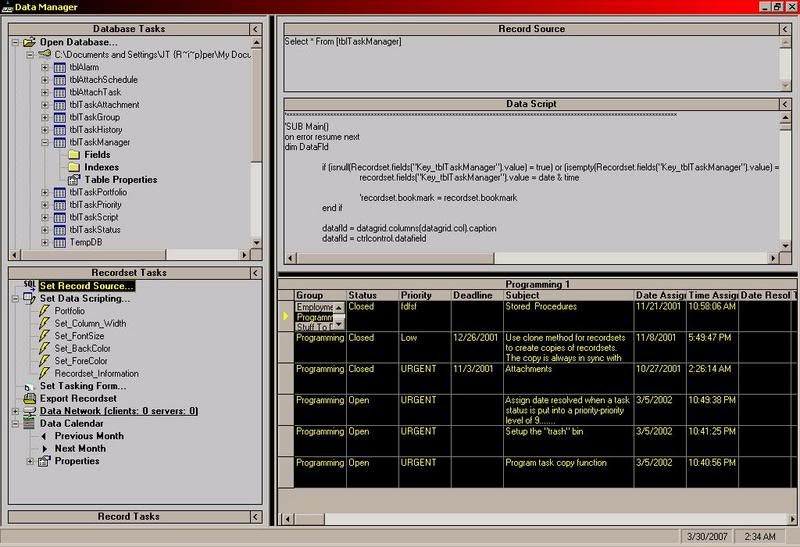
Oh yeah one more thing.........here's a program I wrote a long time ago.....This is one bad mofo...all my own source code....Does more than I could possibly explain.......But to sum it up, You can use vbscript to control the program. The design of the data grid, how it presents information, and program functions as shown under the "Data Scripting" Create your own custom forms similar to the way visual basic does it, and bind data to the controls on the form.
Programs like this can cost 1000's of dollars or more(although mine pales in comparison). I should finish coding this bad johnson.........
Edit to add:
Ok, I found a possible solution to one aspect of my keyboard problem. I'm gonna use an api to place a hook into windows to trap keyboard events. I should be able to use the hook to initiate events as well.
|
|
| Back to top |
|
|
Labyrnth
Moderator
![]() Reputation: 10 Reputation: 10
Joined: 28 Nov 2006
Posts: 6301
|
| Posted: Fri Mar 30, 2007 8:46 pm Post subject: |
|
|
| ravicus wrote: | I bet you yourself are writing no code. Visual Basic is too easy, it teaches bad programming practices, and you just use other people's functions/modules/classes and say you made it. I would like to see what you can do without a pre-made module. There will always be programs better than yours, but it is still a good learning experience.
Ok, now that i have discouraged you, I will say something you should do in order to help your skills. Try to modify the code that the tutorial provides to make your program unique. Thats how I am learning Java and C++, and it is working great.
Please post your source and finished product whenever possible, I would like to analyze them. |
You have a misconception..
1. It is not as easy as you are boasting about. 90% of the coders who use c++ say that, and have no clue what it takes to program in VB.
And another thing they say is that C++ is better then VB.
There is no proof of this but personal choice in programming.
VB Dominates C++ on database programming. C++ is faster on some code then VB. Also vb is faster then c++ in some code.
I have used both languages. Also VB does not teach bad programming practices, The coder teaches himself that.
2. There is nothing wrong with looking at others code and using modules
3. You do the same thing with any code you are working with, If you say you dont your a damn liar.
Everyone knows looking at code is how you learn/teach yourself to code.
If you went to school for it, You would be using others code and looking and reading it just the same as if you self teach yourself.
So dont come in here with those lines trying to sound like you are a rabbit out of the hat programmer.
You are making yourself sound more silly everyday you post something like this. And yes i have a problem with people who act like you do.
|
|
| Back to top |
|
|
AsakuraX
Advanced Cheater
![]() Reputation: 0 Reputation: 0
Joined: 12 Dec 2006
Posts: 93
Location: CE Forum
|
| Posted: Fri Mar 30, 2007 8:59 pm Post subject: |
|
|
| ravicus wrote: | I bet you yourself are writing no code. Visual Basic is too easy, it teaches bad programming practices, and you just use other people's functions/modules/classes and say you made it. I would like to see what you can do without a pre-made module. There will always be programs better than yours, but it is still a good learning experience.
Ok, now that i have discouraged you, I will say something you should do in order to help your skills. Try to modify the code that the tutorial provides to make your program unique. Thats how I am learning Java and C++, and it is working great.
Please post your source and finished product whenever possible, I would like to analyze them. |
Stop trying to sound pro. You got pwn't in the thread you created, i merely suggested changing the value to 1e20.
_________________
::.:: ZOMFGWTFWTHBBQIDIOTS ::.:: |
|
| Back to top |
|
|
Traps
Cheater
![]() Reputation: 0 Reputation: 0
Joined: 26 Mar 2007
Posts: 35
|
| Posted: Fri Mar 30, 2007 11:22 pm Post subject: |
|
|
| Labyrnth wrote: | | ravicus wrote: | I bet you yourself are writing no code. Visual Basic is too easy, it teaches bad programming practices, and you just use other people's functions/modules/classes and say you made it. I would like to see what you can do without a pre-made module. There will always be programs better than yours, but it is still a good learning experience.
Ok, now that i have discouraged you, I will say something you should do in order to help your skills. Try to modify the code that the tutorial provides to make your program unique. Thats how I am learning Java and C++, and it is working great.
Please post your source and finished product whenever possible, I would like to analyze them. |
You have a misconception..
1. It is not as easy as you are boasting about. 90% of the coders who use c++ say that, and have no clue what it takes to program in VB.
And another thing they say is that C++ is better then VB.
There is no proof of this but personal choice in programming.
VB Dominates C++ on database programming. C++ is faster on some code then VB. Also vb is faster then c++ in some code.
I have used both languages. Also VB does not teach bad programming practices, The coder teaches himself that.
2. There is nothing wrong with looking at others code and using modules
3. You do the same thing with any code you are working with, If you say you dont your a damn liar.
Everyone knows looking at code is how you learn/teach yourself to code.
If you went to school for it, You would be using others code and looking and reading it just the same as if you self teach yourself.
So dont come in here with those lines trying to sound like you are a rabbit out of the hat programmer.
You are making yourself sound more silly everyday you post something like this. And yes i have a problem with people who act like you do. |
Nicely said! Myself.......... I just wanted to punch him...........  OK, I got distracted a little from my program ....... Now that I have an idea of what I need to do, I am starting over(although I'll be copy/pasting some of the source I have already written) so that I can make my code a little more organized and effecient. OK, I got distracted a little from my program ....... Now that I have an idea of what I need to do, I am starting over(although I'll be copy/pasting some of the source I have already written) so that I can make my code a little more organized and effecient.
So far here's what I would like to do with my program
1. Record and playback mouse and keyboard events. -Pretty much done, just need to debug, and make more efficient, and allow for data to be saved to file.
2. Allow for some kind of if-then type of logic to determine the flow of the macro
3. Read areas of the screen for pixel colors(or capture full images), to determine changes, that could be used in the logic for macro. Like .... If a certain step has been reached, check the screen at x,y coordinate and compare the pixel color to red. If color=red, then hault this macro, and run macro B. Something like that anyway. 
4. Of course this logic will be input by the user at runtime, and saved along with macros.
I believe I can do all 3.........and if done, should provide a decent bot or macro program. And for those who dont like to read...I've already indicated that I could just use Autoit. Why would I use autoit. I have no idea how to use autoit, and i'm too lazy to learn. I'd rather write my own software. 
Edit to add:
I've decided to scrap all my code AGAIN, and start all over. This time I'm gonna try and learn how to hook the keyboard(which I can do with the help of some example code I found), however I'm having a little trouble at the moment trying to hook the mouse. I need to trap mouse down and mouse up events. I should just join some of these sites I've found, and ask some questions...but alas I am lazy and hate registering....haha....besides in trying to figure it out myself I'll learn more.....
Edit to add:
Everything coming along now. I've sucessfully hooked keyboard and mouse. Playback of mouse including clicks up and down are accurate. For example, my macro will duplicate a drag and drop function. I'm currently working on sending the recorded keystrokes
Edit to add:
Done. Works good. Now I get to implement the cool stuff, like logic, pixel recognition, and whatever else I can come up with.
|
|
| Back to top |
|
|
|
|
You cannot post new topics in this forum
You cannot reply to topics in this forum
You cannot edit your posts in this forum
You cannot delete your posts in this forum
You cannot vote in polls in this forum
You cannot attach files in this forum
You can download files in this forum
|
|
 FAQ
FAQ Search
 Memberlist
 Usergroups
 Register
 Profile
 Log in to check your private messages
 Log in


