blueBoxDiv
Newbie cheater
![]() Reputation: 0 Reputation: 0
Joined: 26 Sep 2023
Posts: 13
|
 Posted: Tue Sep 26, 2023 11:05 am Post subject: How to invoke/call a Mono function with params like window? Posted: Tue Sep 26, 2023 11:05 am Post subject: How to invoke/call a Mono function with params like window? |
 |
|
This question can be for any related function calls that you need to pass parameters to. Here specifically Unity apps.
I am only asking for the correct way on doing what I talk about below.
I take the function "UnityEngine.Screen:SetResolution" as an example, for this universal question (if there's a solution to this question, there can be a solution to other functions).
With Mono features, I mean these Unity things.
It's something Cheat Engine does for you and the tab only shows up if you choose a Unity game, from what I know.
the image urls are like this cuz yes and dnc :shrug: sorry
i.imgur . com /jkQV6IT.png
I added a "Header" with CTRL + Alt + A and typed this (unfinished) thing in there:
| Code: |
define(screenWidth, 1920)
define(screenHeight, 1080)
[ENABLE]
alloc(changeResolution, 2048)
dealloc(changeResolution)
[DISABLE]
|
I tried something like
| Code: |
changeResolution:
call "UnityEngine.Screen:SetResolution"
|
but with the way I did it, it only crashed the application and I did not even provide parameters to it, nor do I have any clue if this is correct
I think call just jumps to where the function is, but I am unsure how I can find out what I have to do, to pass parameters. I was looking for a Lua function first that would do it all in one call, but I didn't find.
the function is literally here
i.imgur . com /qOFaJeS.png
it's there...
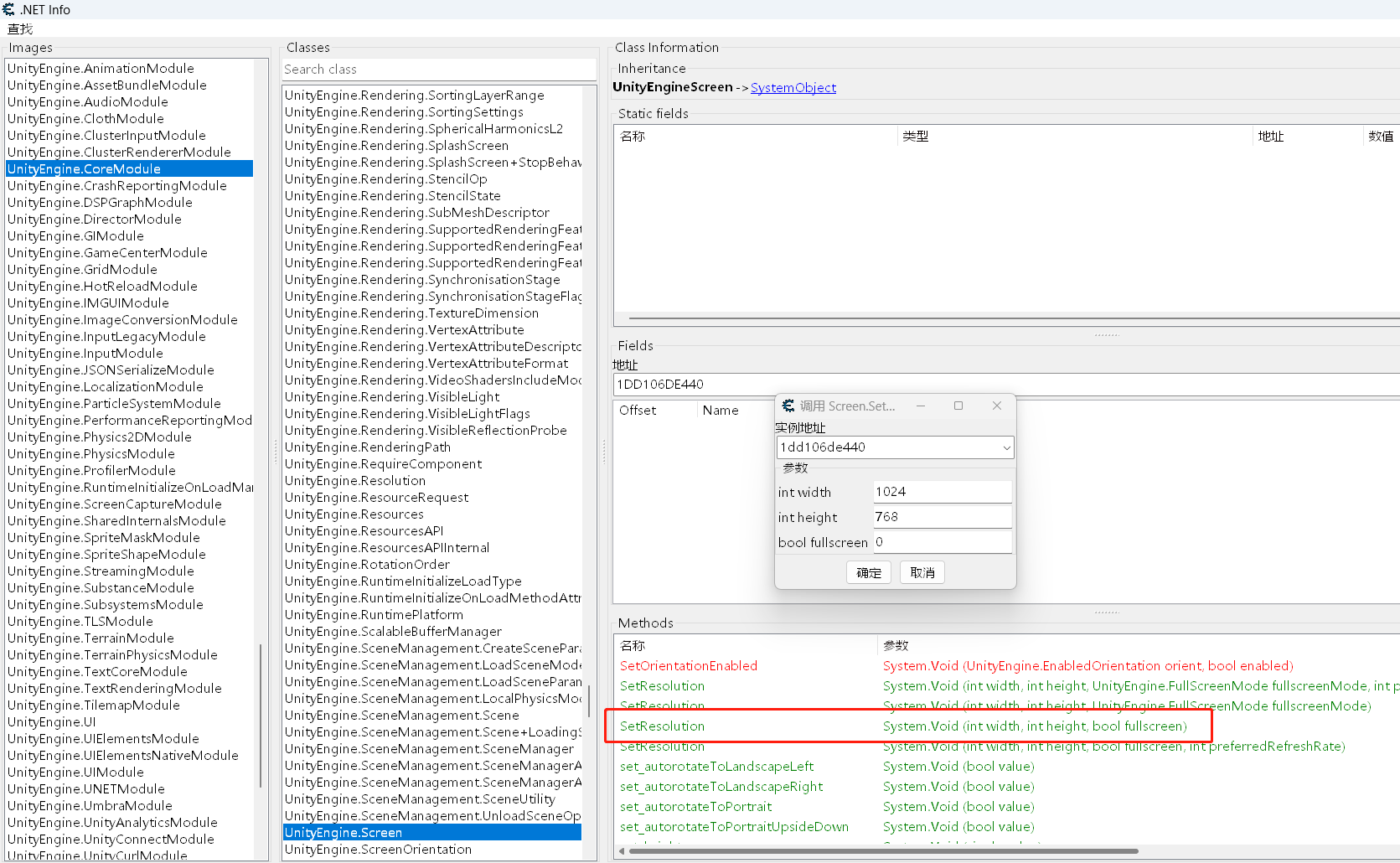
if I right click on it I can open this window
i.imgur . com /ILrQbF0.png
The instance address did not matter.
filling it all out did exactly what I was trying to do, the problem is it's only in this Mono window, I am not sure how I can "convert" this into the Auto Assembler
like just pre-defined parameteres, not the entire nice window with input box
How can I do that, what the Invoke function thing is doing?
I've tried setting a breakpoint, but I haven't even found the "mov" values that add the resolution when using the Invoke function from the thing there.
So it wasn't obvious to me on what I have to do in the Auto Assembler to call a function properly with parameters, just like the invoke function window is doing it for you.
|
|

 FAQ
FAQ Search
 Memberlist
 Usergroups
 Register
 Profile
 Log in to check your private messages
 Log in