| View previous topic :: View next topic |
| Author |
Message |
lontongmalam
Newbie cheater
![]() Reputation: 0 Reputation: 0
Joined: 13 Apr 2022
Posts: 17
|
 Posted: Tue Sep 26, 2023 4:13 pm Post subject: Form Flashing On Lose Focus Posted: Tue Sep 26, 2023 4:13 pm Post subject: Form Flashing On Lose Focus |
 |
|
How do I make a custom form that flashes when I switch my focus to another form?
I'm sorry, but I'm not sure what it's called. Here's an example:
Assume I generate a form called frmAAA using an auto-assemble script. This form includes an edit box and other components required by the script to continue the operation.
I want frmAAA to flash whenever the user clicks on another form to keep the user's attention on it until the user complete filling out the required data or cancels the operation. Just like when we modify the value of a memory record.
Thanks!
|
|
| Back to top |
|
 |
ParkourPenguin
I post too much
 Reputation: 152 Reputation: 152
Joined: 06 Jul 2014
Posts: 4715
|
| Posted: Tue Sep 26, 2023 5:51 pm Post subject: |
|
|
Instead of calling `show` try `showModal`
_________________
I don't know where I'm going, but I'll figure it out when I get there. |
|
| Back to top |
|
|
lontongmalam
Newbie cheater
![]() Reputation: 0 Reputation: 0
Joined: 13 Apr 2022
Posts: 17
|
| Posted: Tue Sep 26, 2023 6:14 pm Post subject: |
|
|
| ParkourPenguin wrote: | | Instead of calling `show` try `showModal` |
Thank you for your response.
I tried the showModal() method, and it appeared to work; however, it simply kept the form on top and did not prevent me from clicking on other forms.
|
|
| Back to top |
|
|
ParkourPenguin
I post too much
Reputation: 152
Joined: 06 Jul 2014
Posts: 4715
|
| Posted: Tue Sep 26, 2023 7:11 pm Post subject: |
|
|
Sure, you can click on other windows, but that doesn't do anything. Mouse events are ignored AFAIK.
Other windows might get drawn on top. You can also try this:
| Code: | f = createForm(false)
f.FormStyle = 'fsStayOnTop'
f.showModal() |
Is there a form already in CE that behaves the way you want?
_________________
I don't know where I'm going, but I'll figure it out when I get there. |
|
| Back to top |
|
|
lontongmalam
Newbie cheater
![]() Reputation: 0 Reputation: 0
Joined: 13 Apr 2022
Posts: 17
|
| Posted: Tue Sep 26, 2023 7:36 pm Post subject: |
|
|
| ParkourPenguin wrote: | Sure, you can click on other windows, but that doesn't do anything. Mouse events are ignored AFAIK.
Other windows might get drawn on top. You can also try this:
| Code: | f = createForm(false)
f.FormStyle = 'fsStayOnTop'
f.showModal() |
Is there a form already in CE that behaves the way you want? |
For example, if you modify the description of a memory record, a window will appear, and this window will flash if we click on another CE area.
| Description: |
|
| Filesize: |
790.96 KB |
| Viewed: |
3459 Time(s) |

|
|
|
| Back to top |
|
|
ParkourPenguin
I post too much
Reputation: 152
Joined: 06 Jul 2014
Posts: 4715
|
| Posted: Tue Sep 26, 2023 9:33 pm Post subject: |
|
|
All that does is call InputQuery. As far as I can see in lazarus's source, this uses showModal. You're doing something wrong.
Make sure the form isn't visible by default (i.e. the `false` argument I passed to createForm)- I previously made that mistake.
_________________
I don't know where I'm going, but I'll figure it out when I get there. |
|
| Back to top |
|
|
lontongmalam
Newbie cheater
![]() Reputation: 0 Reputation: 0
Joined: 13 Apr 2022
Posts: 17
|
| Posted: Tue Sep 26, 2023 11:41 pm Post subject: |
|
|
| ParkourPenguin wrote: | All that does is call InputQuery. As far as I can see in lazarus's source, this uses showModal. You're doing something wrong.
Make sure the form isn't visible by default (i.e. the `false` argument I passed to createForm)- I previously made that mistake. |
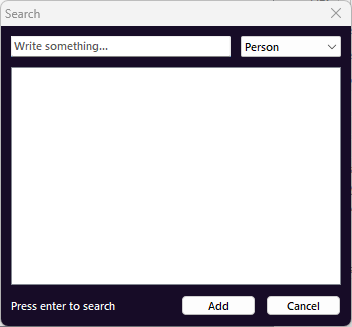
InputQuery only returns basic values with no other options; similarly to showSelectionList, it is not possible to add more functions.
So I discovered that this method makes use of the FlashWindow function available in the Windows API. There are various tutorials for using it on Lazarus, but I'm not sure how to use it on CE.
| Description: |
|
| Filesize: |
6.26 KB |
| Viewed: |
3420 Time(s) |
|
|
|
| Back to top |
|
|
Dark Byte
Site Admin
 Reputation: 471 Reputation: 471
Joined: 09 May 2003
Posts: 25827
Location: The netherlands
|
| Posted: Wed Sep 27, 2023 2:35 am Post subject: |
|
|
| Code: |
if not inMainThread() then messageDialog('You need to synchronize() this first',mtError) end
f=createForm(false)
b=createButton(f)
b.Caption='OK'
b.OnClick=function()
f.ModalResult=mrOK
end
f.showModal()
|
_________________
Do not ask me about online cheats. I don't know any and wont help finding them.
Like my help? Join me on Patreon so i can keep helping |
|
| Back to top |
|
|
lontongmalam
Newbie cheater
![]() Reputation: 0 Reputation: 0
Joined: 13 Apr 2022
Posts: 17
|
| Posted: Wed Sep 27, 2023 8:11 am Post subject: |
|
|
| Dark Byte wrote: | | Code: |
if not inMainThread() then messageDialog('You need to synchronize() this first',mtError) end
f=createForm(false)
b=createButton(f)
b.Caption='OK'
b.OnClick=function()
f.ModalResult=mrOK
end
f.showModal()
|
|
Thanks Dark Byte!
My mistake, this actually worked if I only conducted a correction from createForm(MainForm) to createForm(false), my form is not supposed to have an owner.
|
|
| Back to top |
|
|
|

 FAQ
FAQ Search
 Memberlist
 Usergroups
 Register
 Profile
 Log in to check your private messages
 Log in


