| View previous topic :: View next topic |
| Author |
Message |
.lua
Expert Cheater
 Reputation: 1 Reputation: 1
Joined: 13 Sep 2018
Posts: 203
|
 Posted: Sat Jan 21, 2023 10:26 am Post subject: How to effectively change image color Posted: Sat Jan 21, 2023 10:26 am Post subject: How to effectively change image color |
 |
|
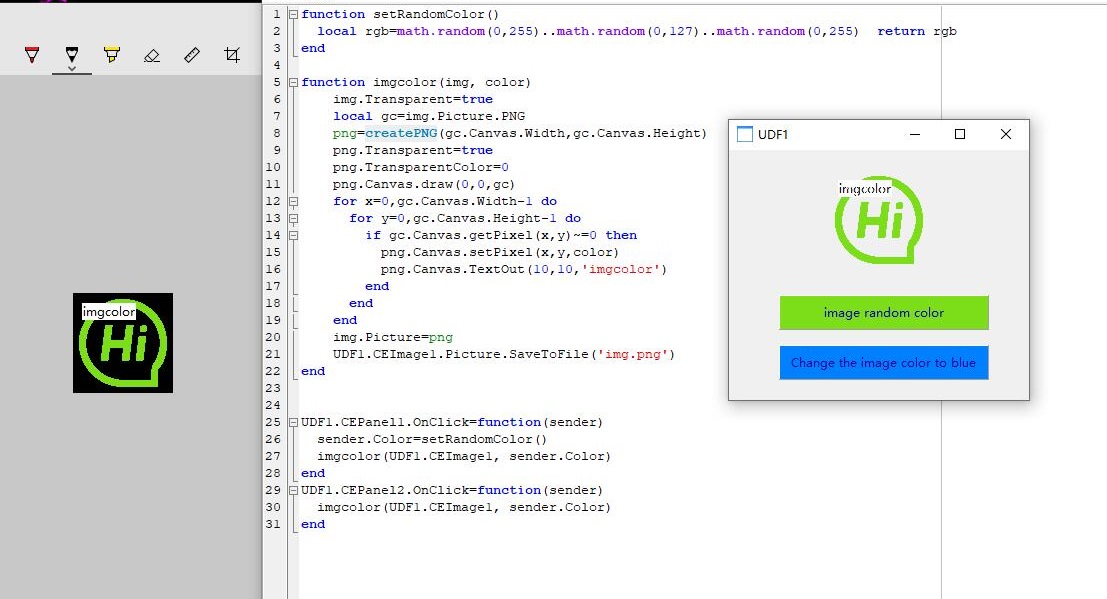
All I can think of is traversing pixels to modify it, but the efficiency is not so high. Do you have a good way
Another question is why the saved image is not transparent(But it is transparent in the form)
| Description: |
|
| Filesize: |
138.06 KB |
| Viewed: |
2167 Time(s) |
|
| Description: |
|

Download |
| Filename: |
Change image color.CT.lua |
| Filesize: |
4.56 KB |
| Downloaded: |
255 Time(s) |
|
|
| Back to top |
|
 |
Dark Byte
Site Admin
 Reputation: 472 Reputation: 472
Joined: 09 May 2003
Posts: 25871
Location: The netherlands
|
| Posted: Sat Jan 21, 2023 11:07 am Post subject: |
|
|
changing color not sure, but if transparant is enabeled and the picture isn't then the transparant color is taken from one of the corners (i think bottom left but could be wrong)
_________________
Do not ask me about online cheats. I don't know any and wont help finding them.
Like my help? Join me on Patreon so i can keep helping |
|
| Back to top |
|
|
.lua
Expert Cheater
Reputation: 1
Joined: 13 Sep 2018
Posts: 203
|
| Posted: Sat Jan 21, 2023 12:59 pm Post subject: |
|
|
| Dark Byte wrote: | | changing color not sure, but if transparant is enabeled and the picture isn't then the transparant color is taken from one of the corners (i think bottom left but could be wrong) |
The image itself is transparent
|
|
| Back to top |
|
|
AylinCE
Grandmaster Cheater Supreme
 Reputation: 37 Reputation: 37
Joined: 16 Feb 2017
Posts: 1549
|
| Posted: Sat Jan 21, 2023 3:49 pm Post subject: |
|
|
If the picture is transparent; Leave a label that is the same width as the image and fits right behind the image. (label.AutoSize=false)
You just need to change the label.color.
Maybe you can connect the tag to a timer and change the picture color at certain intervals.
_________________
|
|
| Back to top |
|
|
.lua
Expert Cheater
Reputation: 1
Joined: 13 Sep 2018
Posts: 203
|
| Posted: Sat Jan 21, 2023 10:49 pm Post subject: |
|
|
| AylinCE wrote: | | If the picture is transparent; Leave a label that is the same width as the image and fits right behind the image. |
I mean, the image has transparent channels, and the image content still exists
|
|
| Back to top |
|
|
|

 FAQ
FAQ Search
 Memberlist
 Usergroups
 Register
 Profile
 Log in to check your private messages
 Log in


