| View previous topic :: View next topic |
| Author |
Message |
Antoshick
Advanced Cheater
![]() Reputation: 0 Reputation: 0
Joined: 02 Nov 2018
Posts: 56
|
 Posted: Tue Jan 07, 2020 12:13 pm Post subject: Get window height and width function Posted: Tue Jan 07, 2020 12:13 pm Post subject: Get window height and width function |
 |
|
Can I use CE to get the height and width of the game window, also position of the game window on the desktop?
With using lua or another ways.
|
|
| Back to top |
|
 |
Dark Byte
Site Admin
 Reputation: 473 Reputation: 473
Joined: 09 May 2003
Posts: 25918
Location: The netherlands
|
| Posted: Tue Jan 07, 2020 12:25 pm Post subject: |
|
|
if you can get the window handle yes
this code prints out the position of the windows calculator:
| Code: |
x=findWindow(nil,'Calculator')
m=createMemoryStream()
m.size=16
if executeCodeLocalEx('GetWindowRect',x,m.Memory) then
m.Position=0
print("left="..m.readDword())
print("top="..m.readDword())
print("right="..m.readDword())
print("bottom="..m.readDword())
end
m.destroy()
|
_________________
Tools give you results. Knowledge gives you control.
Like my help? Join me on Patreon so i can keep helping |
|
| Back to top |
|
|
Antoshick
Advanced Cheater
![]() Reputation: 0 Reputation: 0
Joined: 02 Nov 2018
Posts: 56
|
| Posted: Wed Jan 08, 2020 1:10 am Post subject: |
|
|
| Dark Byte wrote: | if you can get the window handle yes
this code prints out the position of the windows calculator:
| Code: |
x=findWindow(nil,'Calculator')
m=createMemoryStream()
m.size=16
if executeCodeLocalEx('GetWindowRect',x,m.Memory) then
m.Position=0
print("left="..m.readDword())
print("top="..m.readDword())
print("right="..m.readDword())
print("bottom="..m.readDword())
end
m.destroy()
|
|
With this code i see this result (Calculator is running)
| Code: |
left=139390200
top=0
right=259625016
bottom=0 |
Also with the game the same result
Only with Notepad I see the correct values.
What am i doing wrong?
|
|
| Back to top |
|
|
Dark Byte
Site Admin
Reputation: 473
Joined: 09 May 2003
Posts: 25918
Location: The netherlands
|
| Posted: Wed Jan 08, 2020 2:42 am Post subject: |
|
|
Not using CE 7.0 ?
findWindow not finding the correct window? (could be an invisible window somewhere else with that name)
_________________
Tools give you results. Knowledge gives you control.
Like my help? Join me on Patreon so i can keep helping |
|
| Back to top |
|
|
Antoshick
Advanced Cheater
![]() Reputation: 0 Reputation: 0
Joined: 02 Nov 2018
Posts: 56
|
| Posted: Wed Jan 08, 2020 4:47 am Post subject: |
|
|
| Dark Byte wrote: | Not using CE 7.0 ?
findWindow not finding the correct window? (could be an invisible window somewhere else with that name) |
I am using CE 7.0, reinstalled it today from url - https://github.com/cheat-engine/cheat-engine/releases/tag/7.0 - CheatEngine70.exe 17 MB.
Also Windows 10 1909 Rus language, intel i5.
How can i check if findWindow not finding the correct window? What script?
|
|
| Back to top |
|
|
Dark Byte
Site Admin
Reputation: 473
Joined: 09 May 2003
Posts: 25918
Location: The netherlands
|
| Posted: Wed Jan 08, 2020 9:18 am Post subject: |
|
|
In CE there is a "tools->dissect windows"
the value in front of the windows are window handles, check if they match up
_________________
Tools give you results. Knowledge gives you control.
Like my help? Join me on Patreon so i can keep helping |
|
| Back to top |
|
|
Antoshick
Advanced Cheater
![]() Reputation: 0 Reputation: 0
Joined: 02 Nov 2018
Posts: 56
|
| Posted: Wed Jan 08, 2020 1:05 pm Post subject: |
|
|
| Dark Byte wrote: | In CE there is a "tools->dissect windows"
the value in front of the windows are window handles, check if they match up |
i atached calculator.exe to CE by processes and then opened "tools->dissect windows", but for calculator i don't see any values, i see only this
| Code: | 000B0856 - MSCTFIME UI - (MSCTFIME UI) (Invis)
001001CA - Default IME - (IME) (Invis) |
for other programms i see third string. for example for notepad and for games.
Only calculator won't work.
Also, if i get handle for some game from "tools->dissect windows" and use it instead
| Code: | | x=findWindow(nil,'grid') |
for example
script work fine and shows correct values.
Maybe i use incorrect name of game window (nil,'grid')?
How to get correct name of window, is it have the same name as exe process?
|
|
| Back to top |
|
|
Dark Byte
Site Admin
Reputation: 473
Joined: 09 May 2003
Posts: 25918
Location: The netherlands
|
| Posted: Wed Jan 08, 2020 1:50 pm Post subject: |
|
|
Look at the window list when attached to the target (e.g grid)
Check the windows that do not have the (invis) tag
Then note down the caption
If there is more than one or a common name, then also use the classname (the first entry between round brackets () )
_________________
Tools give you results. Knowledge gives you control.
Like my help? Join me on Patreon so i can keep helping |
|
| Back to top |
|
|
Antoshick
Advanced Cheater
![]() Reputation: 0 Reputation: 0
Joined: 02 Nov 2018
Posts: 56
|
| Posted: Thu Jan 09, 2020 12:06 am Post subject: |
|
|
| Dark Byte wrote: |
Then note down the caption
|
Now work fine, with caption from "tools->dissect windows", tested for 2 games, but third game has specific caption
| Code: | | 000C08D4-Need for Speed? Rivals - (Need for Speed? Rivals) |
and script not work if i use
| Code: | | x=findWindow(nil,'Need for Speed? Rivals') |
also not work if i use
| Code: | | x=findWindow(Need for Speed? Rivals,'Need for Speed? Rivals') |
This third game window has this title

Can i get handle from another way, with using lua script and game process name? or another.
|
|
| Back to top |
|
|
Dark Byte
Site Admin
Reputation: 473
Joined: 09 May 2003
Posts: 25918
Location: The netherlands
|
| Posted: Thu Jan 09, 2020 2:05 am Post subject: |
|
|
this code will return a similar result which is more easily copy/pasted
| Code: |
w=getWindow(getForegroundWindow(), GW_HWNDFIRST)
pid=getOpenedProcessID()
while w and (w~=0) do
if getWindowProcessID(w)==pid then
print(w..' - '..getWindowCaption(w)..'('..getWindowClassName(w)..')')
end
w=getWindow(w,GW_HWNDNEXT)
end
|
_________________
Tools give you results. Knowledge gives you control.
Like my help? Join me on Patreon so i can keep helping |
|
| Back to top |
|
|
Antoshick
Advanced Cheater
![]() Reputation: 0 Reputation: 0
Joined: 02 Nov 2018
Posts: 56
|
| Posted: Thu Jan 09, 2020 5:04 am Post subject: |
|
|
| Dark Byte wrote: | this code will return a similar result which is more easily copy/pasted
| Code: |
w=getWindow(getForegroundWindow(), GW_HWNDFIRST)
pid=getOpenedProcessID()
while w and (w~=0) do
if getWindowProcessID(w)==pid then
print(w..' - '..getWindowCaption(w)..'('..getWindowClassName(w)..')')
end
w=getWindow(w,GW_HWNDNEXT)
end
|
|
With caption 'Need for Speed? Rivals', which i copy/past, script still not work correct. Anyway now with this last i can get correct values of window
| Code: | w=getWindow(getForegroundWindow(), GW_HWNDFIRST)
pid=getOpenedProcessID()
game_window_handle = 0
while w and (w~=0) do
if getWindowProcessID(w)==pid then
game_window_handle = w
end
w=getWindow(w,GW_HWNDNEXT)
end
m=createMemoryStream()
m.size=16
if executeCodeLocalEx('GetWindowRect',game_window_handle,m.Memory) then
m.Position=0
print("left="..m.readDword())
print("top="..m.readDword())
print("right="..m.readDword())
print("bottom="..m.readDword())
end
m.destroy() |
Thank for your help.
|
|
| Back to top |
|
|
AylinCE
Grandmaster Cheater Supreme
 Reputation: 39 Reputation: 39
Joined: 16 Feb 2017
Posts: 1572
|
| Posted: Thu Jan 09, 2020 8:24 pm Post subject: |
|
|
| Code: | | x=findWindow(nil,'Need for Speed™ Rivals') |
_________________
|
|
| Back to top |
|
|
Antoshick
Advanced Cheater
![]() Reputation: 0 Reputation: 0
Joined: 02 Nov 2018
Posts: 56
|
| Posted: Fri Jan 10, 2020 12:02 am Post subject: |
|
|
| Aylin wrote: | | Code: | | x=findWindow(nil,'Need for Speed™ Rivals') |
|
Thank, but with this string, the script does not show the correct values.
|
|
| Back to top |
|
|
AylinCE
Grandmaster Cheater Supreme
Reputation: 39
Joined: 16 Feb 2017
Posts: 1572
|
| Posted: Fri Jan 10, 2020 1:38 am Post subject: |
|
|
| Antoshick wrote: | | Aylin wrote: | | Code: | | x=findWindow(nil,'Need for Speed™ Rivals') |
|
Thank, but with this string, the script does not show the correct values. |
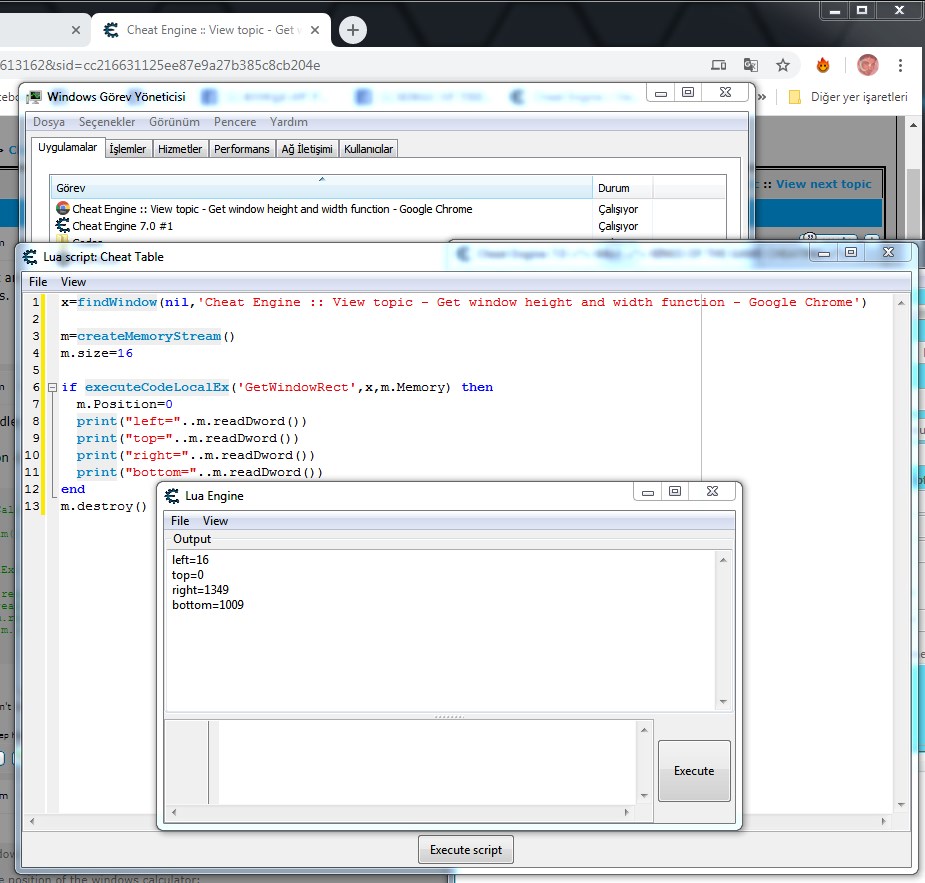
Use the name given by the application to Windows.
Look in: Open Windows Task Manager.
See the first section in Task Manager (Applications)
There you will see the full name of the game window.
| Description: |
|
| Filesize: |
151.17 KB |
| Viewed: |
5918 Time(s) |
|
_________________
|
|
| Back to top |
|
|
Antoshick
Advanced Cheater
![]() Reputation: 0 Reputation: 0
Joined: 02 Nov 2018
Posts: 56
|
| Posted: Fri Jan 10, 2020 4:08 am Post subject: |
|
|
| Quote: | Use the name given by the application to Windows.
Look in: Open Windows Task Manager.
See the first section in Task Manager (Applications)
There you will see the full name of the game window. |
The same effect, incorrect values

|
|
| Back to top |
|
|
|

 FAQ
FAQ Search
 Memberlist
 Usergroups
 Register
 Profile
 Log in to check your private messages
 Log in


