| View previous topic :: View next topic |
| Author |
Message |
AylinCE
Grandmaster Cheater Supreme
 Reputation: 37 Reputation: 37
Joined: 16 Feb 2017
Posts: 1551
|
 Posted: Mon Oct 08, 2018 10:25 am Post subject: 2 values in a single box (help) Posted: Mon Oct 08, 2018 10:25 am Post subject: 2 values in a single box (help) |
 |
|
I can change a byte code to aobs with the code below.
And I can write a ranging code with a few additions to the other box.
My question is:
I've got 2 one numerical value format and could not be aobs both side by side.
samples with a mathematical expression:
Value1 : 100
Value2 : 50
The result is different
newValue1 : 64 00 00 00
newValue2 : 32 00 00 00
How can the following code combine and format these two values?
64 00 00 00 32 00 00 00 ?
| Code: | function CEButton3Click(sender)
newvalue = UDF1.CEEdit3.Text
newvalue = tonumber(newvalue)
if not newvalue then return end -- if not a number we're done
-- newvalue = doubleToByteTable(newvalue) -- alternatively
newvalue = dwordToByteTable(newvalue)
newvalue = byteTableToAobString(newvalue)
UDF1.CEEdit3.Text=('%s'):format(newvalue, newvalue)
end |
Thanks for the suggestions.
_________________
|
|
| Back to top |
|
 |
TheyCallMeTim13
Wiki Contributor
 Reputation: 51 Reputation: 51
Joined: 24 Feb 2017
Posts: 976
Location: Pluto
|
| Posted: Mon Oct 08, 2018 2:18 pm Post subject: |
|
|
Do it with just use bytes, or as a really odd qword; if you have to have the 2 values done in one. Or just separate them out.
_________________
|
|
| Back to top |
|
|
FreeER
Grandmaster Cheater Supreme
![]() Reputation: 53 Reputation: 53
Joined: 09 Aug 2013
Posts: 1091
|
| Posted: Mon Oct 08, 2018 3:18 pm Post subject: |
|
|
so basically you have two separate dwords and you want to show the bytes one after the other in the same string?
| Code: | function test(size, ...)
local args = {...}
local res = {}
local format = ('%%.%dX'):format(size*2)
for k,arg in ipairs(args) do
for b in format:format(arg):gmatch('..') do
res[#res+1] = b
end
end
return table.concat(res,' ')
end
return test(4,1,2,3) -- obviously numbers can come from anywhere
-- first is number of bytes per number
result:
00 00 00 01 00 00 00 02 00 00 00 03 |
_________________
|
|
| Back to top |
|
|
AylinCE
Grandmaster Cheater Supreme
Reputation: 37
Joined: 16 Feb 2017
Posts: 1551
|
| Posted: Mon Oct 08, 2018 4:12 pm Post subject: |
|
|
| FreeER wrote: | so basically you have two separate dwords and you want to show the bytes one after the other in the same string?
|
Yes, @freeER, we speak the same language.
I tried, but the only result I can get aobs.
copy, paste, merge.
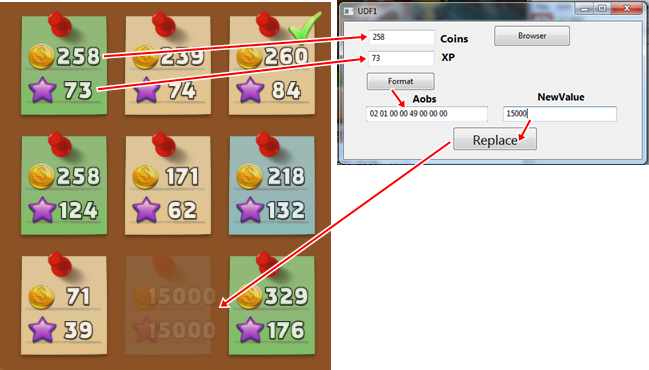
The example that appears in the picture will explain my question, I hope.
EDIT:
Replace Code:
(@freeER, this code will look familiar to you. Thanks again)
| Code: | function CEButton2Click(sender)
newvalue = UDF1.CEEdit2.Text
newvalue = tonumber(newvalue)
if not newvalue then return end
newvalue = dwordToByteTable(newvalue)
newvalue = byteTableToAobString(newvalue)
codescan1 = UDF1.CEEdit1.Text
Aobswap(codescan1,(' %s %s '):format(newvalue, newvalue))
end |
| Description: |
|
| Filesize: |
153.56 KB |
| Viewed: |
2989 Time(s) |
|
_________________
|
|
| Back to top |
|
|
AylinCE
Grandmaster Cheater Supreme
Reputation: 37
Joined: 16 Feb 2017
Posts: 1551
|
| Posted: Tue Oct 09, 2018 4:29 am Post subject: |
|
|
| FreeER wrote: |
| Code: | function test(size, ...)
local args = {...}
local res = {}
local format = ('%%.%dX'):format(size*2)
for k,arg in ipairs(args) do
for b in format:format(arg):gmatch('..') do
res[#res+1] = b
end
end
return table.concat(res,' ')
end
return test(4,1,2,3) -- obviously numbers can come from anywhere
-- first is number of bytes per number
result:
00 00 00 01 00 00 00 02 00 00 00 03 |
|
I couldn't put the boxes inside this code.
(UDF1.CEEdit2.Text (Coins)
UDF1.CEEdit3.Text (Xp)
UDF1.CEEdit1.Text (Format))
Merge gave error.
I would like an interaction example. Please
Thank you.
_________________
|
|
| Back to top |
|
|
FreeER
Grandmaster Cheater Supreme
![]() Reputation: 53 Reputation: 53
Joined: 09 Aug 2013
Posts: 1091
|
| Posted: Tue Oct 09, 2018 7:21 am Post subject: |
|
|
| Aylin wrote: | | I tried, but the only result I can get aobs. |
not sure what you mean /shrug. | Aylin wrote: | | The example that appears in the picture will explain my question, I hope. |
not really no.
| Code: | I couldn't put the boxes inside this code.
(UDF1.CEEdit2.Text (Coins)
UDF1.CEEdit3.Text (Xp)
UDF1.CEEdit1.Text (Format)) |
the test function I gave just takes a size and then any amount of numbers and returns a string of the bytes separated by spaces. So eg. | Code: | | test(4,tonumber(UDF1.CEEdit2.Text),tonumber(UDF1.CEEdit3.Text)) |
would return the bytes of the coins and xp as dwords in a string, about the same as | Code: | | table.concat(dwordToByteTable(tonumber(UDF1.CEEdit2.Text)),' ') .. table.concat(dwordToByteTable(tonumber(UDF1.CEEdit3.Text)),' ') |
Though it may be backwards from what memory shows and what you'd use as an aob... for an aob you'd probably want something like | Code: | function test(size, ...)
local args = {...}
local res = {}
local format = ('%%.%dX'):format(size*2)
for k,arg in ipairs(args) do
for i=1,size do res[#res+1]=0 end -- add size bytes
local i = #res -- index for where to start adding (in reverse / little endian)
for b in format:format(arg):gmatch('..') do
res[i] = b; i=i-1
end
end
return table.concat(res,' ')
end
return test(4,1,2,3)
the result: 01 00 00 00 02 00 00 00 03 00 00 00
instead of: 00 00 00 01 00 00 00 02 00 00 00 03 |
btw. you really should name the edit boxes things that actually make sense eg. UDF1.CEEditCoins and UDF1.CEEditXP or something... makes understanding code that uses the names a hell of a lot easier than UDF1.CEEdit1 UDF1.CEEdit2 UDF1.CEEdit3 and not knowing what 1 2 and 3 are for without some extra comment that often isn't given in the code itself (and would be unnecessary with a name). CE has to give it some unique name but it has no idea what you're using it for so it's not surprising that it just adds a number but still you can do better.
_________________
|
|
| Back to top |
|
|
AylinCE
Grandmaster Cheater Supreme
Reputation: 37
Joined: 16 Feb 2017
Posts: 1551
|
| Posted: Tue Oct 09, 2018 9:31 am Post subject: |
|
|
I developed the old code you gave me earlier.
Maybe it was enough to work on the first code instead of writing new code.
I notice them late.
But the infrastructure is always your work. I appreciate that.
Thank you.
| Code: | function CEButton3Click(sender)
newvalue = UDF1.CEEdit1.Text
newvalue1 = UDF1.CEEdit2.Text
newvalue = tonumber(newvalue)
newvalue1 = tonumber(newvalue1)
if not newvalue then return end
newvalue = dwordToByteTable(newvalue)
newvalue1 = dwordToByteTable(newvalue1)
newvalue = byteTableToAobString(newvalue, newvalue1)
newvalue1 = byteTableToAobString(newvalue1)
UDF1.CEEdit3.Text=('%s %s'):format(newvalue, newvalue1)
end |
And as a result of this work
https://www.dropbox.com/s/bqv8z5f9ztbe2xc/Byte-Aobs%20Format1.CETRAINER?dl=1
Again Thanks, big thank
_________________
|
|
| Back to top |
|
|
|

 FAQ
FAQ Search
 Memberlist
 Usergroups
 Register
 Profile
 Log in to check your private messages
 Log in


