 |
Cheat Engine
The Official Site of Cheat Engine
|
| View previous topic :: View next topic |
| Author |
Message |
ConanOfOz
Newbie cheater
![]() Reputation: 0 Reputation: 0
Joined: 13 Jul 2015
Posts: 12
|
 Posted: Sat Jul 30, 2016 2:18 am Post subject: How to make a conditional value control Posted: Sat Jul 30, 2016 2:18 am Post subject: How to make a conditional value control |
 |
|
I'm working on Star Trek Bridge Commander (STBC), and I need to find out how to make a script that can decide when to change a value.
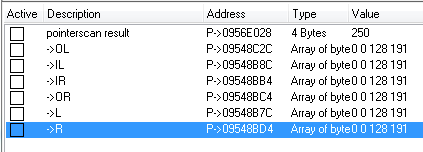
I've managed to locate the photon torpedoes, and the 4-byte array which indicates their status. See attachment - I don't know how to make these show in hex.
There are four forward tubes, and two rear. When loaded and ready to fire, each array will read "00 00 80 BF" (0 0 128 191 in decimal).
When a tube is fired, "BF" changes to "3F". The first three bytes appear to go through a counting cycle. "3F" will change to "40, 41, 42" successively, then jumps to "BF" again, with the array back to its original state; tube ready to fire again.
During the cycle, if I change the fourth byte to "42", the cycle immediately resets to original, and the tube is ready to fire again. However, if I lock this array in its original form, the tube goes red and can never be fired again until the game is exited and reloaded.
I want to find out how to write a script that will watch each of the arrays' 4th byte; when this value drops below "42", write "42" to that address which will result in the counting cycle terminating instantly, and correctly.
The pointerscan I used to find the torpedoes pointer returned many results; the one I'm using is...
"stbc.exe"+0057A810.
There are 5 offsets used...
F4, 34, C8, 16C, 15C.
I found that the 6 torpedo tube arrays are at fixed offsets to this address. So, for example, the front tube outer-left (OL) is the torpedo count address offset -253FC. Subtracting the F4 used in the pointer, the pointer offsets for OL then become...
-25308, 34, C8, 16C, 15C.
Anyone willing to coach me through creating an AA script?
| Description: |
|
| Filesize: |
5.84 KB |
| Viewed: |
8407 Time(s) |
|
Last edited by ConanOfOz on Sat Jul 30, 2016 6:42 am; edited 1 time in total |
|
| Back to top |
|
 |
Zanzer
I post too much
![]() Reputation: 126 Reputation: 126
Joined: 09 Jun 2013
Posts: 3278
|
| Posted: Sat Jul 30, 2016 6:18 am Post subject: |
|
|
| Find out what instruction is accessing your byte and post the AOB template here.
|
|
| Back to top |
|
|
ConanOfOz
Newbie cheater
![]() Reputation: 0 Reputation: 0
Joined: 13 Jul 2015
Posts: 12
|
| Posted: Sun Jul 31, 2016 5:05 am Post subject: |
|
|
| Zanzer wrote: | | Find out what instruction is accessing your byte and post the AOB template here. |
There are three pieces of code accessing this address (as a 4-byte value).
One that triggers when torpedoes are fired.
One that runs rapidly while the count cycles.
One that triggers when the tube resets.
Which one do you need to see, and how do I create an "AOB template" from this code?
|
|
| Back to top |
|
|
Zanzer
I post too much
![]() Reputation: 126 Reputation: 126
Joined: 09 Jun 2013
Posts: 3278
|
| Posted: Sun Jul 31, 2016 7:51 am Post subject: |
|
|
If the byte has the 3F value you mentioned in that first instruction, then that one should do.
In Memory View, Tools > Auto Assemble > Template > AOB Injection
|
|
| Back to top |
|
|
ConanOfOz
Newbie cheater
![]() Reputation: 0 Reputation: 0
Joined: 13 Jul 2015
Posts: 12
|
| Posted: Sun Jul 31, 2016 6:51 pm Post subject: |
|
|
This is the first "access" code, triggered when the torpedo is fired.
| Code: | alloc(newmem,2048)
label(returnhere)
label(originalcode)
label(exit)
newmem: //this is allocated memory, you have read,write,execute access
//place your code here
originalcode:
mov [ecx+edi*4],00000000
exit:
jmp returnhere
"stbc.exe"+17CA71:
jmp newmem
nop
nop
returnhere:
|
This is the part that caused the cycling (I refrain from calling it a counter)
| Code: | alloc(newmem,2048)
label(returnhere)
label(originalcode)
label(exit)
newmem: //this is allocated memory, you have read,write,execute access
//place your code here
originalcode:
fstp dword ptr [ecx]
mov ebp,[esi+000000AC]
exit:
jmp returnhere
"stbc.exe"+17C701:
jmp newmem
nop
nop
nop
returnhere:
|
And finally, this gets called and everything gets reset to original values, and the tube is ready to fire again.
| Code: | alloc(newmem,2048)
label(returnhere)
label(originalcode)
label(exit)
newmem: //this is allocated memory, you have read,write,execute access
//place your code here
originalcode:
mov [edx+ebx*4],BF800000
exit:
jmp returnhere
"stbc.exe"+17D93B:
jmp newmem
nop
nop
returnhere:
|
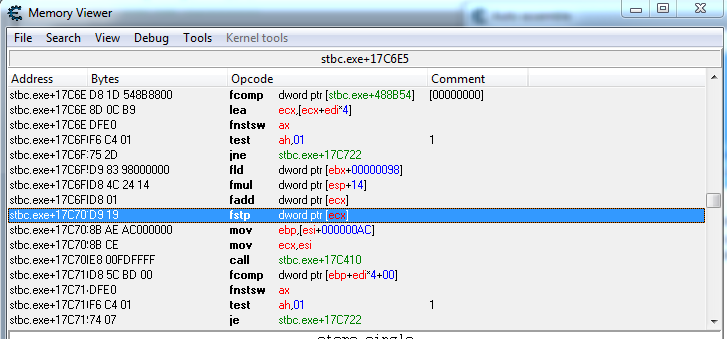
There is something important going on in the middle fragment. Remember I said if I set the most significant byte to 42, the counter (nearly) instantly completes whatever cycle it is doing, and everything resets correctly, ready to fire again? So something in this counter code is reading from this address.
I've attached an image of some of the code around the target instruction in the counter section. (I still can't link url images - sorry).
BTW, I tried setting the "00000000" in the first code sample to "42000000" thinking to simulate me manually altering this address - didn't work. "Broke" the tube and it wouldn't fire again. The counting cycle is doing something essential to a successful reset; I think either we have to monitor/write to the address as I originally asked about, or modify the counting cycle in some way - not sure what you have in mind there.
| Description: |
|
| Filesize: |
38.3 KB |
| Viewed: |
8197 Time(s) |
|
|
|
| Back to top |
|
|
Zanzer
I post too much
![]() Reputation: 126 Reputation: 126
Joined: 09 Jun 2013
Posts: 3278
|
| Posted: Sun Jul 31, 2016 7:37 pm Post subject: |
|
|
Sorry to break it to you, but your value is a simple float. 
It starts at -1.0 when it's ready to fire.
That first instruction sets the value to 0.0.
The problem is that instruction looks like it touches several other addresses.
So I'm not sure that is the proper place for your injection.
Instead of the 00000000 that it has, you can try this instead:
| Code: | | mov [ecx+edi*4],(float)0.01 |
Let me know if that works and doesn't break anything else.
I'm not sure if your counter goes up or down while waiting for the cooldown. You can also try:
| Code: | | mov [ecx+edi*4],(float)0.99 |
Actually, since you claimed the byte goes up to 42, that's the float value 32.0.
So you probably want to use something like:
| Code: | | mov [ecx+edi*4],(float)30 |
Or just go all out and tell it that 1000 seconds have elapsed:
| Code: | | mov [ecx+edi*4],(float)1000 |
I would assume this instruction touches all cooldowns, so be prepared for rapid fire from the enemy too.
If all else fails, try this for the second instruction:
| Code: | alloc(newmem,2048)
label(returnhere)
label(originalcode)
label(exit)
label(myvar) //added
newmem:
fadd dword ptr [myvar] //added
originalcode:
fstp dword ptr [ecx]
mov ebp,[esi+000000AC]
exit:
jmp returnhere
myvar: // added
dd (float)100 // added
"stbc.exe"+17C701:
jmp newmem
nop
nop
nop
returnhere: |
Final note: you used Code Injection, you want to use AOB Injection instead.
|
|
| Back to top |
|
|
ConanOfOz
Newbie cheater
![]() Reputation: 0 Reputation: 0
Joined: 13 Jul 2015
Posts: 12
|
| Posted: Mon Aug 01, 2016 12:01 am Post subject: |
|
|
| Zanzer wrote: | Sorry to break it to you, but your value is a simple float.
It starts at -1.0 when it's ready to fire. |
I'll take your word for it
| Quote: | | I would assume this instruction touches all cooldowns, so be prepared for rapid fire from the enemy too. |
And there is the rub. I found a trainer that does this, and carries a warning that the enemy too get insta-reloads.
| Quote: | | Final note: you used Code Injection, you want to use AOB Injection instead. |
I was wondering why I didn't see "AOB Injection", and assumed that was a typo.
Have now upgraded 6.3 to 6.5.1 -- "AOB Injection is now available.
Back to the core problem...
I don't understand why we must look at the code, and not create a little script to monitor/change the 6 values relating to MY torpedo tubes. Manually altered in the way I mentioned does in fact work.
Is there something I'm not understanding about all this?
I mean, can I make a script to set 6 pointers or something to my tubes, like "OL" for my front-outer-left, then do something like...
| Code: | cmp [OL],$42
jl ... ;code to set [OL] to $42 |
Is this doable, or am I simply showing my ignorance? I really know almost nothing about assembler or CE, so I'm groping in the dark mostly. That's probably not even workable code, but hopefully my intent is clear.
=====
On another note...
I see the "Dissect Code" option might be what I need. Looking for tutorials... It seems the CE Tutorial part 9 is a similar situation; multiple things changed by the same code block. Looking to see if I can use this.
|
|
| Back to top |
|
|
Zanzer
I post too much
![]() Reputation: 126 Reputation: 126
Joined: 09 Jun 2013
Posts: 3278
|
| Posted: Mon Aug 01, 2016 7:07 pm Post subject: |
|
|
Did any of those scripts work? Worry about a player-specific script after you get it working first.
Change your pointer types from array of bytes into floats instead.
It will be much clearer how the value works.
|
|
| Back to top |
|
|
ConanOfOz
Newbie cheater
![]() Reputation: 0 Reputation: 0
Joined: 13 Jul 2015
Posts: 12
|
| Posted: Mon Aug 01, 2016 9:56 pm Post subject: |
|
|
An aobscanmodule is required, as the code moves between restarts.
The following works great...
| Code: | [ENABLE]
aobscanmodule(Counter,stbc.exe,C7 04 B9 00 00 00 00 53 8B CE E8 A0 0F 00 00 6A 00 68 8C 85 8D 00)
alloc(newmem,$1000)
label(code)
label(return)
newmem:
code:
mov [ecx+edi*4],$421F0000 // Trigger instant reload
jmp return
Counter:
jmp code
nop
nop
return:
registersymbol(Counter)
[DISABLE]
Counter:
db C7 04 B9 00 00 00 00
unregistersymbol(Counter)
dealloc(newmem)
|
From the default AOB Injection template code, all I changed was...
| Code: | | mov [ecx+edi*4],00000000 |
...to...
| Code: | | mov [ecx+edi*4],$421F0000 // Trigger instant reload |
However, it works for the enemy too.
I tried modifying this myself, but it doesn't activate in CE...
| Code: | [ENABLE]
aobscanmodule(Counter,stbc.exe,C7 04 B9 00 00 00 00 53 8B CE E8 A0 0F 00 00 6A 00 68 8C 85 8D 00)
aobscanmodule(Tubes,stbc.exe,00 00 80 BF ?? ?? ?? ?? ?? ?? ?? ?? ?? ?? ?? ?? 00 00 80 BF ?? ?? ?? ?? ?? ?? ?? ?? ?? ?? ?? ?? ?? ?? ?? ?? ?? ?? ?? ?? ?? ?? ?? ?? ?? ?? ?? ?? ?? ?? ?? ?? ?? ?? ?? ?? 00 00 80 BF ?? ?? ?? ?? ?? ?? ?? ?? ?? ?? ?? ?? 00 00 80 BF ?? ?? ?? ?? ?? ?? ?? ?? ?? ?? ?? ?? 00 00 80 BF ?? ?? ?? ?? ?? ?? ?? ?? ?? ?? ?? ?? ?? ?? ?? ?? ?? ?? ?? ?? ?? ?? ?? ?? ?? ?? ?? ?? ?? ?? ?? ?? ?? ?? ?? ?? ?? ?? ?? ?? ?? ?? ?? ?? ?? ?? ?? ?? ?? ?? ?? ?? ?? ?? ?? ?? ?? ?? ?? ?? ?? ?? ?? ?? ?? ?? ?? ?? ?? ?? ?? ?? ?? ?? ?? ?? ?? ?? ?? ?? ?? ?? ?? ?? 00 00 80 BF)
alloc(newmem,$1000)
label(code)
label(return)
label(enemy)
newmem:
code:
cmp [ecx],Tubes // Test if ecx is pointing to Tubes (mine)
jne enemy // If not equal, this is for the enemy - jmp to normal code
mov [ecx+edi*4],$421F0000 // Trigger instant reload
jmp return
enemy:
mov [ecx+edi*4],00000000 // Trigger normal reload
jmp return
Counter:
jmp code
nop
nop
return:
registersymbol(Counter)
[DISABLE]
Counter:
db C7 04 B9 00 00 00 00
unregistersymbol(Counter)
dealloc(newmem)
|
I noticed that ecx contains the address of the start of my tube data block, and the offsets for each specific tube were multiples of 4, with Outer-Left being +0 (and I saw that edi was 0 for this tube).
So I figured that a simple test of ecx to see if it pointed to my data would enable me to make this work for myself only. You can see the logic in the coding.
But, this code will not activate. Something wrong with the new "aobscanmodule" maybe. Search pattern too long? I tried "aobscan" as well but the code still doesn't activate.
|
|
| Back to top |
|
|
Zanzer
I post too much
![]() Reputation: 126 Reputation: 126
Joined: 09 Jun 2013
Posts: 3278
|
| Posted: Mon Aug 01, 2016 10:37 pm Post subject: |
|
|
Maybe try the normal aobscan() instead:
| Code: | | aobscan(Tubes,00 00 80 BF ?? ?? ?? ?? ?? ?? ?? ?? ?? ?? ?? ?? 00 00 80 BF ?? ?? ?? ?? ?? ?? ?? ?? ?? ?? ?? ?? ?? ?? ?? ?? ?? ?? ?? ?? ?? ?? ?? ?? ?? ?? ?? ?? ?? ?? ?? ?? ?? ?? ?? ?? 00 00 80 BF ?? ?? ?? ?? ?? ?? ?? ?? ?? ?? ?? ?? 00 00 80 BF ?? ?? ?? ?? ?? ?? ?? ?? ?? ?? ?? ?? 00 00 80 BF ?? ?? ?? ?? ?? ?? ?? ?? ?? ?? ?? ?? ?? ?? ?? ?? ?? ?? ?? ?? ?? ?? ?? ?? ?? ?? ?? ?? ?? ?? ?? ?? ?? ?? ?? ?? ?? ?? ?? ?? ?? ?? ?? ?? ?? ?? ?? ?? ?? ?? ?? ?? ?? ?? ?? ?? ?? ?? ?? ?? ?? ?? ?? ?? ?? ?? ?? ?? ?? ?? ?? ?? ?? ?? ?? ?? ?? ?? ?? ?? ?? ?? ?? ?? 00 00 80 BF) |
Also, not sure, but you might've wanted
You could also use your pointer in the compare.
| Code: | push eax
mov eax,[stbc.exe+0057A810]
mov eax,[eax+F4]
mov eax,[eax+34]
mov eax,[eax+C8]
mov eax,[eax+16C]
mov eax,[eax+15C]
cmp eax,ecx
pop eax
jne enemy |
|
|
| Back to top |
|
|
ConanOfOz
Newbie cheater
![]() Reputation: 0 Reputation: 0
Joined: 13 Jul 2015
Posts: 12
|
| Posted: Tue Aug 02, 2016 2:51 am Post subject: |
|
|
I went back to the original code that works.
As soon as I add a second aobscan, it will not activate/run.
Does AA only allow one AOB scan?
P.S. I did use aobscan, not aobscanmodule. Same result.
P.P.S. I also tried reducing the length of the pattern in case that was the problem. Still doesn't work.
P.P.P.S. Can I create a second script, run an aobscan for my data in there, then register the variable?
e.g. :
| Code: | [ENABLE]
aobscan(Tubes,stbc.exe,00 00 80 BF * * * * * * * * * * * * 00 00 80 BF)
registersymbol(Tubes)
[DISABLE]
unregistersymbol(Tubes) |
P.P.P.P.S. My first statement that the tube status is at a consistent offset to the number of torpedoes was wrong. Currently scanning down pointers so I can test your suggestion about pointers; can't use the torpedo count pointer...
|
|
| Back to top |
|
|
cooleko
Grandmaster Cheater
![]() Reputation: 11 Reputation: 11
Joined: 04 May 2016
Posts: 717
|
| Posted: Tue Aug 02, 2016 11:52 am Post subject: |
|
|
Every time i get a counter, I simply perform a compare:
| Quote: | | "3F" will change to "40, 41, 42" successively, then jumps to "BF" |
cmp [counter_address], 3f
je originalcode
cmp [counter_address], bf
je originalcode
cmp [counter_address], 42
jge originalcode
mov [counter_address], 42
originalcode:
Should work.
|
|
| Back to top |
|
|
ConanOfOz
Newbie cheater
![]() Reputation: 0 Reputation: 0
Joined: 13 Jul 2015
Posts: 12
|
| Posted: Tue Aug 02, 2016 1:52 pm Post subject: |
|
|
| cooleko wrote: | Every time i get a counter, I simply perform a compare:
| Quote: | | "3F" will change to "40, 41, 42" successively, then jumps to "BF" |
...snip... |
Thanks for the tip. Unfortunately, this will work for enemy too.
My evening's efforts have actually taken me backward.
1. I discovered, after probably 20 or 30 restarts, that the game sometimes does, in fact, use a different arrangement for the status values of the six tubes; their relationship to each other does change.
2. On three separate attempts, running a series of pointerscans to try to find a source pointer for these values ultimately resulted in 0 entries. That's right, after 4 or 5 cycles through, I ended up with NO matches.
3. I can readily find the four addresses with the basic scan tools in CE. I start the game with all 6 tubes loaded and ready. I do a First Scan looking for the "Exact" 4-byte value "BF800000". Then I manually fire off all 6 tubes, leave the game active, switch back to CE, and do a couple or three scans for "changed value". Very fast. I get all 6 addresses easily.
4. aob injection code that was working earlier is crashing the game now. I have changed it of course, trying to manually insert the six addresses into six "cmp" statements, but now it crashes the game. Maybe someone can pick what's wrong with the code...
| Code: | [ENABLE]
aobscanmodule(Counter,stbc.exe,C7 04 ?? 00 00 00 00 ?? 8B CE E8 ?? ?? ?? ?? 6A 00 68 ?? ?? ?? ?? 6A 2C B9)
alloc(newmem,$2048)
label(code)
label(return)
label(mine)
label(enemy)
newmem:
code:
push eax
mov eax,$09333E0C
cmp ecx,eax // Is this OL?
je mine
mov eax,$09333FC4
cmp ecx,eax // Is this IL?
je mine
mov eax,$093341DC
cmp ecx,eax // Is this IR?
je mine
mov eax,$093341E4
cmp ecx,eax // Is this OR?
je mine
mov eax,$093347E4
cmp ecx,eax // Is this L?
je mine
mov eax,$09334B7C
cmp ecx,eax // Is this R?
je mine
jmp enemy
mine:
mov [ecx+edi*4],$42000000 // Trigger instant reload
pop eax
jmp return
enemy:
mov [ecx+edi*4],$00000000
pop eax
jmp return
Counter:
jmp code
nop
nop
return:
registersymbol(Counter)
[DISABLE]
Counter:
db C7 04 B9 00 00 00 00
unregistersymbol(Counter)
dealloc(newmem) |
It enables ok, and by watching the "memory region" I can see that the aobscanmodule call is finding the right area and inserting the code.
Of course, I have to test the address being manipulated to find out if the call to this code is for my torpedo launch, or an enemy's. As soon as I fire, however, stbc crashes.
|
|
| Back to top |
|
|
|
|
You cannot post new topics in this forum
You cannot reply to topics in this forum
You cannot edit your posts in this forum
You cannot delete your posts in this forum
You cannot vote in polls in this forum
You cannot attach files in this forum
You can download files in this forum
|
|
 FAQ
FAQ Search
 Memberlist
 Usergroups
 Register
 Profile
 Log in to check your private messages
 Log in


