| View previous topic :: View next topic |
| Author |
Message |
Seergaze3
Master Cheater
![]() Reputation: -1 Reputation: -1
Joined: 10 Mar 2009
Posts: 347
Location: earth
|
 Posted: Sat May 16, 2009 3:27 am Post subject: Background ghost mark Posted: Sat May 16, 2009 3:27 am Post subject: Background ghost mark |
 |
|
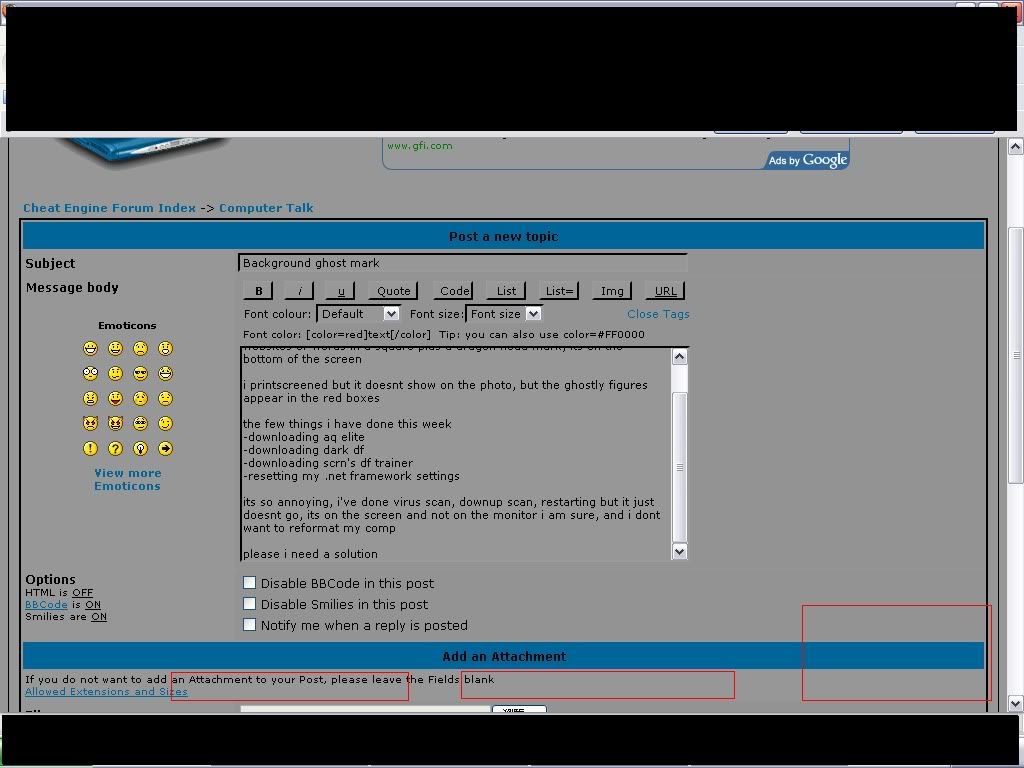
Guys i got a serious problem, just today, i discover there are some ghostly marks on my background, i cant see it well, but it looks like 2 websites or words in a square plus a dragon head mark, its on the bottom of the screen
i printscreened but it doesnt show on the photo, there are 2 sentence of words, the big red box contains something that looks like a dragon head or a helmet
the few things i have done this week
-downloading aq elite
-downloading dark df
-downloading scrn's df trainer
-resetting my .net framework settings
its so annoying, i've done virus scan, downup scan, restarting but it just doesnt go, its on the screen and not on the monitor i am sure, and i dont want to reformat my comp
please i need a solution
|
|
| Back to top |
|
 |
iTz SWAT
I post too much
 Reputation: 1 Reputation: 1
Joined: 20 Dec 2007
Posts: 2227
Location: Me.Location;
|
| Posted: Sat May 16, 2009 3:37 am Post subject: |
|
|
Obviously we can't see it through the screenshot...
Try cleaning your screen.
Also can you give us an Image of it. Ad in via digital camera...
_________________
|
|
| Back to top |
|
|
DoomsDay
Grandmaster Cheater
 Reputation: 0 Reputation: 0
Joined: 06 Jan 2007
Posts: 768
Location: %HomePath%
|
| Posted: Sat May 16, 2009 3:38 am Post subject: |
|
|
| Did you try searching these sentences in google? An actual photo would be nice.
|
|
| Back to top |
|
|
Seergaze3
Master Cheater
![]() Reputation: -1 Reputation: -1
Joined: 10 Mar 2009
Posts: 347
Location: earth
|
| Posted: Sat May 16, 2009 3:41 am Post subject: |
|
|
| the words are too blur cant see a thing, i tried changing the background but it doesnt work, and even more worst when i try to use my camera (or maybe it just sucks)
|
|
| Back to top |
|
|
iTz SWAT
I post too much
Reputation: 1
Joined: 20 Dec 2007
Posts: 2227
Location: Me.Location;
|
| Posted: Sat May 16, 2009 3:46 am Post subject: |
|
|
| im4eversmart wrote: | | the words are too blur cant see a thing, i tried changing the background but it doesnt work, and even more worst when i try to use my camera (or maybe it just sucks) |
Run Magnifier...
If it is software then it's possible you may see it enlarged...
If it is hardware the only way we can see it is via Digital Camera.
Could be a bunch of dead pixels and your imagination...
_________________
|
|
| Back to top |
|
|
WinRAR
Grandmaster Cheater
![]() Reputation: 1 Reputation: 1
Joined: 16 Mar 2007
Posts: 890
Location: skullfucking dead children
|
| Posted: Sat May 16, 2009 5:11 am Post subject: |
|
|
| try pressing the 'auto adjust' button on your monitor if it has one.
|
|
| Back to top |
|
|
sponge cake recipe
Grandmaster Cheater Supreme
![]() Reputation: 22 Reputation: 22
Joined: 24 Sep 2007
Posts: 1635
|
| Posted: Sat May 16, 2009 7:25 am Post subject: |
|
|
Do you have an old monitor?
Maybe you left it on a game or something and the image burnt in.
Happened to a friend of mine's phone.
|
|
| Back to top |
|
|
pkyourface
Master Cheater
 Reputation: 0 Reputation: 0
Joined: 26 Dec 2006
Posts: 252
|
| Posted: Sat May 16, 2009 9:38 am Post subject: |
|
|
| It's definitely your monitor because that screenshot looks fine on mine.
|
|
| Back to top |
|
|
NINTENDO
Grandmaster Cheater Supreme
![]() Reputation: 0 Reputation: 0
Joined: 02 Nov 2007
Posts: 1371
|
| Posted: Sat May 16, 2009 11:29 am Post subject: |
|
|
| Viral wrote: | Do you have an old monitor?
Maybe you left it on a game or something and the image burnt in.
Happened to a friend of mine's phone. |
serisoly? :S I thought it would need to be on for ever the image to get attached :/
_________________
Intel over amd yes. |
|
| Back to top |
|
|
kls85
I post too much
 Reputation: 22 Reputation: 22
Joined: 18 Jul 2008
Posts: 2757
Location: Under ur bed
|
| Posted: Sat May 16, 2009 12:09 pm Post subject: |
|
|
| wallantia wrote: | | Viral wrote: | Do you have an old monitor?
Maybe you left it on a game or something and the image burnt in.
Happened to a friend of mine's phone. |
serisoly? :S I thought it would need to be on for ever the image to get attached :/ |
Image burn can happen if you left that image on for a long period of time.
This was a flaw with the old Plasma TVs.
To verify if it is a image burn, turn off your monitor and see if the image is still there.
If yes then it's image burn, if no then it's something else.
|
|
| Back to top |
|
|
KorruptByte
Expert Cheater
 Reputation: 0 Reputation: 0
Joined: 14 Apr 2007
Posts: 214
|
| Posted: Sun May 17, 2009 9:39 pm Post subject: |
|
|
If you have a CRT monitor, press the Degauss button.
*It's the button that makes your screen shake and then stops*
_________________
|
|
| Back to top |
|
|
Honda
Grandmaster Cheater Supreme
 Reputation: 0 Reputation: 0
Joined: 07 May 2008
Posts: 1242
|
| Posted: Sun May 17, 2009 10:08 pm Post subject: |
|
|
| KorruptByte wrote: | If you have a CRT monitor, press the Degauss button.
*It's the button that makes your screen shake and then stops* |
Isn't that called auto adjustment?
Cause when I press that on my HDTV/Monitor, it just shakes, fixed the screen, then stop.
|
|
| Back to top |
|
|
kls85
I post too much
Reputation: 22
Joined: 18 Jul 2008
Posts: 2757
Location: Under ur bed
|
| Posted: Mon May 18, 2009 7:42 am Post subject: |
|
|
| Encrypted wrote: | | KorruptByte wrote: | If you have a CRT monitor, press the Degauss button.
*It's the button that makes your screen shake and then stops* |
Isn't that called auto adjustment?
Cause when I press that on my HDTV/Monitor, it just shakes, fixed the screen, then stop. |
They both look like it's doing the same thing (shaking the screen), but degauss and auto adjust are two different functions.
|
|
| Back to top |
|
|
|

 FAQ
FAQ Search
 Memberlist
 Usergroups
 Register
 Profile
 Log in to check your private messages
 Log in


