| View previous topic :: View next topic |
| Author |
Message |
Mysterious
Grandmaster Cheater Supreme
![]() Reputation: 0 Reputation: 0
Joined: 26 Jun 2006
Posts: 1421
|
 Posted: Sun Jan 18, 2009 7:38 pm Post subject: When i try to update java , WTF? Posted: Sun Jan 18, 2009 7:38 pm Post subject: When i try to update java , WTF? |
 |
|
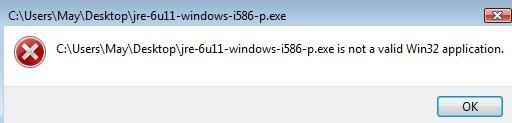
Problem :
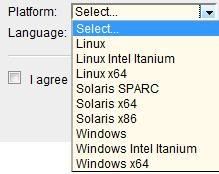
What do i do :
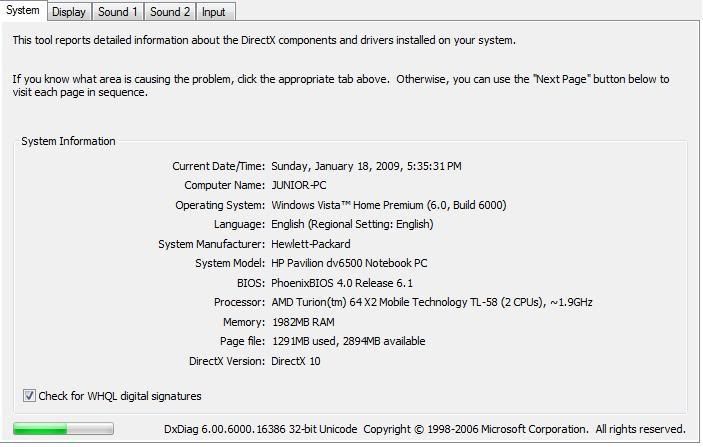
Computer Info :
 [/color] [/color]
question : What Computer Operating ? 32bit/64bit I AM CONFUSED |
|
| Back to top |
|
 |
Waly
Master Cheater
![]() Reputation: -1 Reputation: -1
Joined: 25 Nov 2008
Posts: 293
|
| Posted: Sun Jan 18, 2009 9:50 pm Post subject: |
|
|
Wow, this happened to me so many times on Vista. Typically, Vista is x64. I really don't recall how I fixed it, but I remember it had something to do with tinkering with the settings...
[offtopic]
Grats on so close to 1337 posts =D
[/offtopic] |
|
| Back to top |
|
|
superweapons
Grandmaster Cheater Supreme
 Reputation: 2 Reputation: 2
Joined: 04 Jan 2008
Posts: 1355
Location: The Internet. Where else?
|
| Posted: Mon Jan 19, 2009 12:08 am Post subject: |
|
|
The program you're trying to run might be for a different OS version, is corrupted, or isn't compatible with your hardware. Number 3 seems the most reasonable, i586 is Intel's Pentium family of processors, while you're running a completely different AMD processor. But I'm pretty sure that Sun developed it as a universal runtime update, so it could also be file corruption, download it again from a mirror.
You're probably running Vista x86 B6000 without any service packs.
_________________
|
|
| Back to top |
|
|
vmanisme
Master Cheater
 Reputation: 0 Reputation: 0
Joined: 05 Sep 2007
Posts: 458
Location: Google!
|
| Posted: Mon Jan 19, 2009 12:19 am Post subject: |
|
|
try this:
right click (on the setup file)>click properties>compatibility>and check "Run this program in compatibility for: Windows XP (SP2)"
_________________
|
|
| Back to top |
|
|
Karakawe
I post too much
 Reputation: 3 Reputation: 3
Joined: 17 Apr 2007
Posts: 3899
|
| Posted: Mon Jan 19, 2009 12:52 am Post subject: |
|
|
If you downloaded the x64 version, that simply means you have the 32-bit version of Vista installed. Download the listing under "Windows".
Opposite goes as well. If you downloaded the x86 version ("Windows"), you have 64-bit Vista installed. Download the other.
In other words, try both Windows installs.
| vmanisme wrote: | try this:
right click (on the setup file)>click properties>compatibility>and check "Run this program in compatibility for: Windows XP (SP2)" |
That won't do anything, it's just a generic response for Vista. |
|
| Back to top |
|
|
Mysterious
Grandmaster Cheater Supreme
![]() Reputation: 0 Reputation: 0
Joined: 26 Jun 2006
Posts: 1421
|
| Posted: Mon Jan 19, 2009 1:40 am Post subject: |
|
|
| I downloaded both and it wont let me install ! |
|
| Back to top |
|
|
|

 FAQ
FAQ Search
 Memberlist
 Usergroups
 Register
 Profile
 Log in to check your private messages
 Log in


