AylinCE
Grandmaster Cheater Supreme
 Reputation: 37 Reputation: 37
Joined: 16 Feb 2017
Posts: 1548
|
 Posted: Mon Oct 23, 2023 8:19 am Post subject: Use user-defined shortcut keys. (Change-Save-Load) Posted: Mon Oct 23, 2023 8:19 am Post subject: Use user-defined shortcut keys. (Change-Save-Load) |
 |
|
Inspired by master @mgr.inz.Player's code in the link.
https://forum.cheatengine.org/viewtopic.php?t=602091
--##################################--
I won't explain much.
There are explanations for each different section in the code.
Below is the full code with usage example.
If you have difficulty adapting your own form instead of the sample GUI, do not hesitate to write a comment and ask questions.
Note: CE's native generated form (EXE) and address list (CETrainer.CHEAT0, memrec0_hotkey0) may not be compatible with hotkey combinations.
The code below has been tested to work in compatible mode and restore saved keys.
| Code: | -- Example GUI
if f1 then f1.Destroy() f1=nil end
f1 = createForm(true)
f1.Position = poDesktopCenter
f1.Width = 220
f1.Height = 160
c1=createCheckBox(f1) c1.Left=20 c1.Top=20 c1.caption="XP OFF!"
c1.Font.Color=0x00ff00
l1=createLabel(f1) l1.Left=100 l1.Top=20 l1.caption="key: .."
c2=createCheckBox(f1) c2.Left=20 c2.Top=50 c2.caption="HP OFF!"
c2.Font.Color=0xffff00
l2=createLabel(f1) l2.Left=100 l2.Top=50 l2.caption="key: .."
c3=createCheckBox(f1) c3.Left=20 c3.Top=80 c3.caption="MP OFF!"
c3.Font.Color=0xff00ff
l3=createLabel(f1) l3.Left=100 l3.Top=80 l3.caption="key: .."
c4=createCheckBox(f1) c4.Left=20 c4.Top=110 c4.caption="Atk OFF!"
c4.Font.Color=0x00ffff
l4=createLabel(f1) l4.Left=100 l4.Top=110 l4.caption="key: .."
----------------------------------------------------------------
----------------------------------------------------------------
----------------------------------------------------------------
-- use: Checkbox1 changed options ..
-- List below all your code functions to be activated.
cpt1 = c1.Caption
aclr1 = c1.Font.Color
function c1Changed()
if c1.State==1 then
c1.State=0
l1.Font.color=clBlack
c1.Font.Color=aclr1
c1.Caption=cpt1
else
c1.State=1
l1.Font.color=clRed
c1.Font.Color=clRed
c1.Caption=(cpt1):sub(1,-5).." ON!"
end
end
c1.OnChange=c1Changed
function texter1()
print("hotkey click XP")
c1Changed()
end
-- use: address list script active, deactive options ..
cpt2 = c2.Caption
aclr2 = c2.Font.Color
c2.OnChange=function()
al=getAddressList()
mr = addresslist_getMemoryRecord(al,"Hack1") -- Hack1 ? Change your script description ..
mr.Active=c2.Checked
end
function texter2()
print("hotkey click HP")
if c2.State==1 then
c2.State=0
l2.Font.color=clBlack
c2.Font.Color=aclr2
c2.Caption=cpt2
else
c2.State=1
l2.Font.color=clRed
c2.Font.Color=clRed
c2.Caption=(cpt1):sub(1,-5).." ON!"
end
end
-- use: lua script options ..
scrpt = 0
function texter3()
print("hotkey click MP")
script1 = [[[ENABLE]
{$lua}
print("script active")
{$asm}
[DISABLE]
]]
autoAssemble(script1, true)
end
function texter4() print("hotkey click Atk") end
----------------------------------------------------------------
function checkBoxColorized(name)
return executeCodeLocalEx('uxtheme.SetWindowTheme', name.handle, "", "") --thanks @Corroder
end
checkBoxColorized(c1)
checkBoxColorized(c2)
checkBoxColorized(c3)
checkBoxColorized(c4)
--------------------------------------------------------------------
--############################################################################--
keys0 = ""
-- You must provide the first sample keys.
local keys1 = VK_F7
local keys2 = VK_F8
local keys3 = VK_F9
local keys4 = VK_F10
-- Kill hotkeys ..
if hk1 then hk1.destroy() hk1=nil end
if hk2 then hk2.destroy() hk2=nil end
if hk3 then hk3.destroy() hk3=nil end
if hk4 then hk4.destroy() hk4=nil end
-- Use the above kill codes only when running tests at form edit time.
-- Once the form reaches its final end, you can prepare the Trainer by deleting the kill codes above.
-- create hotkeys ..
hk1=createHotkey(texter1, keys1)
hk2=createHotkey(texter2, keys2)
hk3=createHotkey(texter3, keys3)
hk4=createHotkey(texter4, keys4)
--############################################################################--
--############################################################################--
-- save, load hotkeys (keys) ..
local keyCode = {['VK_LBUTTON']=1,['VK_RBUTTON']=2,['VK_CANCEL']=3,['VK_MBUTTON']=4,['VK_XBUTTON1']=5,['VK_XBUTTON2']=6,['VK_BACK']=8,['VK_TAB']=9,['VK_CLEAR']=12,['VK_RETURN']=13,['VK_SHIFT']=16,['VK_CTRL']=17,['VK_MENU']=18,['VK_PAUSE']=19,['VK_CAPITAL']=20,['VK_ESCAPE']=27,['VK_SPACE']=32,['VK_PRIOR']=33,['VK_NEXT']=34,['VK_END']=35,['VK_HOME']=36,['VK_LEFT']=37,['VK_UP']=38,['VK_RIGHT']=39,['VK_DOWN']=40,['VK_SELECT']=41,['VK_PRINT']=42,['VK_EXECUTE']=43,['VK_SNAPSHOT']=44,['VK_INSERT']=45,['VK_DELETE']=46,['VK_HELP']=47,['VK_0']=48,['VK_1']=49,['VK_2']=50,['VK_3']=51,['VK_4']=52,['VK_5']=53,['VK_6']=54,['VK_7']=55,['VK_8']=56,['VK_9']=57,['VK_A']=65,['VK_B']=66,['VK_C']=67,['VK_D']=68,['VK_E']=69,['VK_F']=70,['VK_G']=71,['VK_H']=72,['VK_I']=73,['VK_J']=74,['VK_K']=75,['VK_L']=76,['VK_M']=77,['VK_N']=78,['VK_O']=79,['VK_P']=80,['VK_Q']=81,['VK_R']=82,['VK_S']=83,['VK_T']=84,['VK_U']=85,['VK_V']=86,['VK_W']=87,['VK_X']=88,['VK_Y']=89,['VK_Z']=90,['VK_LWIN']=91,['VK_RWIN']=92,['VK_APPS']=93,['VK_NUMPAD0']=96,['VK_NUMPAD1']=97,['VK_NUMPAD2']=98,['VK_NUMPAD3']=99,['VK_NUMPAD4']=100,['VK_NUMPAD5']=101,['VK_NUMPAD6']=102,['VK_NUMPAD7']=103,['VK_NUMPAD8']=104,['VK_NUMPAD9']=105,['VK_MULTIPLY']=106,['VK_ADD']=107,['VK_SEPARATOR']=108,['VK_SUBTRACT']=109,['VK_DECIMAL']=110,['VK_DIVIDE']=111,['VK_F1']=112,['VK_F2']=113,['VK_F3']=114,['VK_F4']=115,['VK_F5']=116,['VK_F6']=117,['VK_F7']=118,['VK_F8']=119,['VK_F9']=120,['VK_F10']=121,['VK_F11']=122,['VK_F12']=123,['VK_F13']=124,['VK_F14']=125,['VK_F15']=126,['VK_F16']=127,['VK_F17']=128,['VK_F18']=129,['VK_F19']=130,['VK_F20']=131,['VK_F21']=132,['VK_F22']=133,['VK_F23']=134,['VK_F24']=135,['VK_NUMLOCK']=144,['VK_SCROLL']=145,['VK_LSHIFT']=160,['VK_LCONTROL']=162,['VK_LMENU']=164,['VK_RSHIFT']=161,['VK_RCONTROL']=163,['VK_RMENU']=165}
settings=getSettings('allKys1')
function cntKeys(key,hotkey)
if key~="" then
keyText=(key):gsub("+",",VK_")
str="VK_"..keyText
str=(str):gsub("%s",""):upper()
local keys={0,0,0,0,0}
local i=1
for v in str:gmatch'[^,]+' do
v1=(v):gsub("%s","")
aa5 = keyCode[tostring(v1)]
keys[i]=tonumber(aa5)
i=i+1
end
hotkey.setKeys(keys[1],keys[2],keys[3],keys[4],keys[5])
end
end
function keyString(hotkey)
userDefinedKeys={0,0,0,0,0}
for i,v in ipairs({hotkey.getKeys()}) do
userDefinedKeys[i]=v
end
res = convertKeyComboToString(userDefinedKeys)
return res
end
function saveKeys(hotkey,name)
settings.Value[name]=keyString(hotkey)
end
function loadKeys()
cntKeys(settings.Value['k1'],hk1)
cntKeys(settings.Value['k2'],hk2)
cntKeys(settings.Value['k3'],hk3)
cntKeys(settings.Value['k4'],hk4)
end
loadKeys()
-- write hotkey ..
l1.caption="key: " .. keyString(hk1)
l2.caption="key: " .. keyString(hk2)
l3.caption="key: " .. keyString(hk3)
l4.caption="key: " .. keyString(hk4)
--############################################################################--
--############################################################################--
-- Edit Hotkey Form ..
local ky = {}
if keyFrm1 then keyFrm1.Destroy() keyFrm1=nil end
keyFrm1=createForm(false)
function frmCreate()
if keyFrm1 then keyFrm1.Destroy() keyFrm1=nil end
DP1=getScreenDPI()/96
keyFrm1=createForm()
keyFrm1.height=168*DP1 keyFrm1.width=300*DP1 keyFrm1.left=296*DP1 keyFrm1.top=259*DP1
keyFrm1.PopupMode=1 keyFrm1.caption="Set new hotkey"
keyFrm1.Position="poDesktopCenter" keyFrm1.BorderStyle="bsNone" keyFrm1.ShowInTaskBar="stAlways"
keyFrm1.setLayeredAttributes(0x000100, 255, LWA_COLORKEY | LWA_ALPHA )
keyFrm1.Color=0x000100
-------------------------
inputtext1="******************************************\n*** Set a hotkey and Click 'Apply' ***\n******************************************"
----------------------- ky.mPnl1 -----
ky.mPnl1=createPanel(keyFrm1)
ky.mPnl1.AutoSize=false
ky.mPnl1.height=30*DP1 ky.mPnl1.width=280*DP1 ky.mPnl1.left=10*DP1 ky.mPnl1.top=10*DP1
ky.mPnl1.caption="Select new hotkey!"
ky.mPnl1.Cursor = -22 ky.mPnl1.Color=15321797
ky.mPnl1.Font.Style="fsBold" ky.mPnl1.Font.Size=14*DP1
ky.mPnl1.OnMouseDown = function() keyFrm1.DragNow() end
-----------------------
----------------------- ky.closeButton -----
ky.closeButton=createButton(ky.mPnl1)
ky.closeButton.AutoSize=false
ky.closeButton.height=24*DP1 ky.closeButton.width=30*DP1 ky.closeButton.left=240*DP1 ky.closeButton.top=3*DP1
ky.closeButton.caption="X"
ky.closeButton.Font.Style="fsBold" ky.closeButton.Font.Size=14*DP1
-----------------------
----------------------- ky.mPnl2 -----
ky.mPnl2=createPanel(keyFrm1)
ky.mPnl2.AutoSize=false
ky.mPnl2.height=110*DP1 ky.mPnl2.width=280*DP1 ky.mPnl2.left=10*DP1 ky.mPnl2.top=45*DP1
ky.mPnl2.caption="" ky.mPnl2.Color=15321797
ky.mPnl2.alignment="2"
ky.mPnl2.Font.Style="fsBold" ky.mPnl2.Font.Size=14*DP1
-----------------------
----------------------- ky.kLbl1 -----
ky.kLbl1=createLabel(ky.mPnl2)
ky.kLbl1.AutoSize=false
ky.kLbl1.height=55*DP1 ky.kLbl1.width=276*DP1 ky.kLbl1.left=2*DP1 ky.kLbl1.top=10*DP1
ky.kLbl1.caption=inputtext1
ky.kLbl1.alignment="taCenter" ky.kLbl1.Font.Style="fsBold"
ky.kLbl1.Font.Size=11*DP1 ky.kLbl1.optimalFill=true
-----------------------
----------------------- ky.clearButton -----
ky.clearButton=createButton(ky.mPnl2)
ky.clearButton.AutoSize=false
ky.clearButton.height=28*DP1 ky.clearButton.width=70*DP1 ky.clearButton.left=10*DP1 ky.clearButton.top=75*DP1
ky.clearButton.caption="Clear"
ky.clearButton.Font.Style="fsBold" ky.clearButton.Font.Size=12*DP1
-----------------------
----------------------- ky.applyButton -----
ky.applyButton=createButton(ky.mPnl2)
ky.applyButton.AutoSize=false
ky.applyButton.height=28*DP1 ky.applyButton.width=70*DP1 ky.applyButton.left=200*DP1 ky.applyButton.top=75*DP1
ky.applyButton.caption="Apply"
ky.applyButton.Font.Style="fsBold" ky.applyButton.Font.Size=12*DP1
-----------------------
----------------------- ky.kEdt1 -----
ky.kEdt1=createEdit(ky.mPnl2)
ky.kEdt1.AutoSize=false
ky.kEdt1.height=27*DP1 ky.kEdt1.width=100*DP1 ky.kEdt1.left=90*DP1 ky.kEdt1.top=75*DP1
ky.kEdt1.text="" ky.kEdt1.alignment="taCenter"
ky.kEdt1.Font.Style="fsBold" ky.kEdt1.Font.Size=12*DP1
-----------------------
ky.closeButton.OnClick = function ()
ky.kEdt1.setFocus()
keyFrm1.Hide()
end
function userPressedKey(sender, key)
if userDefinedKeys[5]==0 then
for i=1,5 do
if userDefinedKeys[i]==0 then
userDefinedKeys[i]=key
break
else
if userDefinedKeys[i]==key then break end
end
end
end
ky.kEdt1.Text=convertKeyComboToString(userDefinedKeys)
return 0
end
function clearHotkey()
userDefinedKeys={0,0,0,0,0}
ky.kEdt1.Text=convertKeyComboToString(userDefinedKeys)
ky.kEdt1.setFocus()
end
ky.kEdt1.OnKeyDown = userPressedKey
local mbtn={false,true,true,true}
ky.kEdt1.OnMouseDown = function (s,k) if mbtn[k] then s.OnKeyDown(s,k+2) end end
ky.clearButton.OnClick = clearHotkey
end
function changeHotkeyKeys(hotkey,sender,name)
if not changeHotkeyKeysFormCreated then
changeHotkeyKeysFormCreated = true
keys0 = hotkey.Keys
frmCreate()
else
keys0 = hotkey.Keys
frmCreate()
end
if hotkey==nil then return end
userDefinedKeys={0,0,0,0,0}
if hotkey.ClassName=='TGenericHotkey' then
for i,v in ipairs({hotkey.getKeys()}) do
userDefinedKeys[i]=v
end
ky.kEdt1.Text=convertKeyComboToString(userDefinedKeys)
ky.applyButton.OnClick=function()
hotkey.setKeys(userDefinedKeys[1],userDefinedKeys[2],
userDefinedKeys[3],userDefinedKeys[4],
userDefinedKeys[5])
sender.caption="key: "..ky.kEdt1.Text
saveKeys(hotkey,name)
keyFrm1.Hide()
end
elseif hotkey.ClassName=='TMemoryRecordHotkey' then
for i,v in ipairs(hotkey.Keys) do
userDefinedKeys[i]=v
end
ky.kEdt1.Text=convertKeyComboToString(userDefinedKeys)
ky.applyButton.OnClick=function()
hotkey.Keys = userDefinedKeysh
sender.caption="key: "..ky.kEdt1.Text
saveKeys()
keyFrm1.Hide()
end
end
return hotkey.Keys
end
--############################################################################--
--############################################################################--
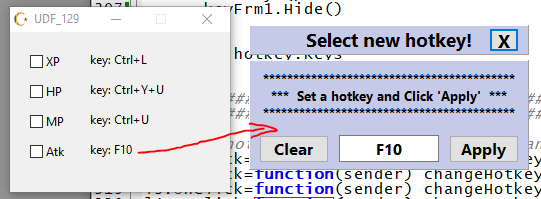
-- Edit hotkey form start click .. (changeHotkeyKeys options: 1- Hotkey name.. 2-Write label name (MyTrainer.CELabel1 or UDF1.CELabel1) .. 3- Save key code name ..
l1.OnClick=function(sender) changeHotkeyKeys(hk1,sender,"k1") end
l2.OnClick=function(sender) changeHotkeyKeys(hk2,sender,"k2") end
l3.OnClick=function(sender) changeHotkeyKeys(hk3,sender,"k3") end
l4.OnClick=function(sender) changeHotkeyKeys(hk4,sender,"k4") end
|
Image: ek_1
--##############################################--
--##############################################--
--##############################################--
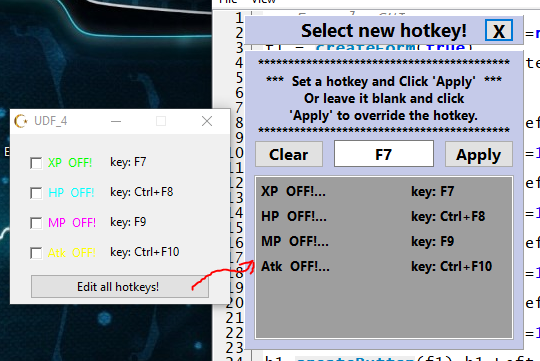
All Hotkey Edits (Menu Button Click!)
| Code: | -- Example GUI
if f1 then f1.Destroy() f1=nil end
f1 = createForm(true)
f1.Position = poDesktopCenter
f1.Width = 220
f1.Height = 170
c1=createCheckBox(f1) c1.Left=20 c1.Top=20 c1.caption="XP OFF!"
c1.Font.Color=0x00ff00
l1=createLabel(f1) l1.Left=100 l1.Top=20 l1.caption="key: .."
c2=createCheckBox(f1) c2.Left=20 c2.Top=50 c2.caption="HP OFF!"
c2.Font.Color=0xffff00
l2=createLabel(f1) l2.Left=100 l2.Top=50 l2.caption="key: .."
c3=createCheckBox(f1) c3.Left=20 c3.Top=80 c3.caption="MP OFF!"
c3.Font.Color=0xff00ff
l3=createLabel(f1) l3.Left=100 l3.Top=80 l3.caption="key: .."
c4=createCheckBox(f1) c4.Left=20 c4.Top=110 c4.caption="Atk OFF!"
c4.Font.Color=0x00ffff
l4=createLabel(f1) l4.Left=100 l4.Top=110 l4.caption="key: .."
b1=createButton(f1) b1.Left=20 b1.Top=140 b1.Width=180
b1.caption="Edit all hotkeys! "
----------------------------------------------------------------
----------------------------------------------------------------
function checkBoxColorized(name)
return executeCodeLocalEx('uxtheme.SetWindowTheme', name.handle, "", "") --thanks @Corroder
end
checkBoxColorized(c1)
checkBoxColorized(c2)
checkBoxColorized(c3)
checkBoxColorized(c4)
--############################################################################--
--############################################################################--
-- save, load hotkeys (keys) ..
local hotkeyTbl = {}
local label1Tbl = {}
local label2Tbl = {}
local cboxTbl = {}
keys0 = ""
local keyCode = {['VK_LBUTTON']=1,['VK_RBUTTON']=2,['VK_CANCEL']=3,['VK_MBUTTON']=4,['VK_XBUTTON1']=5,['VK_XBUTTON2']=6,['VK_BACK']=8,['VK_TAB']=9,['VK_CLEAR']=12,['VK_RETURN']=13,['VK_SHIFT']=16,['VK_CTRL']=17,['VK_MENU']=18,['VK_PAUSE']=19,['VK_CAPITAL']=20,['VK_ESCAPE']=27,['VK_SPACE']=32,['VK_PRIOR']=33,['VK_NEXT']=34,['VK_END']=35,['VK_HOME']=36,['VK_LEFT']=37,['VK_UP']=38,['VK_RIGHT']=39,['VK_DOWN']=40,['VK_SELECT']=41,['VK_PRINT']=42,['VK_EXECUTE']=43,['VK_SNAPSHOT']=44,['VK_INSERT']=45,['VK_DELETE']=46,['VK_HELP']=47,['VK_0']=48,['VK_1']=49,['VK_2']=50,['VK_3']=51,['VK_4']=52,['VK_5']=53,['VK_6']=54,['VK_7']=55,['VK_8']=56,['VK_9']=57,['VK_A']=65,['VK_B']=66,['VK_C']=67,['VK_D']=68,['VK_E']=69,['VK_F']=70,['VK_G']=71,['VK_H']=72,['VK_I']=73,['VK_J']=74,['VK_K']=75,['VK_L']=76,['VK_M']=77,['VK_N']=78,['VK_O']=79,['VK_P']=80,['VK_Q']=81,['VK_R']=82,['VK_S']=83,['VK_T']=84,['VK_U']=85,['VK_V']=86,['VK_W']=87,['VK_X']=88,['VK_Y']=89,['VK_Z']=90,['VK_LWIN']=91,['VK_RWIN']=92,['VK_APPS']=93,['VK_NUMPAD0']=96,['VK_NUMPAD1']=97,['VK_NUMPAD2']=98,['VK_NUMPAD3']=99,['VK_NUMPAD4']=100,['VK_NUMPAD5']=101,['VK_NUMPAD6']=102,['VK_NUMPAD7']=103,['VK_NUMPAD8']=104,['VK_NUMPAD9']=105,['VK_MULTIPLY']=106,['VK_ADD']=107,['VK_SEPARATOR']=108,['VK_SUBTRACT']=109,['VK_DECIMAL']=110,['VK_DIVIDE']=111,['VK_F1']=112,['VK_F2']=113,['VK_F3']=114,['VK_F4']=115,['VK_F5']=116,['VK_F6']=117,['VK_F7']=118,['VK_F8']=119,['VK_F9']=120,['VK_F10']=121,['VK_F11']=122,['VK_F12']=123,['VK_F13']=124,['VK_F14']=125,['VK_F15']=126,['VK_F16']=127,['VK_F17']=128,['VK_F18']=129,['VK_F19']=130,['VK_F20']=131,['VK_F21']=132,['VK_F22']=133,['VK_F23']=134,['VK_F24']=135,['VK_NUMLOCK']=144,['VK_SCROLL']=145,['VK_LSHIFT']=160,['VK_LCONTROL']=162,['VK_LMENU']=164,['VK_RSHIFT']=161,['VK_RCONTROL']=163,['VK_RMENU']=165}
settings=getSettings('allKys1')
function cntKeys(key,hotkey)
local keyActive = ""
if key~="None!" then
keyText=(key):gsub("+",",VK_")
str="VK_"..keyText
str=(str):gsub("%s",""):upper()
local keys={0,0,0,0,0}
local i=1
for v in str:gmatch'[^,]+' do
v1=(v):gsub("%s","")
aa5 = keyCode[tostring(v1)]
keys[i]=tonumber(aa5)
i=i+1
end
keyActive=key
hotkey.setKeys(keys[1],keys[2],keys[3],keys[4],keys[5])
else
keyActive = "None!"
end
return keyActive
end
function keyString(hotkey)
if hotkey~="None!" then
userDefinedKeys={0,0,0,0,0}
for i,v in ipairs({hotkey.getKeys()}) do
userDefinedKeys[i]=v
end
res = convertKeyComboToString(userDefinedKeys)
else
res = "None!"
end
print(res)
return res
end
function keyDestroy(key,lbl)
local keys1={0,0,0,0,0}
if key.ClassName=='TGenericHotkey' then
key.setKeys(keys1[1],keys1[2],keys1[3],keys1[4],keys1[5])
elseif key.ClassName=='TMemoryRecordHotkey' then
key.Keys=keys1
end
lbl.Caption = "Key: None!"
end
function saveKeys(hotkey,name,sender,ops)
if tonumber(ops)==1 then
keyDestroy(hotkey,sender)
settings.Value[name]="None!"
elseif tonumber(ops)==2 then
settings.Value[name]=keyString(hotkey)
end
end
function loadKeys()
if cntKeys(settings.Value['k1'],hk1)=="None!" then keyDestroy(hk1,l1) end
if cntKeys(settings.Value['k2'],hk2)=="None!" then keyDestroy(hk2,l2) end
if cntKeys(settings.Value['k3'],hk3)=="None!" then keyDestroy(hk3,l3) end
if cntKeys(settings.Value['k4'],hk4)=="None!" then keyDestroy(hk4,l4) end
end
--############################################################################--
--############################################################################--
-- Edit Hotkey Form ..
local ky = {}
function createScrollBox(Parent)
local box = createComponentClass('TScrollBox', Parent)
box.Parent = Parent
return box
end
-----------------------
----------------------- ky.Scrbx1 -----
DP1=getScreenDPI()/96
nextTop=5*DP1
--function frmCreate()
if keyFrm1 then keyFrm1.Destroy() keyFrm1=nil end
keyFrm1=createForm()
keyFrm1.height=450*DP1 keyFrm1.width=300*DP1 keyFrm1.left=296*DP1 keyFrm1.top=259*DP1
keyFrm1.PopupMode=1 keyFrm1.caption="Set new hotkey"
keyFrm1.Position="poDesktopCenter" keyFrm1.BorderStyle="bsNone" keyFrm1.ShowInTaskBar="stAlways"
-------------------------
inputtext1="******************************************\n*** Set a hotkey and Click 'Apply' ***\nOr leave it blank and click\n'Apply' to override the hotkey.\n******************************************"
----------------------- ky.mPnl1 -----
ky.mPnl1=createPanel(keyFrm1)
ky.mPnl1.AutoSize=false
ky.mPnl1.height=30*DP1 ky.mPnl1.width=280*DP1 ky.mPnl1.left=10*DP1 ky.mPnl1.top=10*DP1
ky.mPnl1.caption="Select new hotkey!"
ky.mPnl1.Cursor = -22 ky.mPnl1.Color=15321797
ky.mPnl1.Font.Style="fsBold" ky.mPnl1.Font.Size=14*DP1
ky.mPnl1.OnMouseDown = function() keyFrm1.DragNow() end
-----------------------
----------------------- ky.closeButton -----
ky.closeButton=createButton(ky.mPnl1)
ky.closeButton.AutoSize=false
ky.closeButton.height=24*DP1 ky.closeButton.width=30*DP1 ky.closeButton.left=240*DP1 ky.closeButton.top=3*DP1
ky.closeButton.caption="X"
ky.closeButton.Font.Style="fsBold" ky.closeButton.Font.Size=14*DP1
-----------------------
----------------------- ky.mPnl2 -----
ky.mPnl2=createPanel(keyFrm1)
ky.mPnl2.AutoSize=false
ky.mPnl2.height=300*DP1 ky.mPnl2.width=280*DP1 ky.mPnl2.left=10*DP1 ky.mPnl2.top=45*DP1
ky.mPnl2.caption="" ky.mPnl2.Color=15321797
ky.mPnl2.alignment="2"
ky.mPnl2.Font.Style="fsBold" ky.mPnl2.Font.Size=14*DP1
-----------------------
----------------------- ky.kLbl1 -----
ky.kLbl1=createLabel(ky.mPnl2)
ky.kLbl1.AutoSize=false
ky.kLbl1.height=85*DP1 ky.kLbl1.width=276*DP1 ky.kLbl1.left=2*DP1 ky.kLbl1.top=5*DP1
ky.kLbl1.caption=inputtext1
ky.kLbl1.alignment="taCenter" ky.kLbl1.Font.Style="fsBold"
ky.kLbl1.Font.Size=11*DP1 ky.kLbl1.optimalFill=true
-----------------------
----------------------- ky.clearButton -----
ky.clearButton=createButton(ky.mPnl2)
ky.clearButton.AutoSize=false
ky.clearButton.height=28*DP1 ky.clearButton.width=70*DP1 ky.clearButton.left=10*DP1 ky.clearButton.top=90*DP1
ky.clearButton.caption="Clear"
ky.clearButton.Font.Style="fsBold" ky.clearButton.Font.Size=12*DP1
-----------------------
----------------------- ky.applyButton -----
ky.applyButton=createButton(ky.mPnl2)
ky.applyButton.AutoSize=false
ky.applyButton.height=28*DP1 ky.applyButton.width=70*DP1 ky.applyButton.left=200*DP1 ky.applyButton.top=90*DP1
ky.applyButton.caption="Apply"
ky.applyButton.Font.Style="fsBold" ky.applyButton.Font.Size=12*DP1
-----------------------
----------------------- ky.kEdt1 -----
ky.kEdt1=createEdit(ky.mPnl2)
ky.kEdt1.AutoSize=false
ky.kEdt1.height=27*DP1 ky.kEdt1.width=100*DP1 ky.kEdt1.left=90*DP1 ky.kEdt1.top=90*DP1
ky.kEdt1.text="" ky.kEdt1.alignment="taCenter"
ky.kEdt1.Font.Style="fsBold" ky.kEdt1.Font.Size=12*DP1
keyFrm1.Hide()
-----------------------
ky.closeButton.OnClick = function ()
ky.kEdt1.setFocus()
keyFrm1.Hide()
end
-----------------------
---------------------------------------
function userPressedKey(sender, key)
if userDefinedKeys[5]==0 then
for i=1,5 do
if userDefinedKeys[i]==0 then
userDefinedKeys[i]=key
break
else
if userDefinedKeys[i]==key then break end
end
end
end
ky.kEdt1.Text=convertKeyComboToString(userDefinedKeys)
return 0
end
function clearHotkey()
userDefinedKeys={0,0,0,0,0}
ky.kEdt1.Text=convertKeyComboToString(userDefinedKeys)
ky.kEdt1.setFocus()
end
ky.kEdt1.OnKeyDown = userPressedKey
local mbtn={false,true,true,true}
ky.kEdt1.OnMouseDown = function (s,k) if mbtn[k] then s.OnKeyDown(s,k+2) end end
ky.clearButton.OnClick = clearHotkey
--end
lblcpt=""
function changeHotkeyKeys(hotkey,sender,name)
if not changeHotkeyKeysFormCreated then
changeHotkeyKeysFormCreated = true
keys0 = hotkey.Keys
keyFrm1.Show()
keyFrm1.setLayeredAttributes(0x000100, 255, LWA_COLORKEY | LWA_ALPHA )
keyFrm1.Color=0x000100
--frmCreate()
else
keys0 = hotkey.Keys
keyFrm1.Show()
keyFrm1.setLayeredAttributes(0x000100, 255, LWA_COLORKEY | LWA_ALPHA )
keyFrm1.Color=0x000100
--frmCreate()
end
if hotkey==nil then return end
userDefinedKeys={0,0,0,0,0}
if hotkey.ClassName=='TGenericHotkey' then
local ky0 = {hotkey.getKeys()}
--print(1,#ky0)
if ky0==nil or ky0==0 then
ky.kEdt1.Text=""
else
for i,v in ipairs({hotkey.getKeys()}) do
userDefinedKeys[i]=v
end
ky.kEdt1.Text=convertKeyComboToString(userDefinedKeys)
ky.applyButton.OnClick=function()
if ky.kEdt1.Text=="" then
sender.caption="key: None!"
lblcpt.caption="key: None!"
saveKeys(hotkey,name,sender,1)
else
hotkey.setKeys(userDefinedKeys[1],userDefinedKeys[2],
userDefinedKeys[3],userDefinedKeys[4],
userDefinedKeys[5])
sender.caption="key: "..ky.kEdt1.Text
lblcpt.caption="key: "..ky.kEdt1.Text
saveKeys(hotkey,name,sender,2)
end
end
end
elseif hotkey.ClassName=='TMemoryRecordHotkey' then
if hotkey.Keys==nil then
ky.kEdt1.Text=""
else
for i,v in ipairs(hotkey.Keys) do
userDefinedKeys[i]=v
end
ky.kEdt1.Text=convertKeyComboToString(userDefinedKeys)
ky.applyButton.OnClick=function()
if ky.kEdt1.Text=="" then
sender.caption="key: None!"
lblcpt.caption="key: None!"
saveKeys(hotkey,name,sender,1)
else
hotkey.Keys = userDefinedKeysh
sender.caption="key: "..ky.kEdt1.Text
lblcpt.caption="key: "..ky.kEdt1.Text
saveKeys(hotkey,name,sender,2)
end
end
end
end
return hotkey.Keys
end
--############################################################################--
function crtList1()
ky.Scrbx1=createScrollBox(ky.mPnl2)
ky.Scrbx1.AutoSize=false
ky.Scrbx1.height=165*DP1 ky.Scrbx1.width=260*DP1 ky.Scrbx1.left=10*DP1 ky.Scrbx1.top=125*DP1
ky.Scrbx1.Color=10395294
for i=1, #label1Tbl do
label2Tbl["la"..i]=createLabel(ky.Scrbx1)
label2Tbl["la"..i].AutoSize=false
label2Tbl["la"..i].height=21*DP1 label2Tbl["la"..i].width=140*DP1
label2Tbl["la"..i].left=5*DP1 label2Tbl["la"..i].top=tonumber(nextTop)*DP1
label2Tbl["la"..i].caption=cboxTbl[i].caption.."..." label2Tbl["la"..i].Cursor = -21
label2Tbl["la"..i].Font.Style="fsBold" label2Tbl["la"..i].Font.Color=0
label2Tbl["la"..i].Font.Size=10*DP1 label2Tbl["la"..i].optimalFill=true
label2Tbl["lb"..i]=createLabel(ky.Scrbx1)
label2Tbl["lb"..i].AutoSize=false
label2Tbl["lb"..i].height=21*DP1 label2Tbl["lb"..i].width=100*DP1
label2Tbl["lb"..i].left=155*DP1 label2Tbl["lb"..i].top=tonumber(nextTop)*DP1
label2Tbl["lb"..i].caption=label1Tbl[i].Caption label2Tbl["lb"..i].Cursor = -21
label2Tbl["lb"..i].Font.Style="fsBold" label2Tbl["lb"..i].Font.Color=0
label2Tbl["lb"..i].Font.Size=10*DP1 label2Tbl["lb"..i].optimalFill=true
label2Tbl["lb"..i].OnClick=function(sender)
lblcpt=label1Tbl[i]
changeHotkeyKeys(hotkeyTbl[i],sender,"k"..tonumber(i))
end
label2Tbl["la"..i].OnClick=function()
lblcpt=label1Tbl[i]
sender = label2Tbl["lb"..i]
changeHotkeyKeys(hotkeyTbl[i],sender,"k"..tonumber(i))
end
nextTop=tonumber(nextTop) + 25
end
--ky.Scrbx1.Visible=true
end
--############################################################################--
-- use: Checkbox1 changed options ..
-- List below all your code functions to be activated.
cpt1 = c1.Caption
aclr1 = c1.Font.Color
function c1Changed()
if c1.State==0 then
l1.Font.color=clBlack
c1.Font.Color=aclr1
c1.Caption=cpt1
else
l1.Font.color=clRed
c1.Font.Color=clRed
c1.Caption=(cpt1):sub(1,-5).." ON!"
end
end
function texter1()
sleep(150)
if c1.State==1 then
c1.State=0
else
c1.State=1
end
print("hotkey click XP")
c1Changed()
end
c1.OnChange=c1Changed
-- use: address list script active, deactive options ..
cpt2 = c2.Caption
aclr2 = c2.Font.Color
c2.OnChange=function()
al=getAddressList()
mr = addresslist_getMemoryRecord(al,"Hack1") -- Hack1 ? Change your script description ..
mr.Active=c2.Checked
end
function texter2()
print("hotkey click HP")
if c2.State==1 then
c2.State=0
l2.Font.color=clBlack
c2.Font.Color=aclr2
c2.Caption=cpt2
else
c2.State=1
l2.Font.color=clRed
c2.Font.Color=clRed
c2.Caption=(cpt1):sub(1,-5).." ON!"
end
end
-- use: lua script options ..
scrpt = 0
function texter3()
print("hotkey click MP")
script1 = [[[ENABLE]
{$lua}
print("script active")
{$asm}
[DISABLE]
]]
autoAssemble(script1, true)
end
function texter4() print("hotkey click Atk") end
--############################################################################--
-- Kill hotkeys ..
if hk1 then hk1.destroy() hk1=nil end
if hk2 then hk2.destroy() hk2=nil end
if hk3 then hk3.destroy() hk3=nil end
if hk4 then hk4.destroy() hk4=nil end
-- Use the above kill codes only when running tests at form edit time.
-- Once the form reaches its final end, you can prepare the Trainer by deleting the kill codes above.
-- create hotkeys ..
hk1=createHotkey(texter1, VK_F7)
hk2=createHotkey(texter2, VK_F8)
hk3=createHotkey(texter3, VK_F9)
hk4=createHotkey(texter4, VK_F10)
------------------------------------------
loadKeys()
-- write hotkey ..
l1.caption="key: " .. keyString(hk1)
l2.caption="key: " .. keyString(hk2)
l3.caption="key: " .. keyString(hk3)
l4.caption="key: " .. keyString(hk4)
--Do not forget to fill out these tables in order.
hotkeyTbl = {hk1,hk2,hk3,hk4}
cboxTbl = {c1,c2,c3,c4}
label1Tbl = {l1,l2,l3,l4} -- Your Trainer: UDF1.CELabel1, UDF1.CELabel2..
------------------------------------------
crtList1()
-- Edit hotkey form start click .. (changeHotkeyKeys options: 1- Hotkey name.. 2-Write label name (MyTrainer.CELabel1 or UDF1.CELabel1) .. 3- Save key code name ..
--function key1(sender) lblcpt=label2Tbl["lb"..1] changeHotkeyKeys(hk1,sender,"k1") end
--function key2(sender) print(label2Tbl["lb"..1]) lblcpt=label2Tbl["lb"..2] changeHotkeyKeys(hk2,sender,"k2") end
--function key3(sender) lblcpt=label2Tbl["lb"..3] changeHotkeyKeys(hk3,sender,"k3") end
--function key4(sender) lblcpt=label2Tbl["lb"..4] changeHotkeyKeys(hk4,sender,"k4") end
--l1.OnClick=key1 l2.OnClick=key2 l3.OnClick=key3 l4.OnClick=key4
b1.OnClick=function() changeHotkeyKeys(hk1,l1,"k1") end |
Image: ek_2
I hope it helps your business a little bit.
Until we talk about something else, enjoy it.
| Description: |
|
| Filesize: |
87.35 KB |
| Viewed: |
2482 Time(s) |
|
| Description: |
|
| Filesize: |
16.09 KB |
| Viewed: |
3979 Time(s) |
|
_________________
Last edited by AylinCE on Wed Nov 08, 2023 10:19 am; edited 1 time in total |
|

 FAQ
FAQ Search
 Memberlist
 Usergroups
 Register
 Profile
 Log in to check your private messages
 Log in


