 |
Cheat Engine
The Official Site of Cheat Engine
|
| View previous topic :: View next topic |
| Author |
Message |
Corroder
Grandmaster Cheater Supreme
 Reputation: 75 Reputation: 75
Joined: 10 Apr 2015
Posts: 1668
|
 Posted: Mon Apr 20, 2020 3:43 pm Post subject: Trying Play Video Using winmm.dll Posted: Mon Apr 20, 2020 3:43 pm Post subject: Trying Play Video Using winmm.dll |
 |
|
In vb (w/o call Window Media Player), play video inside a control is:
| Code: | Private Declare Function mciSendString Lib "winmm.dll" Alias "mciSendStringA" (ByVal lpstrCommand As String, ByVal lpstrReturnString As String, ByVal uReturnLength As Integer, ByVal hwndCallback As Integer) As Integer
Const WS_CHILD As Integer = &H40000000
Private Sub PlayMedia(ByRef FileName As String, ByVal Window As Control)
FileName = Chr(34) & FileName & Chr(34)
mciSendString("Open " & FileName & " alias MediaFile parent " & CStr(Window.Handle.ToInt32) & " style " & CStr(WS_CHILD), Nothing, 0, 0)
mciSendString("put MediaFile window at 0 0 " & CStr(PixelToTwip(Window.ClientRectangle.Width) / 15) & " " & CStr(PixelToTwip(Window.ClientRectangle.Height) / 15), Nothing, 0, 0)
mciSendString("Play MediaFile", Nothing, 0, 0)
End Sub
Private Function PixelToTwip(ByVal Pixel As Integer) As Double
Return Pixel * 15
End Function
--- Usage example:
PlayMedia("FileName", PictureBox1)
|
Ported to CE Lua:
| Code: | function mciSendString(lpstrCommand, lpstrReturnString, uReturnLength, hwndCallback)
return executeCodeLocalEx("winmm.mciSendString", lpstrCommand, lpstrReturnString, uReturnLength, hwndCallback)
end
WS_CHILD = 0x40000000
function PixelToTwip(Pixel)
return Pixel * 15
end
function PlayMedia(FileName, hWindow)
FileName = string.char(34)..FileName..string.char(34)
mciSendString("Open "..FileName.." alias MediaFile parent "..tostring(hWindow.getSize()).." style "..tostring(WS_CHILD), nil, 0, 0)
mciSendString("put MediaFile window at 0 0 "..tostring(PixelToTwip(hWindow.Width) / 15).." "..tostring(PixelToTwip(hWindow.Height) / 15), nil, 0, 0)
mciSendString("Play MediaFile", nil, 0, 0)
end
if f then f.destroy() end
f = createForm()
im = createImage(f)
im.Align = 'alClient'
vid = "E:\\TorturedSoul.mp4"
PlayMedia(vid, im) |
Error:Failure determining what winmm.mciSendString means
1. Why mciSendString can not determined?
2. Could you check if any wrong syntax on CE Lua code overall?
_________________
Stealing Code From Stolen Code...
And Admit It.. Hmmm....Typically LOL |
|
| Back to top |
|
 |
AylinCE
Grandmaster Cheater Supreme
 Reputation: 37 Reputation: 37
Joined: 16 Feb 2017
Posts: 1549
|
| Posted: Mon Apr 20, 2020 8:41 pm Post subject: |
|
|
There is no "Canvas" for it in CE! (Image, Panel, Form)
But it can be tried with different methods.
1) Can put a "wnimm.dll" synchronization and a Canvas into DB CE.
2) You can open "WMP" in CE form.
3) Player can be tried with a Canvas.
I am curious about the result.
Good work, man.
| Code: | local mciSendString = dll.add("winmm.dll", "mciSendStringA", dll.cdecl, dll.aInteger, dll.aString, dll.aString, dll.aInteger, dll.aInteger)
dll.call(mciSendString, "set CDaudio door open", "", 0, 0)
dll.free("winmm.dll") |
| Quote: | | But in any case, your signature of the mciSendString method is wrong, it returns an Int32 (DWORD) and not an Int64 (long). |
You've probably seen these:
https://docs.microsoft.com/tr-tr/windows/win32/multimedia/mcierr-return-values?redirectedfrom=MSDN
_________________
|
|
| Back to top |
|
|
Dark Byte
Site Admin
 Reputation: 472 Reputation: 472
Joined: 09 May 2003
Posts: 25875
Location: The netherlands
|
| Posted: Mon Apr 20, 2020 11:48 pm Post subject: |
|
|
run a local aa script that does loadlibrary(winmm.dll)
and then reinitialize the local symbolhandler
_________________
Do not ask me about online cheats. I don't know any and wont help finding them.
Like my help? Join me on Patreon so i can keep helping |
|
| Back to top |
|
|
Corroder
Grandmaster Cheater Supreme
Reputation: 75
Joined: 10 Apr 2015
Posts: 1668
|
| Posted: Tue Apr 21, 2020 1:50 am Post subject: |
|
|
| Dark Byte wrote: | run a local aa script that does loadlibrary(winmm.dll)
and then reinitialize the local symbolhandler |
From old files by mgr.inz.Player:
| Code: | function initVideoPlayer()
if initializeVideoPlayerIsDone then
return true
end
local script64bit=[[loadlibrary(C:\Windows\SysWOW64\winmm.dll)
alloc(ceVideoPlayer,4096)
registersymbol(ceVideoPlayer)
ceVideoPlayer:
lea rsp,[rsp-28]
lea rsi,[rcx+400]
lea rdx,[rcx+300]
mov r8d,80
xor r9d,r9d
call mciSendStringW
mov rcx,rax
mov rdx,rsi
mov r8,200
call mciGetErrorStringW
lea rsp,[rsp+28]
ret]]
local script32bit=[[loadlibrary(C:\Windows\System32\winmm.dll)
alloc(ceVideoPlayer,4096)
registersymbol(ceVideoPlayer)
ceVideoPlayer:
push ebp
mov ebp,esp
push ebx
mov ebx,[ebp+8]
sub esp,10
mov [esp],ebx
lea ebx,[ebx+300]
mov [esp+4],ebx
mov [esp+8],80
mov [esp+c],0
call mciSendStringW
mov ebx,[ebp+8]
lea ebx,[ebx+400]
sub esp,0c
mov [esp],eax
mov [esp+0x4],ebx
mov [esp+0x8],200
call mciGetErrorStringW
pop ebx
leave
ret 004]]
if cheatEngineIs64Bit() then script = script64bit else script = script32bit end
if autoAssemble(script,true) then
initializeVideoPlayerIsDone = true
VideoPlayerCommandMS = createMemoryStream()
VideoPlayerCommandMS.Size = 2048
return true
else
return false
end
end
function VideoPlayerSendCommand(command)
writeStringLocal(VideoPlayerCommandMS.Memory, command, true)
writeBytesLocal (VideoPlayerCommandMS.Memory+2*#command, 0, 0)
executeCodeLocal('ceVideoPlayer',VideoPlayerCommandMS.Memory)
return readStringLocal(VideoPlayerCommandMS.Memory+1024,512,true),
readStringLocal(VideoPlayerCommandMS.Memory+768,128,true)
end
WS_CHILD = 0x40000000
function PlayVideo(path, hWindow)
if not initVideoPlayer() then return end
VideoPlayerSendCommand(string.format('open "%s" type mpegvideo alias MediaFile parent', path)..tostring(hWindow.handle).." style "..tostring(WS_CHILD), nil, 0, 0)
VideoPlayerSendCommand("put MediaFile window at 0 0 "..tostring(hWindow.Width).." "..tostring(hWindow.Height), 0, 0, 0)
VideoPlayerSendCommand("play MediaFile")
end
if f then f.destroy() end
f = createForm()
im = createPicture(f)
im.Align = 'alClient'
vid = "E:\\TorturedSoul.mp4"
PlayVideo(vid, im) |
Still doesn't work. I think the problem is on 'media file type' and set the pixel to the handle, according to the VB script above.
EDIT:
1. Media/Video must be in WMV format.
EDIT2:
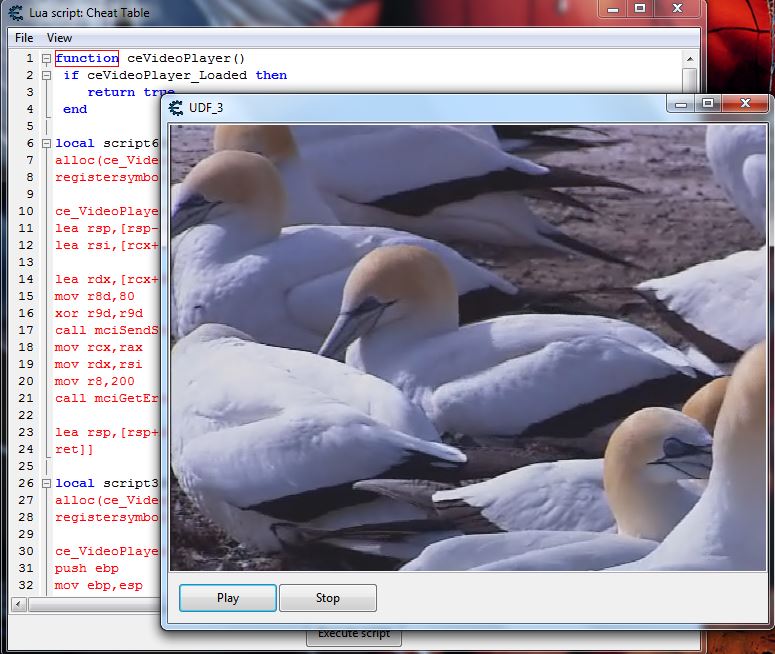
Finally, this one is going to work.
| Code: | function ceVideoPlayer()
if ceVideoPlayer_Loaded then
return true
end
local script64bit=[[loadlibrary(C:\Windows\System32\winmm.dll) -- or loadlibrary(C:\Windows\SysWOW64\winmm.dll)
alloc(ce_VideoPlayer,4096)
registersymbol(ce_VideoPlayer)
ce_VideoPlayer:
lea rsp,[rsp-28]
lea rsi,[rcx+400]
lea rdx,[rcx+300]
mov r8d,80
xor r9d,r9d
call mciSendStringW
mov rcx,rax
mov rdx,rsi
mov r8,200
call mciGetErrorStringW
lea rsp,[rsp+28]
ret]]
local script32bit=[[loadlibrary(C:\Windows\System32\winmm.dll)
alloc(ce_VideoPlayer,4096)
registersymbol(ce_VideoPlayer)
ce_VideoPlayer:
push ebp
mov ebp,esp
push ebx
mov ebx,[ebp+8]
sub esp,10
mov [esp],ebx
lea ebx,[ebx+300]
mov [esp+4],ebx
mov [esp+8],80
mov [esp+c],0
call mciSendStringW
mov ebx,[ebp+8]
lea ebx,[ebx+400]
sub esp,0c
mov [esp],eax
mov [esp+0x4],ebx
mov [esp+0x8],200
call mciGetErrorStringW
pop ebx
leave
ret 004]]
if cheatEngineIs64Bit() then script = script64bit else script = script32bit end
if autoAssemble(script,true) then
ceVideoPlayer_Loaded=true
msPlayerCommand=createMemoryStream()
msPlayerCommand.Size=2048
return true
else
return false
end
end
function mciSendString(Command)
writeStringLocal(msPlayerCommand.Memory, Command, true);
writeBytesLocal (msPlayerCommand.Memory+2*#Command, 0, 0);
executeCodeLocal('ce_VideoPlayer',msPlayerCommand.Memory);
return readStringLocal(msPlayerCommand.Memory+1024,512,true),
readStringLocal(msPlayerCommand.Memory+768,128,true)
end
local filename = "E:\\Wildlife.wmv" --- change to the video path here
local retVal = 0
function button1_click(sender)
if not ceVideoPlayer() then return end
filename = string.char(34)..filename..string.char(34)
retVal = mciSendString("open "..filename.." type mpegvideo alias movie parent "..tonumber(panel1.handle).." style child", "", 0, 0)
retVal = mciSendString("play movie", "", 0, 0)
end
function button2_click(sender)
if not ceVideoPlayer() then return end
retVal = mciSendString("stop movie", "", 0, 0)
retVal = mciSendString("close movie", "", 0, 0)
end
function form1_FormClosed(sender)
if not ceVideoPlayer() then return end
retVal = mciSendString("close movie", "", 0, 0)
end
----
if form then form.destroy() end
form = createForm()
form.setSize(600,500)
form.BorderStyle = 'bsSizeable'
panel1 = createPanel(form)
panel1.Width = 600
panel1.Height = 450
panel1.BorderStyle = 'bsSingle'
button1 = createButton(form)
button1.setPosition(10, 460)
button1.setSize(100,30)
button1.Caption = 'Play'
button2 = createButton(form)
button2.setPosition(110, 460)
button2.setSize(100,30)
button2.Caption = 'Stop'
form.Show()
button1.OnCLick = button1_click
button2.OnCLick = button2_click |
Note :
1. Not yet try to play MP4 video. I think need FFCodec and according to the windows version
2. Meanwhile only play AVI and WMV video format.
3. The video play inside the panel boundaries, so need to write code for video window size according to form re-size
Maybe someone able to add the function for video window size adjusts to form size, right?
| Description: |
|
| Filesize: |
98.42 KB |
| Viewed: |
2189 Time(s) |
|
_________________
Stealing Code From Stolen Code...
And Admit It.. Hmmm....Typically LOL |
|
| Back to top |
|
|
|
|
You cannot post new topics in this forum
You cannot reply to topics in this forum
You cannot edit your posts in this forum
You cannot delete your posts in this forum
You cannot vote in polls in this forum
You cannot attach files in this forum
You can download files in this forum
|
|
 FAQ
FAQ Search
 Memberlist
 Usergroups
 Register
 Profile
 Log in to check your private messages
 Log in


