| View previous topic :: View next topic |
| Author |
Message |
Myriad453
Newbie cheater
![]() Reputation: 0 Reputation: 0
Joined: 09 May 2019
Posts: 15
|
 Posted: Fri May 10, 2019 8:16 pm Post subject: How do I copy text in memory viewer? Posted: Fri May 10, 2019 8:16 pm Post subject: How do I copy text in memory viewer? |
 |
|
I've been trying for several days to copy text in the Memory Viewer as actual text instead of numbers, and all the topics before don't seem to work - one used the attached lua code, but that just returns a "getn" value of nil as an error. I can't seem to work it out.
| Description: |
|

Download |
| Filename: |
copytoclipboardastext.lua |
| Filesize: |
556 Bytes |
| Downloaded: |
226 Time(s) |
|
|
| Back to top |
|
 |
Dark Byte
Site Admin
 Reputation: 472 Reputation: 472
Joined: 09 May 2003
Posts: 25875
Location: The netherlands
|
| Posted: Sat May 11, 2019 12:48 am Post subject: |
|
|
show a screenshot of your selection
Does your selection go through unallocated memory?
_________________
Do not ask me about online cheats. I don't know any and wont help finding them.
Like my help? Join me on Patreon so i can keep helping |
|
| Back to top |
|
|
Myriad453
Newbie cheater
![]() Reputation: 0 Reputation: 0
Joined: 09 May 2019
Posts: 15
|
| Posted: Sat May 11, 2019 3:06 pm Post subject: |
|
|
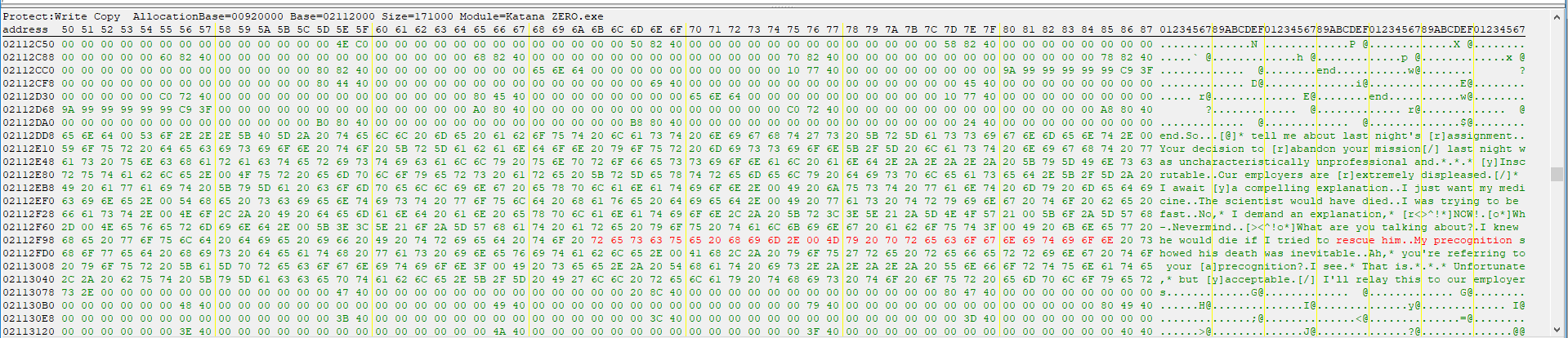
Here's my selection, note that I'm a complete noob so I'm so sorry that I don't understand anything
| Description: |
|
| Filesize: |
91.08 KB |
| Viewed: |
5688 Time(s) |
|
|
|
| Back to top |
|
|
Dark Byte
Site Admin
Reputation: 472
Joined: 09 May 2003
Posts: 25875
Location: The netherlands
|
| Posted: Sat May 11, 2019 3:33 pm Post subject: |
|
|
hold shift and rightclick and then choose "Copy as text to clipboard" and it should copy to clipboard then
make sure your ce version isn't too old though
_________________
Do not ask me about online cheats. I don't know any and wont help finding them.
Like my help? Join me on Patreon so i can keep helping |
|
| Back to top |
|
|
Myriad453
Newbie cheater
![]() Reputation: 0 Reputation: 0
Joined: 09 May 2019
Posts: 15
|
| Posted: Sat May 11, 2019 5:07 pm Post subject: |
|
|
| It still returns the same error, I'm on the latest version of CE.
|
|
| Back to top |
|
|
Corroder
Grandmaster Cheater Supreme
 Reputation: 75 Reputation: 75
Joined: 10 Apr 2015
Posts: 1668
|
| Posted: Sat May 11, 2019 10:07 pm Post subject: |
|
|
| Myriad453 wrote: | | It still returns the same error, I'm on the latest version of CE. |
Did you try as DB said?. Hold shift and right click and copy to clipboard.
Then open your notepad, paste there.
If you follow DB said and still get errors then it's better if you show or tell what kind of errors you got.
_________________
Stealing Code From Stolen Code...
And Admit It.. Hmmm....Typically LOL |
|
| Back to top |
|
|
Myriad453
Newbie cheater
![]() Reputation: 0 Reputation: 0
Joined: 09 May 2019
Posts: 15
|
| Posted: Sun May 12, 2019 1:22 pm Post subject: |
|
|
| I did as DB said, holding shift and right clicking, and as I said I still got the same error as I had originally, "Error:...les\Cheat Engine 6.8.3\autorun\copytoclipboardastext.lua:9: attempt to call a nil value (field 'getn')"
|
|
| Back to top |
|
|
Corroder
Grandmaster Cheater Supreme
Reputation: 75
Joined: 10 Apr 2015
Posts: 1668
|
| Posted: Sun May 12, 2019 8:18 pm Post subject: |
|
|
| Code: | hexView=getMemoryViewForm().HexadecimalView
m=hexView.PopupMenu
mi=createMenuItem(m)
mi.Caption="Copy as text to clipboard"
mi.Shortcut="Ctrl+Alt+C"
mi.OnClick=function(sender)
if hexView.HasSelection then
local bytes=readBytes(hexView.SelectionStart, hexView.SelectionStop-hexView.SelectionStart+1,true)
local s=byteTableToString(bytes)
writeToClipboard(s)
end
end
m.items.insert(5,mi) |
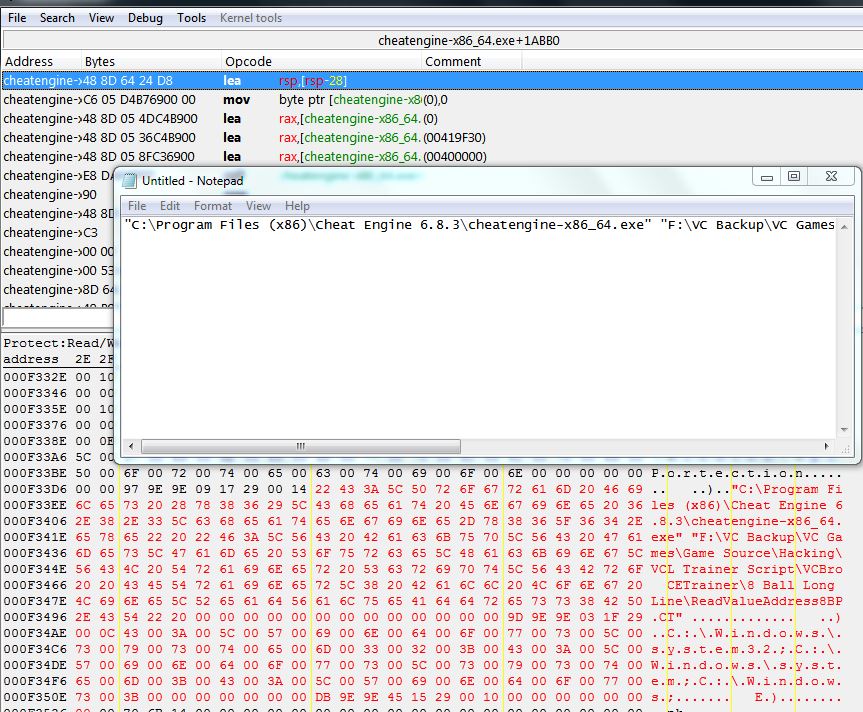
1. Delete your copytoclipboardastext.lua from cheat engine autorun folder (make a copy first)
2. Copy and paste the code above and save as a lua file. i.e : blablabla.lua
3. Put blablabla.lua to folder autorun cheat engine
4. Start your CE, open process, open memory view, select memory you want to copy
5. Click Tool menu and click 'Copy as text to clipboard'
6. Open notepad and paste there
| Description: |
|
| Filesize: |
188.95 KB |
| Viewed: |
5631 Time(s) |
|
_________________
Stealing Code From Stolen Code...
And Admit It.. Hmmm....Typically LOL |
|
| Back to top |
|
|
Myriad453
Newbie cheater
![]() Reputation: 0 Reputation: 0
Joined: 09 May 2019
Posts: 15
|
| Posted: Sun May 12, 2019 9:20 pm Post subject: |
|
|
| Thank you! That works.
|
|
| Back to top |
|
|
Myriad453
Newbie cheater
![]() Reputation: 0 Reputation: 0
Joined: 09 May 2019
Posts: 15
|
| Posted: Sat May 18, 2019 5:13 pm Post subject: |
|
|
| Checking back - This only copies up to where two periods (..) appear in the text I'm trying to copy. I'd prefer to mass copy large paragraphs, because I really don't want to copy over by hand.
|
|
| Back to top |
|
|
TheyCallMeTim13
Wiki Contributor
 Reputation: 51 Reputation: 51
Joined: 24 Feb 2017
Posts: 976
Location: Pluto
|
| Posted: Sat May 18, 2019 6:53 pm Post subject: |
|
|
| Myriad453 wrote: | | Checking back - This only copies up to where two periods (..) appear in the text I'm trying to copy. I'd prefer to mass copy large paragraphs, because I really don't want to copy over by hand. |
Those are zeroed bytes (Null), they're Null terminated strings. It's just the way strings are stored and read on computers in most cases.
https://en.wikipedia.org/wiki/Null-terminated_string
_________________
|
|
| Back to top |
|
|
Corroder
Grandmaster Cheater Supreme
Reputation: 75
Joined: 10 Apr 2015
Posts: 1668
|
| Posted: Tue May 21, 2019 1:55 am Post subject: |
|
|
Since table.getn has changed to #table on Lua 5.3, then try using this script below, save as a Lua file and put on CE autorun folder.
| Code: | hexView=getMemoryViewForm().HexadecimalView
m=hexView.PopupMenu
mi=createMenuItem(m)
mi.Caption="Copy as text to clipboard"
mi.Shortcut="Ctrl+Alt+C"
mi.OnClick=function(sender)
if hexView.HasSelection then
local bytes=readBytes(hexView.SelectionStart, hexView.SelectionStop-hexView.SelectionStart+1,true)
for i=1,#bytes do
if (bytes[i] < 31) then
bytes[i] = 46
elseif (bytes[i] >= 128) then
bytes[i] = 32
end
end
local s=byteTableToString(bytes)
writeToClipboard(s)
end
end
m.items.insert(5,mi) |
_________________
Stealing Code From Stolen Code...
And Admit It.. Hmmm....Typically LOL |
|
| Back to top |
|
|
Myriad453
Newbie cheater
![]() Reputation: 0 Reputation: 0
Joined: 09 May 2019
Posts: 15
|
| Posted: Fri May 24, 2019 11:39 pm Post subject: |
|
|
| That worked perfectly! Thanks for the help.
|
|
| Back to top |
|
|
|

 FAQ
FAQ Search
 Memberlist
 Usergroups
 Register
 Profile
 Log in to check your private messages
 Log in


