| View previous topic :: View next topic |
| Author |
Message |
ileandros
Newbie cheater
![]() Reputation: 0 Reputation: 0
Joined: 02 Oct 2012
Posts: 17
|
 Posted: Thu May 23, 2013 8:40 pm Post subject: Memory Read RGC Posted: Thu May 23, 2013 8:40 pm Post subject: Memory Read RGC |
 |
|
Hello,
Can anyone help me get the memory of the chat of the RGC?
Since i can't post url's yet please check it on google.
The Client doesnt requir any installations and its only 20mb size so please take a look someone who has nothing to do and he is booring 
Thanks in advance
|
|
| Back to top |
|
 |
jucce
Advanced Cheater
![]() Reputation: 1 Reputation: 1
Joined: 02 Apr 2013
Posts: 99
|
| Posted: Fri May 24, 2013 4:24 am Post subject: |
|
|
| What if you just search for the latest typed string in Cheat Engine and then look at that memory region? You can also look at "what accesses this address" to try and find the code that triggers updates of the chat.
|
|
| Back to top |
|
|
ileandros
Newbie cheater
![]() Reputation: 0 Reputation: 0
Joined: 02 Oct 2012
Posts: 17
|
| Posted: Fri May 24, 2013 6:22 am Post subject: |
|
|
| jucce wrote: | | What if you just search for the latest typed string in Cheat Engine and then look at that memory region? You can also look at "what accesses this address" to try and find the code that triggers updates of the chat. |
I searched for a text from the chat and found it. But when i check what accesses this address nothing happens since it is not a changing value.
I had used cheat engine years ago when i made a trainer for a game.
Don't remember it very well.
|
|
| Back to top |
|
|
jucce
Advanced Cheater
![]() Reputation: 1 Reputation: 1
Joined: 02 Apr 2013
Posts: 99
|
| Posted: Sat May 25, 2013 11:46 am Post subject: |
|
|
Okay, try this. Find the addresses for the latest 10 lines of chat text. Then see if you can find a pattern in the memory locations or pointers to the locations. If that is possible you can predict the address of the next line to be added. Then manually add that address and do "what accesses this address", when the next chat message comes you should see the originating code.
Also try taking a look at the memory region where you are finding the strings from the chat, it is likely that they will be grouped together.
Could you explain what the end goal is, what are you trying to accomplish?
|
|
| Back to top |
|
|
ileandros
Newbie cheater
![]() Reputation: 0 Reputation: 0
Joined: 02 Oct 2012
Posts: 17
|
| Posted: Sat May 25, 2013 6:53 pm Post subject: |
|
|
| jucce wrote: | Okay, try this. Find the addresses for the latest 10 lines of chat text. Then see if you can find a pattern in the memory locations or pointers to the locations.
|
Tried it.
Can't find any patterns or pointers. The problem is that even if i find the string in the memory when i try what accesses this addres it gives nothing even when chat keeps changing.
| jucce wrote: | | Could you explain what the end goal is, what are you trying to accomplish? |
Yes of course, i am just trying to read the chat. I am trying to do this because a friend who is a GM in that client asked me if it is possible to read the chat. And from my side i want to do this as an exercise.
If i find the memories then i will code it and do a filewrite of the chat or even appear it in a message box.
Have you tried the client? If you have free time and nothing to do (hope so) then download it and try it. It requier no installations. Just extract it in a crappy folder, test it and then delete it.
Do a RGC download search on google and you will find it easy, since i can't post link yet.
|
|
| Back to top |
|
|
ileandros
Newbie cheater
![]() Reputation: 0 Reputation: 0
Joined: 02 Oct 2012
Posts: 17
|
| Posted: Mon May 27, 2013 5:55 pm Post subject: |
|
|
Anyone else wanna do the dirty job???
Give me a hand guys, i see these forums are pretty active...
|
|
| Back to top |
|
|
jucce
Advanced Cheater
![]() Reputation: 1 Reputation: 1
Joined: 02 Apr 2013
Posts: 99
|
| Posted: Mon May 27, 2013 6:14 pm Post subject: |
|
|
Okay so I tried downloading the client. First of all scan with Unicode checked since that gives better results.
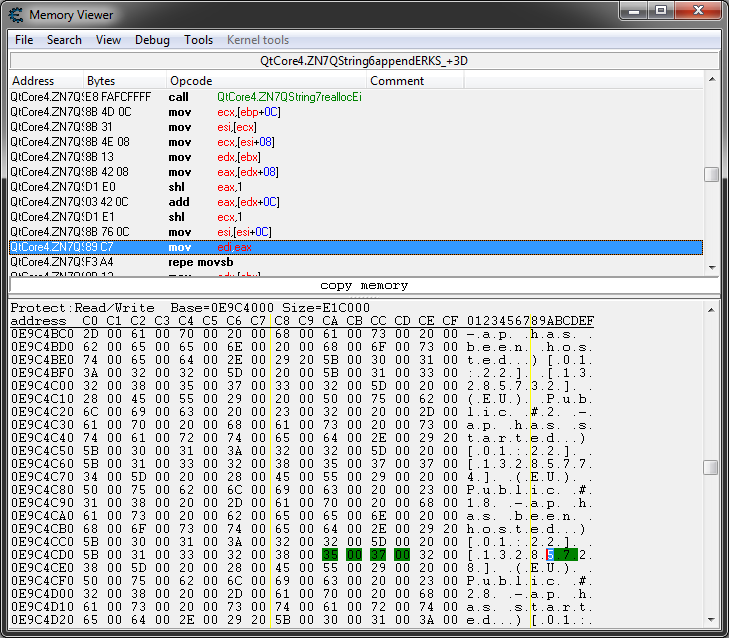
I did manage to find a range of memory where the chat text is located and indeed if I observe that memory range in the memory viewer I can see the new lines being added at the end. When you see that it is possible to add a memory location that you know is going to be written to shortly and monitor it for writes. When doing that I typically see it using functions such as QtCore4.ZN7QString6appendERKS_+3D or QtCore4.ZN7QString7reallocEi. See the image for what I find writes the new text lines. So if you can rewrite the code near that location or hook the string handling functions in QtCore4.dll that should be a good start.
The location of the chat text moves in memory. It is also possible to find it and then simply read the strings in that area. The chat text has a fixed format starting with [XX:XX] too which helps with parsing.
Another way is to observe the incoming network traffic since it is sent in clear text and the chat messages can be observed in the incoming TCP packets.
| Description: |
| RGC Memory Viewer Screenshot. |
|
| Filesize: |
52.9 KB |
| Viewed: |
10129 Time(s) |
|
|
|
| Back to top |
|
|
ileandros
Newbie cheater
![]() Reputation: 0 Reputation: 0
Joined: 02 Oct 2012
Posts: 17
|
| Posted: Tue May 28, 2013 12:35 pm Post subject: |
|
|
| jucce wrote: | Okay so I tried downloading the client. First of all scan with Unicode checked since that gives better results.
I did manage to find a range of memory where the chat text is located and indeed if I observe that memory range in the memory viewer I can see the new lines being added at the end. When you see that it is possible to add a memory location that you know is going to be written to shortly and monitor it for writes. When doing that I typically see it using functions such as QtCore4.ZN7QString6appendERKS_+3D or QtCore4.ZN7QString7reallocEi. See the image for what I find writes the new text lines. So if you can rewrite the code near that location or hook the string handling functions in QtCore4.dll that should be a good start.
The location of the chat text moves in memory. It is also possible to find it and then simply read the strings in that area. The chat text has a fixed format starting with [XX:XX] too which helps with parsing.
Another way is to observe the incoming network traffic since it is sent in clear text and the chat messages can be observed in the incoming TCP packets. |
Ok slow down there partner. You did managed it. But how.
I am a begginer here. Haven't used so many times cheat engine.
I tried enabling unicodes since it gives better resaults but still i can't manage to get where you got.
How do i get to where you are...??? That pic of memory view shows me things i never see while i try. Btw don't know if i mentioned it before, i am using cheat engine 6.1 if this makes big difference
Edti: How can i find patterns to memory locations or even pointers with cheat engine. No idea here.
I have never used QtCore4.dll so it is not gonna be easy. But this is an other part
|
|
| Back to top |
|
|
jucce
Advanced Cheater
![]() Reputation: 1 Reputation: 1
Joined: 02 Apr 2013
Posts: 99
|
| Posted: Tue May 28, 2013 2:06 pm Post subject: |
|
|
Try to replicate this:
1. Start RGC and wait for people to write stuff in the chat.
2. Search for a word or part of what someone else wrote in the chat a while ago (not the latest). Choose some normal text written by a user, not a status message or some weird characters people post.
3. Now hopefully you will get one result, right click this and choose "Browse this memory region". Scroll down until you see the end of the strings from the chat and start seeing other nonsense data. Now you should see the end of the string section blink red from time to time when new lines are being added.
4. Right click below this area where you know new lines will be added in a while. Select "Add this address to the list".
5. Now in the main window right click the address you added in step 4 and choose "Find out what writes to this address".
6. Wait for the red lines being written to reach the address you are watching.
7. You should now have the assembler code and memory location from where new strings are written.
8. At this point try hooking the functions, injecting code or reading the pointer to the string being added.
However when doing these steps you need to be fast and also lucky. The reason is that the chat text is sometimes reallocated and will therefore jump away, not writing to the address you are monitoring. So when choosing an address choose it close enough for it to reach but not too close since you won't have time to start the "what writes to this address".
Try those steps and tell me how it went.
|
|
| Back to top |
|
|
ileandros
Newbie cheater
![]() Reputation: 0 Reputation: 0
Joined: 02 Oct 2012
Posts: 17
|
| Posted: Tue May 28, 2013 4:06 pm Post subject: |
|
|
| jucce wrote: | Try to replicate this:
1. Start RGC and wait for people to write stuff in the chat.
2. Search for a word or part of what someone else wrote in the chat a while ago (not the latest). Choose some normal text written by a user, not a status message or some weird characters people post.
3. Now hopefully you will get one result, right click this and choose "Browse this memory region". Scroll down until you see the end of the strings from the chat and start seeing other nonsense data. Now you should see the end of the string section blink red from time to time when new lines are being added.
4. Right click below this area where you know new lines will be added in a while. Select "Add this address to the list".
5. Now in the main window right click the address you added in step 4 and choose "Find out what writes to this address".
6. Wait for the red lines being written to reach the address you are watching.
7. You should now have the assembler code and memory location from where new strings are written.
8. At this point try hooking the functions, injecting code or reading the pointer to the string being added.
However when doing these steps you need to be fast and also lucky. The reason is that the chat text is sometimes reallocated and will therefore jump away, not writing to the address you are monitoring. So when choosing an address choose it close enough for it to reach but not too close since you won't have time to start the "what writes to this address".
Try those steps and tell me how it went. |
I got this.
img819.imageshack.us/img819/8696/25996470.png
Can't post link yet. Just add http.
Edit: To hook it or write a code on it i need a static addres, i think is a dynamic
|
|
| Back to top |
|
|
jucce
Advanced Cheater
![]() Reputation: 1 Reputation: 1
Joined: 02 Apr 2013
Posts: 99
|
| Posted: Wed May 29, 2013 2:40 pm Post subject: |
|
|
| ileandros wrote: | | jucce wrote: | Try to replicate this:
1. Start RGC and wait for people to write stuff in the chat.
2. Search for a word or part of what someone else wrote in the chat a while ago (not the latest). Choose some normal text written by a user, not a status message or some weird characters people post.
3. Now hopefully you will get one result, right click this and choose "Browse this memory region". Scroll down until you see the end of the strings from the chat and start seeing other nonsense data. Now you should see the end of the string section blink red from time to time when new lines are being added.
4. Right click below this area where you know new lines will be added in a while. Select "Add this address to the list".
5. Now in the main window right click the address you added in step 4 and choose "Find out what writes to this address".
6. Wait for the red lines being written to reach the address you are watching.
7. You should now have the assembler code and memory location from where new strings are written.
8. At this point try hooking the functions, injecting code or reading the pointer to the string being added.
However when doing these steps you need to be fast and also lucky. The reason is that the chat text is sometimes reallocated and will therefore jump away, not writing to the address you are monitoring. So when choosing an address choose it close enough for it to reach but not too close since you won't have time to start the "what writes to this address".
Try those steps and tell me how it went. |
I got this.
img819.imageshack.us/img819/8696/25996470.png
Can't post link yet. Just add http.
Edit: To hook it or write a code on it i need a static addres, i think is a dynamic |
Yes that's the same as what I found too. Now you have several options, one is to get the pointer to the string being copied into the memory region, which should be the latest chat entry (although this function may be used for other strings than just the chat strings too). Another alternative is too try and hook the function in the QtCore4.dll. For that you should read up on function hooking. I believe you can use Cheat Engine for that but you can also make a wrapper for the actual dll files without caring much about specific memory locations since you now know which function is being used.
Also perhaps again consider looking at the network traffic or trying to limit the range you need to scan in the memory and then doing a more brute force approach searching for strings starting with [..:..]. There are several ways to proceed I guess try doing the easiest one or the one that focuses on areas you want to learn more about.
|
|
| Back to top |
|
|
|

 FAQ
FAQ Search
 Memberlist
 Usergroups
 Register
 Profile
 Log in to check your private messages
 Log in


