| View previous topic :: View next topic |
| Author |
Message |
Saya
Master Cheater
 Reputation: 6 Reputation: 6
Joined: 11 Feb 2008
Posts: 395
|
 Posted: Wed Sep 16, 2009 3:41 pm Post subject: Msn Making CPU Usage Go High. Posted: Wed Sep 16, 2009 3:41 pm Post subject: Msn Making CPU Usage Go High. |
 |
|
Whenever I use Windows Live Messenger my CPU usage goes up to 100% pretty much all the time.
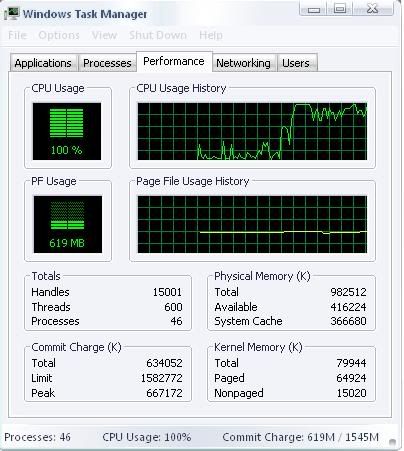
I know it's Msn because after closing Msn my CPU usage goes down again.
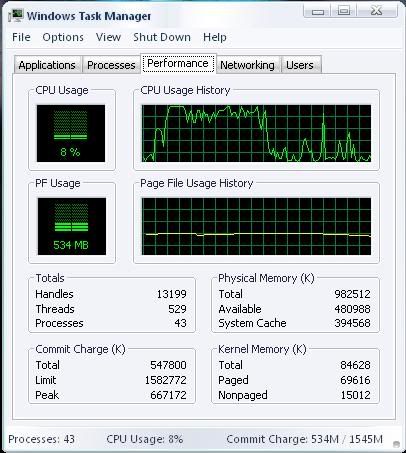
This hasn't always happend before in the previous months.
|
|
| Back to top |
|
 |
SF
I'm a spammer
 Reputation: 119 Reputation: 119
Joined: 19 Mar 2007
Posts: 6028
|
| Posted: Wed Sep 16, 2009 3:41 pm Post subject: |
|
|
Click 'Processes' and tell us the process name that's causing the high load.
_________________
|
|
| Back to top |
|
|
Saya
Master Cheater
Reputation: 6
Joined: 11 Feb 2008
Posts: 395
|
| Posted: Wed Sep 16, 2009 3:46 pm Post subject: |
|
|
| msnmsgr.exe
|
|
| Back to top |
|
|
&Vage
Grandmaster Cheater Supreme
![]() Reputation: 0 Reputation: 0
Joined: 25 Jul 2008
Posts: 1053
|
|
| Back to top |
|
|
Saya
Master Cheater
Reputation: 6
Joined: 11 Feb 2008
Posts: 395
|
| Posted: Wed Sep 16, 2009 5:36 pm Post subject: |
|
|
| Talix wrote: | | void:] wrote: | | http://www.pidgin.im/ |
Doesn't support everything that 8.1.0178 does.
8.1.0178 > pidgin |
This.
I'm using Trillian at the moment since it hardly lags me like Msn does.
|
|
| Back to top |
|
|
iTz SWAT
I post too much
 Reputation: 1 Reputation: 1
Joined: 20 Dec 2007
Posts: 2227
Location: Me.Location;
|
| Posted: Thu Sep 17, 2009 12:33 am Post subject: |
|
|
I actually like the latest Windows Live Messenger... I'm running 14.0.8089.726 and I haven't received a single problem yet...
I'm running Windows 7 x64 Bit and It's only using 4,818K Ram, you must have one shitty ass PC if your games lag with an extra 5MB of ram usage... I wouldn't blame WLM for that...
And about the ad at the bottom of the Main Window , I have had that ad from a long time ago...
In fact, I don't remember ever not seeing that ad on WLM...
I for one like the new "Transformation". It looks quite nice to me...
I haven't tried customizing WLM because I find it great the way it is...
I have only ever had 1 problem in my life with WLM/MSN, my microphone wasn't working with it for some odd reason but when I tried my other one it worked fine...
Try re-installing WLM and see if the problem persists..
_________________
|
|
| Back to top |
|
|
Anden100
Grandmaster Cheater
![]() Reputation: 0 Reputation: 0
Joined: 20 Apr 2007
Posts: 668
|
| Posted: Thu Sep 17, 2009 12:38 am Post subject: |
|
|
| void:] wrote: | | http://www.pidgin.im/ |
agreed, it handles multiple accounts, how i love it 
|
|
| Back to top |
|
|
Cheat Engine User
Something epic
![]() Reputation: 60 Reputation: 60
Joined: 22 Jun 2007
Posts: 2071
|
|
| Back to top |
|
|
Saya
Master Cheater
Reputation: 6
Joined: 11 Feb 2008
Posts: 395
|
| Posted: Thu Sep 17, 2009 2:48 pm Post subject: |
|
|
| iTz SWAT wrote: | I actually like the latest Windows Live Messenger... I'm running 14.0.8089.726 and I haven't received a single problem yet...
I'm running Windows 7 x64 Bit and It's only using 4,818K Ram, you must have one shitty ass PC if your games lag with an extra 5MB of ram usage... I wouldn't blame WLM for that...
And about the ad at the bottom of the Main Window , I have had that ad from a long time ago...
In fact, I don't remember ever not seeing that ad on WLM...
I for one like the new "Transformation". It looks quite nice to me...
I haven't tried customizing WLM because I find it great the way it is...
I have only ever had 1 problem in my life with WLM/MSN, my microphone wasn't working with it for some odd reason but when I tried my other one it worked fine...
Try re-installing WLM and see if the problem persists.. |
I've already done that 2 times.
|
|
| Back to top |
|
|
Fantasy
I post too much
![]() Reputation: 13 Reputation: 13
Joined: 29 Jul 2007
Posts: 3113
|
| Posted: Thu Sep 17, 2009 2:55 pm Post subject: |
|
|
| It's really really lame that they force you to use the newest version. Anyhow, the best thing to do is either to shut it down while not gaming, or anything else .. But IMO you should go with an alternate IM software, like pidgin. Pidgin lacks of many features, but runs smoothly, and you can still talk with your friends :]
|
|
| Back to top |
|
|
iTz SWAT
I post too much
Reputation: 1
Joined: 20 Dec 2007
Posts: 2227
Location: Me.Location;
|
| Posted: Thu Sep 17, 2009 2:58 pm Post subject: |
|
|
Download and install CCleaner. Once installed, run it as administrator and in the Cleaner Tab, click Analyze, wait a few seconds and then click Run Clean once Analization has completed...
Then go to Tools > Uninstall.
Then select Windows Live Messenger from the list and click Run Uninstaller from the 3 buttons at the right.
Once uninstalled go back and do another Analyze and Run Cleaner.
Then go to the Registry Tab and Scan For Issues and then Fix Selected Issues... Clean the registry twice because sometimes it skips one or two entries... After all of that exit CCleaner and go to C:\Program Files\Windows Live\ and see if there's a Messenger folder, if so, Delete it... Restart PC.
Then download the Live Installer again and re-install...
_________________
|
|
| Back to top |
|
|
K, Alcohol
Expert Cheater
![]() Reputation: 0 Reputation: 0
Joined: 25 Mar 2009
Posts: 184
|
| Posted: Thu Sep 17, 2009 6:55 pm Post subject: |
|
|
| Anden100 wrote: | | void:] wrote: | | http://www.pidgin.im/ |
agreed, it handles multiple accounts, how i love it |
I use it too, awesome software.
|
|
| Back to top |
|
|
TeePain
How do I cheat?
![]() Reputation: 0 Reputation: 0
Joined: 17 Sep 2009
Posts: 7
|
| Posted: Thu Sep 17, 2009 7:40 pm Post subject: |
|
|
Be sure to always keep check of your system temperature.
Overheating may always slow down process speeds.
Clogging of dusts in GPU,CPU,Motherboard, and possibly fans prevents cold air from flowing in.
Misplacement of your Case/Computer may prevent air flow also.
The program I use to check temperature of my computer is called. PC Probe II.
Its made by Asus and you need to go to their home site to download it.
It is fully free and is amazing!
Try that for a start.
|
|
| Back to top |
|
|
iTz SWAT
I post too much
Reputation: 1
Joined: 20 Dec 2007
Posts: 2227
Location: Me.Location;
|
| Posted: Fri Sep 18, 2009 12:25 am Post subject: |
|
|
Fuck why do new people always say the stupidest things.
If you read above, you will see that his Processor runs at 100% ONLY WHEN WINDOWS LIVE MESSENGER IS RUNNING. Therefore we are safe to say it isn't dust that clogs up his CPU, unless dust magically teleports to the CPU Cooler once WLM opens, and when it closes it disappears, but I very highly doubt that...
_________________
|
|
| Back to top |
|
|
|

 FAQ
FAQ Search
 Memberlist
 Usergroups
 Register
 Profile
 Log in to check your private messages
 Log in


