 |
Cheat Engine
The Official Site of Cheat Engine
|
| View previous topic :: View next topic |
| Author |
Message |
Chase Payne
Grandmaster Cheater
 Reputation: 1 Reputation: 1
Joined: 20 Mar 2008
Posts: 533
|
 Posted: Sat May 17, 2008 2:01 am Post subject: HELP PInball script Posted: Sat May 17, 2008 2:01 am Post subject: HELP PInball script |
 |
|
| Code: | label(returnhere)
label(originalcode)
label(exit)
pinball.exe+175B7:
jmp pinball.exe+486c4
nop
returnhere:
pinball.exe+0122a9:
db 83 25 44 50 02 01 01 51 D9 1C
/*Makes the cpu think that you never died, and keeps godmode on
Also I don't know why it wont let me do a normal asm command, it always
crashes so I used array of bytes.*/
pinball.exe+486c4:
cmp eax,#0 //Check to see if you are dead
je pinball.exe+282a0 // If you are dead activate god mode, and ingore the ball decrease
jnb originalcode // If you are not dead decrease your ball
[code]pinball.exe+0122a9:
db 83 25 44 50 02 01 01 51 D9 1C [/code]
How do I make this only execute if I tell it too?
pinball.exe+282a0: // Activate God Mode
mov [pinball.exe+25044],#1
jmp returnhere
originalcode:
mov [esi+00000146],eax
exit:
jmp returnhere |
The problem is, it activates god mode regardless if your balls are 0
| Code: | pinball.exe+0122a9:
db 83 25 44 50 02 01 01 51 D9 1C |
How do I make this only execute if I tell it to?
|
|
| Back to top |
|
 |
Slugsnack
Grandmaster Cheater Supreme
![]() Reputation: 71 Reputation: 71
Joined: 24 Jan 2007
Posts: 1857
|
| Posted: Sat May 17, 2008 2:30 am Post subject: |
|
|
An option is to use GetKeyState or GetAsyncKeyState and call that:
http://msdn.microsoft.com/en-us/library/ms646301(VS.85).aspx
http://msdn.microsoft.com/en-us/library/ms646293(VS.85).aspx
Remember to push parameters/arguments in a reverse order as defined by STDCALL.
EAX will hold return value and you also will need to preserve ECX and EDX (put all 3 onto stack then pop them off after you're done).
If you need more help with that, I've already done this before so I can give you exact scripts.
|
|
| Back to top |
|
|
Chase Payne
Grandmaster Cheater
Reputation: 1
Joined: 20 Mar 2008
Posts: 533
|
| Posted: Sat May 17, 2008 3:29 am Post subject: |
|
|
Give me exact scripts with comments in then AA please, I dont know c++.
The get key thing is for regualr assembly right?
I will +rep
|
|
| Back to top |
|
|
Slugsnack
Grandmaster Cheater Supreme
![]() Reputation: 71 Reputation: 71
Joined: 24 Jan 2007
Posts: 1857
|
| Posted: Sat May 17, 2008 11:44 am Post subject: |
|
|
When I was testing out hotkeys, what I wanted was to make something that could stop score changing when I enabled hotkey. Pressing again disables the cheat and score change goes back to normal, and so on.
This is an outline of what I did:
- Find an instruction that is constantly accessed
- Find a codecave
- Patch instruction that is constantly accessed to your codecave
Alternatively, you could actually create your own thread but that's a tiny bit more complicated.
First of all, to find an instruction that was constantly accessed, I found the 'y' coordinate address in memory then attached debugger to find what wrote to that address. It turned out that it was:
| Code: | 1013A0B --> mov dword ptr ds:[esi+4],ecx
mov ecx,dword ptr ds:[eax+c]
mov dword ptr ds:[esi+8],ecx |
So the address of the constantly accessed instruction is 1013A0B.
Change this to jump to our codecave:
| Code: | 1013A0B:
jmp 1022330
nop |
1022330 is address of codecave and the NOP makes sure that the new instructions are the same number of bytes.
The following instructions have been overwritten:
| Code: | mov dword ptr ds:[esi+4],ecx
mov ecx,dword ptr ds:[eax+c] |
At the codecave, replace these instructions and write a little routine to check these two things:
1) Whether a certain hotkey has been pressed
2) If it has been pressed, shall we enable or disable the cheat ?
The cheat I want to do is to make the score not change anymore (NOP out the instruction writing to score). This is originally at:
| Code: | | 1013c98 --> 89 08 --> mov dword ptr ds:[eax],ecx |
To activate the cheat, we need to move the following bytes to this address:
That is, 2 bytes of NOPs. First of all though, we need to check if the certain hotkey has been pressed. I chose my hotkey as 'A' whose virtual key is 0x41. Before we do that though, note in the 80x86 stdcall convention EAX, ECX and EDX are designated for use. EAX holds the return value. So we need to take care of these 3 registers. Simple enough, push and pop 
| Code: | push ecx
push edx
push eax |
Now we can check for the hotkey:
| Code: | push 41
call GetAsyncKeyState |
Testing for whether return is true:
| Code: | test eax,eax
jnz alternative_routine |
This just means that if EAX returns true, then jump to the second check, else, return original values to the 3 registers used and jump back to original memory:
| Code: | pop eax
pop edx
pop ecx
jmp 1013a11 |
This is the second check now and where alternative_routine is. We need to check if the cheat is already enabled. To do this, I found 1 free byte a bit later on from our codecave and used it as a sort of set/clear byte. Whenever I enable the cheat, I set this byte to 01 and that way I can check whether it has been previously enabled. If yes, then I disable the cheat, and set the byte back to 00 and I can test for that again next time 
| Code: | cmp byte ptr ds:[102238b],1 ; 102238b is this free byte I describe above
je disable ; If the byte has been set by me then jump to the disable part of the code. Else.. |
If the byte is NOT equal to 1 (ie. cheat has not been enabled yet) then we need to enable the cheat. To enable the cheat, we need to write the bytes 90 90 at the score instruction virtual address (1013c98):
| Code: | mov ax,9090
mov word ptr ds:[1013c98],ax |
Set the free byte to 01 then return to original memory (remember to return register's to original value):
| Code: | mov byte ptr ds:[102238b],1
pop eax
pop edx
pop ecx
jmp 1013a11 |
And now we are at the disable section (should be 1022370 if you've done exactly as I have). This time we need to move the bytes 89 08 back into the instruction dealing with score (1013c98). Remember how the computer deals with memory values as little endians (I wrote a series of guides and information on this was included, PM me for the link since both links are censored). Therefore if we first move the bytes into AX then we need to move them in this order 08 89:
| Code: | mov ax,889
mov word ptr ds:[1013c98],ax |
Now change our free byte back to 0 to get ready for next time, replace registers and jump back to original memory:
| Code: | pop eax
pop edx
pop ecx
jmp 1013a11 |
A picture of the two places I patched. I actually did it in Olly since it's easier to follow register values, etc. but it'll take like half a minute to convert what I've done into an AA script
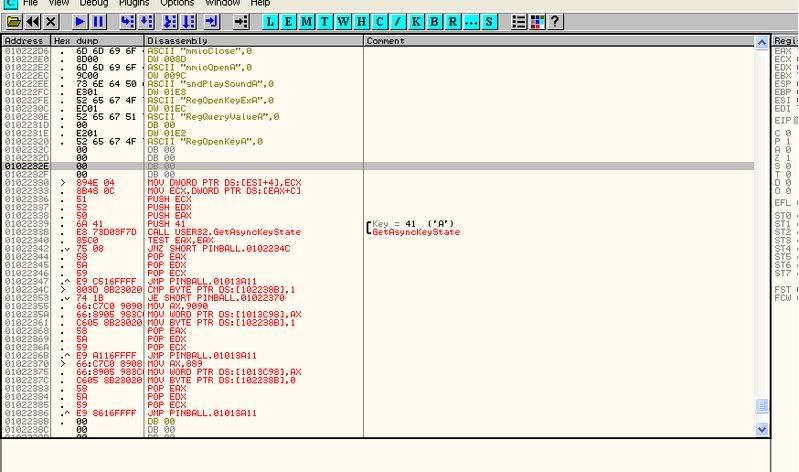

Btw, a few useful links:
MSDN GetAsyncKeyState function : http://msdn2.microsoft.com/en-us/library/ms646293(VS.85).aspx
MSDN Virtual-Key Codes : http://msdn2.microsoft.com/en-us/library/ms645540(VS.85).aspx
If you look at the virtual-key codes and the parameter required for GetAsyncKeyState you will be able to change what hotkey controls the toggling.
The "get key things" are WinAPIs.
|
|
| Back to top |
|
|
|
|
You cannot post new topics in this forum
You cannot reply to topics in this forum
You cannot edit your posts in this forum
You cannot delete your posts in this forum
You cannot vote in polls in this forum
You cannot attach files in this forum
You can download files in this forum
|
|
 FAQ
FAQ Search
 Memberlist
 Usergroups
 Register
 Profile
 Log in to check your private messages
 Log in


