| View previous topic :: View next topic |
| Author |
Message |
kitterz
Grandmaster Cheater Supreme
![]() Reputation: 0 Reputation: 0
Joined: 24 Dec 2007
Posts: 1268
|
 Posted: Sun Apr 13, 2008 4:39 pm Post subject: Last Question for awhile Posted: Sun Apr 13, 2008 4:39 pm Post subject: Last Question for awhile |
 |
|
| I have the source of this autoclicker....and I am wondering how I am supposed to compile it...I tried all sorts of things.
|
|
| Back to top |
|
 |
hcavolsdsadgadsg
I'm a spammer
![]() Reputation: 26 Reputation: 26
Joined: 11 Jun 2007
Posts: 5801
|
| Posted: Sun Apr 13, 2008 4:57 pm Post subject: |
|
|
| You open the solution then you build it.
|
|
| Back to top |
|
|
kitterz
Grandmaster Cheater Supreme
![]() Reputation: 0 Reputation: 0
Joined: 24 Dec 2007
Posts: 1268
|
| Posted: Sun Apr 13, 2008 5:21 pm Post subject: |
|
|
MAy I ask which is the solution file?
-NM-
|
|
| Back to top |
|
|
lurc
Grandmaster Cheater Supreme
 Reputation: 2 Reputation: 2
Joined: 13 Nov 2006
Posts: 1900
|
| Posted: Sun Apr 13, 2008 6:31 pm Post subject: |
|
|
If you have default extentions hidden put your Explorer view into Details and sort in Groups by type.
It will be under "Microsoft Visual Studio Solution"
Anyways, the extention is .sln
_________________
|
|
| Back to top |
|
|
4ng3licDew
Cheater
![]() Reputation: 0 Reputation: 0
Joined: 14 Feb 2008
Posts: 28
|
| Posted: Sun Apr 13, 2008 10:59 pm Post subject: |
|
|
@kitterz: I tried to reply your PM but I can't because I have not reach the number of posts quota.
So I will answer your question here. I used Microsoft Visual Studio C++ 6.0
So to compile AutoClickWin32, you need to:
1) Install Micorsoft Visual Studio 6.0
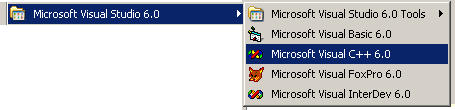
2) Start Microsoft Visual C++ 6.0
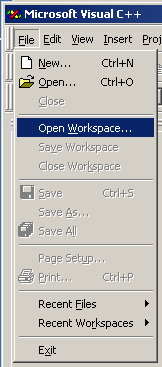
3) Click File/Open Workspace...
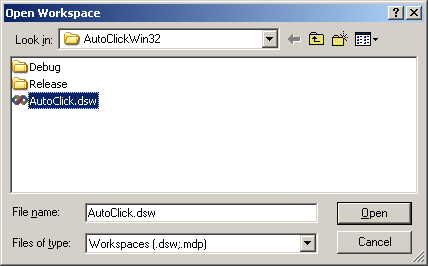
4) Navigate to where your AutoClickWin32 Folder is, and open file AutoClick.dsw
5) Click Build/Set Active Configuration...
6) Select AutoClick - Win32 Release, then click OK
7) Click Build/Build AutoClick.exe
The executable file AutoClick.exe should be in the Release folder (in the AutoClickWin32 folder)
Edit: Add pictures for clarity. I can only attach 3 files at a times. Please see next 2 posts for 4 more pictures.
Edit2: Forum doesn't allow me to post consecutive messages. 
| Description: |
| Start Microsoft Visual C++ 6.0 |
|
| Filesize: |
3.97 KB |
| Viewed: |
2796 Time(s) |
|
| Description: |
| Click File/Open Workspace... |
|
| Filesize: |
5.72 KB |
| Viewed: |
2796 Time(s) |
|
| Description: |
| Navigate to where your AutoClickWin32 folder is, and open file AutoClick.dsw |
|
| Filesize: |
9.43 KB |
| Viewed: |
2796 Time(s) |
|
|
|
| Back to top |
|
|
|

 FAQ
FAQ Search
 Memberlist
 Usergroups
 Register
 Profile
 Log in to check your private messages
 Log in


