| View previous topic :: View next topic |
| Author |
Message |
OSIRIS
Grandmaster Cheater
![]() Reputation: 0 Reputation: 0
Joined: 27 Aug 2006
Posts: 654
|
 Posted: Tue Mar 11, 2008 11:13 am Post subject: [VB2008 TUTORIAL PICTURE] How to crash a computer. Posted: Tue Mar 11, 2008 11:13 am Post subject: [VB2008 TUTORIAL PICTURE] How to crash a computer. |
 |
|
How to crash a computer.
While following this tutorial please make sure that you have saved all open documents and data files. As once you run this program you wont be able to save anything. And you must force your computer to restart. Restarting your computer will probably take double the amount of time.
This tutorial is for VB2008. To start off I just started to learn VB yesterday. It is actually a really simple language to learn and catch on to fast. Some people say that Visual Basic isnt as powerful as C++ or C# but I find it is. I haven't found one thing that C++ could do that I could with Visual Basic.
So start off my making a new Project. Goto file, new project, name it PC Crasher Ok. Now click once on form1 and go to the Text property change that to PC Crasher.
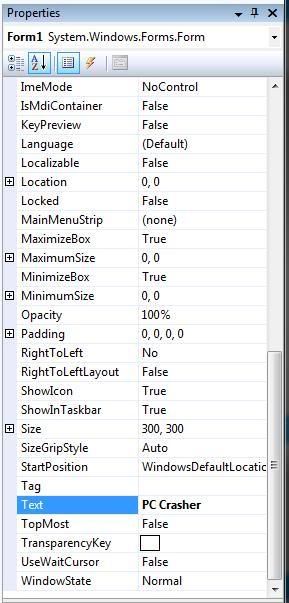
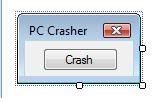
Drag a button onto form1 and change the Text property of it to Crash. Now click once on Form1 and in the property window change both MaximizeBox and MinimizeBox to False, now find and change ShowIcon to false also. Your form should now look something like this. If not resize the border and the button to make it fit nicely.
At the top goto Project, add Windows Form, and hit OK. A new window will appear dont do anything to it at all. Just find the tab Saying Form1.vb [Design] an click it.
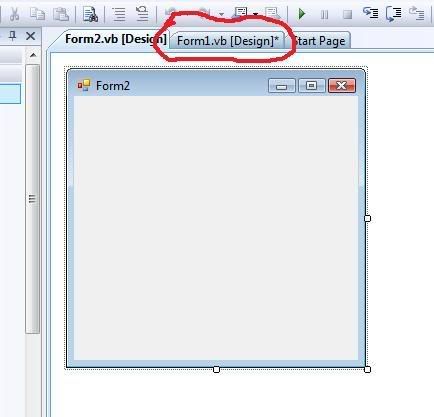
You should be back to the form that had the button saying crash. If so double click the button. You should be in a new window now saying
| Code: |
Public Class Form1
Private Sub Button1_Click(ByVal sender As System.Object, ByVal e As System.EventArgs) Handles Button1.Click
End Sub
End Class
|
In between
| Code: |
Private Sub Button1_Click(ByVal sender As System.Object, ByVal e As System.EventArgs) Handles Button1.Click
|
and
paste this code in there.
| Code: |
Dim i As Integer
i = 1
For i = 1 To 9999
Dim SecondForm As New Form2
SecondForm.Show()
Next i
|
Overall you code window should look EXACTLY like this.
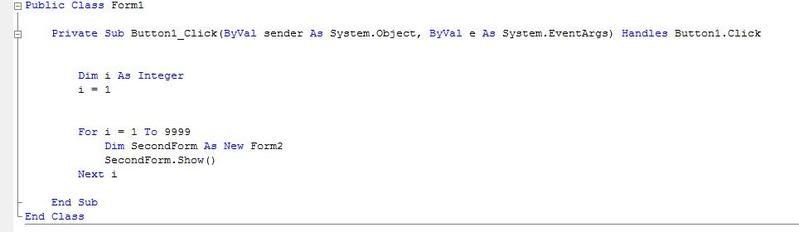
There were done congratulations. Now you would normally want to the find the .exe for your project so then you could run your new program. So now goto File, Save As. Remember where your saving it and hit ok. Now locate the folder where the project is saved in. There will be alot of crap in here. Just click on Bin, Debug, now there will be an application called PC Crasher.exe. You can now copy that to a memory stick? Put it on a CD? What ever you want because that program is now yours. If you had any problems understanding this , I have uploaded the source of mine. Just take a look at the code. |
|
| Back to top |
|
 |
Anden100
Grandmaster Cheater
![]() Reputation: 0 Reputation: 0
Joined: 20 Apr 2007
Posts: 668
|
| Posted: Tue Mar 11, 2008 11:16 am Post subject: |
|
|
i guess that will just execute the second form 9999 times?
well... i think my comp, would be able to take that O.o, could you please post your application, i wish to test it  , or is the application inside the source? , or is the application inside the source?
(i dont code VB myself, i prefer delphi, but i would be able to do the same in delphi...) |
|
| Back to top |
|
|
OSIRIS
Grandmaster Cheater
![]() Reputation: 0 Reputation: 0
Joined: 27 Aug 2006
Posts: 654
|
| Posted: Tue Mar 11, 2008 11:17 am Post subject: |
|
|
| Anden100 wrote: | i guess that will just execute the second form 9999 times?
well... i think my comp, would be able to take that O.o, could you please post your application, i wish to test it
(i dont code VB myself, i prefer delphi, but i would be able to do the same in delphi...) |
I thought my computer could take it, but it couldnt  |
|
| Back to top |
|
|
Anden100
Grandmaster Cheater
![]() Reputation: 0 Reputation: 0
Joined: 20 Apr 2007
Posts: 668
|
| Posted: Tue Mar 11, 2008 11:30 am Post subject: |
|
|
| mageknight wrote: | | Anden100 wrote: | i guess that will just execute the second form 9999 times?
well... i think my comp, would be able to take that O.o, could you please post your application, i wish to test it
(i dont code VB myself, i prefer delphi, but i would be able to do the same in delphi...) |
I thought my computer could take it, but it couldnt |
 , but once again, is the compiled application inside the source???, if not, could you then please post it to me, i wanna test , but once again, is the compiled application inside the source???, if not, could you then please post it to me, i wanna test |
|
| Back to top |
|
|
OSIRIS
Grandmaster Cheater
![]() Reputation: 0 Reputation: 0
Joined: 27 Aug 2006
Posts: 654
|
| Posted: Tue Mar 11, 2008 11:51 am Post subject: |
|
|
| Anden100 wrote: | | mageknight wrote: | | Anden100 wrote: | i guess that will just execute the second form 9999 times?
well... i think my comp, would be able to take that O.o, could you please post your application, i wish to test it
(i dont code VB myself, i prefer delphi, but i would be able to do the same in delphi...) |
I thought my computer could take it, but it couldnt |
, but once again, is the compiled application inside the source???, if not, could you then please post it to me, i wanna test |
Its in the .rar I uploaded. Just navigate to BIN>DEBUG: and it will in there called PC Crash.exe |
|
| Back to top |
|
|
madmunky
Newbie cheater
![]() Reputation: 0 Reputation: 0
Joined: 08 Mar 2008
Posts: 21
|
| Posted: Tue Mar 11, 2008 11:55 am Post subject: |
|
|
It didnt crash mine running vista x86 but did make it go slow till i killed it  |
|
| Back to top |
|
|
Anden100
Grandmaster Cheater
![]() Reputation: 0 Reputation: 0
Joined: 20 Apr 2007
Posts: 668
|
| Posted: Tue Mar 11, 2008 12:00 pm Post subject: |
|
|
ohh, nice
-tested:
No lagg at all, into the end, then it started lagg a bit, but then it gave an error and closed... |
|
| Back to top |
|
|
Cryoma
Member of the Year
![]() Reputation: 198 Reputation: 198
Joined: 14 Jan 2009
Posts: 1819
|
| Posted: Tue Mar 11, 2008 12:05 pm Post subject: |
|
|
| Doesn't work, just make a form that divides by zero. |
|
| Back to top |
|
|
OSIRIS
Grandmaster Cheater
![]() Reputation: 0 Reputation: 0
Joined: 27 Aug 2006
Posts: 654
|
| Posted: Tue Mar 11, 2008 12:09 pm Post subject: |
|
|
| madmunky wrote: | | It didnt crash mine running vista x86 but did make it go slow till i killed it |
How did you kill it? |
|
| Back to top |
|
|
Anden100
Grandmaster Cheater
![]() Reputation: 0 Reputation: 0
Joined: 20 Apr 2007
Posts: 668
|
| Posted: Tue Mar 11, 2008 12:11 pm Post subject: |
|
|
alt+f4 works O.o
or the process manager
you can also use process watch, and then kill it from there O.o |
|
| Back to top |
|
|
OSIRIS
Grandmaster Cheater
![]() Reputation: 0 Reputation: 0
Joined: 27 Aug 2006
Posts: 654
|
| Posted: Tue Mar 11, 2008 12:17 pm Post subject: |
|
|
| Anden100 wrote: | alt+f4 works O.o
or the process manager
you can also use process watch, and then kill it from there O.o |
I changed a few things in this one, try it out. 
http://forum.cheatengine.org/download.php?id=31595 |
|
| Back to top |
|
|
Anden100
Grandmaster Cheater
![]() Reputation: 0 Reputation: 0
Joined: 20 Apr 2007
Posts: 668
|
| Posted: Tue Mar 11, 2008 12:30 pm Post subject: |
|
|
| later on maybe, did you raise the count of forms to open? |
|
| Back to top |
|
|
OSIRIS
Grandmaster Cheater
![]() Reputation: 0 Reputation: 0
Joined: 27 Aug 2006
Posts: 654
|
| Posted: Tue Mar 11, 2008 12:33 pm Post subject: |
|
|
| Anden100 wrote: | | later on maybe, did you raise the count of forms to open? |
I raised it to 999999 and I made it so the forms will be Maximized when they open. I also removed the borders off of form2 and removed the exit button. So all you have is a white screen thats opening it self like 99999 times. |
|
| Back to top |
|
|
Anden100
Grandmaster Cheater
![]() Reputation: 0 Reputation: 0
Joined: 20 Apr 2007
Posts: 668
|
| Posted: Tue Mar 11, 2008 12:37 pm Post subject: |
|
|
| well.. that might make me crash... or i should just kill it with my process killer? |
|
| Back to top |
|
|
hcavolsdsadgadsg
I'm a spammer
![]() Reputation: 26 Reputation: 26
Joined: 11 Jun 2007
Posts: 5801
|
| Posted: Tue Mar 11, 2008 1:58 pm Post subject: |
|
|
| Cryoma wrote: | | Doesn't work, just make a form that divides by zero. |
This won't do anything.
By the way, stop making stupid shit already. |
|
| Back to top |
|
|
|

 FAQ
FAQ Search
 Memberlist
 Usergroups
 Register
 Profile
 Log in to check your private messages
 Log in


