| View previous topic :: View next topic |
| Author |
Message |
jason744
Grandmaster Cheater
 Reputation: 0 Reputation: 0
Joined: 25 Nov 2007
Posts: 638
|
 Posted: Mon Mar 10, 2008 1:20 pm Post subject: [VB2008]Adding buttons within program. Posted: Mon Mar 10, 2008 1:20 pm Post subject: [VB2008]Adding buttons within program. |
 |
|
First of all, don't tell me to use C++ or C# and stuff, since I'm working on that but not succeding 
Right, so I'm asking how you would add a button on to the program, after compiling.
Also, how you would link it to a program path using a textbox.
|
|
| Back to top |
|
 |
OSIRIS
Grandmaster Cheater
![]() Reputation: 0 Reputation: 0
Joined: 27 Aug 2006
Posts: 654
|
| Posted: Mon Mar 10, 2008 1:26 pm Post subject: |
|
|
1) Find where the button is located.
2) Drag it and Drop it onto and open space in the forum.
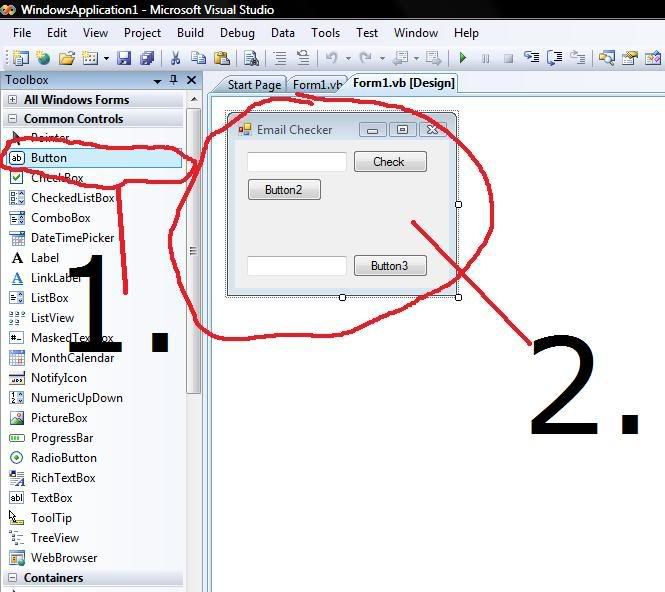
|
|
| Back to top |
|
|
AndrewMan
Grandmaster Cheater Supreme
![]() Reputation: 0 Reputation: 0
Joined: 01 Aug 2007
Posts: 1257
|
| Posted: Mon Mar 10, 2008 1:27 pm Post subject: |
|
|
| mageknight wrote: | 1) Find where the button is located.
2) Drag it and Drop it onto and open space in the forum.
|
Everyone is stealing my idea lol...
I'm working on an email checker for my app too 
_________________
|
|
| Back to top |
|
|
OSIRIS
Grandmaster Cheater
![]() Reputation: 0 Reputation: 0
Joined: 27 Aug 2006
Posts: 654
|
| Posted: Mon Mar 10, 2008 1:29 pm Post subject: |
|
|
Im already done mine.
1. Make your own sub
| Code: |
Private Sub email(ByVal FirstString)
Dim SecondString = "@"
Dim position = InStr(1, FirstString, SecondString)
If position = 0 Then
MsgBox("Not a Valid email address: There was No @ Sign")
End If
End Sub |
2. Make a button.
| Code: |
Dim FirstString = TextBox1.Text
Call email(FirstString)
|
|
|
| Back to top |
|
|
jason744
Grandmaster Cheater
Reputation: 0
Joined: 25 Nov 2007
Posts: 638
|
| Posted: Mon Mar 10, 2008 1:34 pm Post subject: |
|
|
You don't get it.
What I meant is adding a new button on to the Form After compilation.
So adding a button in the program it self. without VB.
And Andrewman I'm gonna try improving yours wether you like it or not. Yay?
|
|
| Back to top |
|
|
Symbol
I'm a spammer
![]() Reputation: 0 Reputation: 0
Joined: 18 Apr 2007
Posts: 5094
Location: Israel.
|
| Posted: Mon Mar 10, 2008 1:54 pm Post subject: |
|
|
He means dynamically, in run-time.
I don't know how to do that on VB though. 
If its .NET, it should be probably something like
<ControlName> Lol = new <ControlName>(); //Declare and create
Lol.Text = "bla.."; //Change text
this.Controls.Add(bla); //Add control.
|
|
| Back to top |
|
|
jason744
Grandmaster Cheater
Reputation: 0
Joined: 25 Nov 2007
Posts: 638
|
| Posted: Mon Mar 10, 2008 1:59 pm Post subject: |
|
|
I have one last question:
After I close a form, the checked radiobuttons always go back to default, so I'm wondering how the code would be like in an apply button.
|
|
| Back to top |
|
|
Symbol
I'm a spammer
![]() Reputation: 0 Reputation: 0
Joined: 18 Apr 2007
Posts: 5094
Location: Israel.
|
| Posted: Mon Mar 10, 2008 2:01 pm Post subject: |
|
|
| Save the settings to the registry/file. (for settings I prefer using registry)
|
|
| Back to top |
|
|
jason744
Grandmaster Cheater
Reputation: 0
Joined: 25 Nov 2007
Posts: 638
|
| Posted: Mon Mar 10, 2008 2:07 pm Post subject: |
|
|
| Anyway without using external data?
|
|
| Back to top |
|
|
AndrewMan
Grandmaster Cheater Supreme
![]() Reputation: 0 Reputation: 0
Joined: 01 Aug 2007
Posts: 1257
|
| Posted: Mon Mar 10, 2008 2:23 pm Post subject: |
|
|
| mageknight wrote: | Im already done mine.
1. Make your own sub
| Code: |
Private Sub email(ByVal FirstString)
Dim SecondString = "@"
Dim position = InStr(1, FirstString, SecondString)
If position = 0 Then
MsgBox("Not a Valid email address: There was No @ Sign")
End If
End Sub |
2. Make a button.
| Code: |
Dim FirstString = TextBox1.Text
Call email(FirstString)
|
|
That just tells you if you entered an @ sign or not. Doesn't open any URL.
_________________
|
|
| Back to top |
|
|
squrrilslayer
Master Cheater
 Reputation: 0 Reputation: 0
Joined: 26 Dec 2006
Posts: 323
|
| Posted: Tue Mar 11, 2008 6:34 am Post subject: Re: [VB2008]Adding buttons within program. |
|
|
| jason744 wrote: | | Right, so I'm asking how you would add a button on to the program, after compiling. |
| Code: |
*code to trigger making of new button (eg, keydown events or logic events)*
Private NewButton As Button
NewButton = New NewButton
with Newbutton
.text = "Button"
.left = 50 '50 pixels along on X axis from LEFT of window
.top = 50 '50 pixels along on Y axis from Top of window
.height = 20 '20 pixels high
.width = 40 '40 pixels wide
end with
|
| jason744 wrote: | | Also, how you would link it to a program path using a textbox. |
| Code: |
Private Sub NewButton_Click(ByVal sender As System.Object, ByVal e As System.EventArgs) Handles NewButton.Click
Dim AppPath as string
AppPath = txtTextbox.text 'takes text from textbox and stores it into AppPath
'from here on, im not to sure
Dim FileNum As Integer = FreeFile()
FileOpen(FileNum, AppPath, OpenMode.*?*) 'OpenMode i forgot what type...
'i dont know much more from here on...
End Sub
|
hope this helps a bit.
_________________
|
|
| Back to top |
|
|
|

 FAQ
FAQ Search
 Memberlist
 Usergroups
 Register
 Profile
 Log in to check your private messages
 Log in