 |
Cheat Engine
The Official Site of Cheat Engine
|
| View previous topic :: View next topic |
| Author |
Message |
lurc
Grandmaster Cheater Supreme
 Reputation: 2 Reputation: 2
Joined: 13 Nov 2006
Posts: 1900
|
 Posted: Wed Nov 07, 2007 8:19 pm Post subject: Couple C# Questions (Settings,TreeView,NameChanging) Posted: Wed Nov 07, 2007 8:19 pm Post subject: Couple C# Questions (Settings,TreeView,NameChanging) |
 |
|
I'm making a Personal Phonebook program in C#.
I wanna make it so that when you add a new contact it makes it add new settings (contactName2, wNumber2, etc.)
since i dont wanna start out with 100 extra settings and 10000000 lines of code i wanna make it go from say contactName1 to contactName2 if the first exists.
Secondly im using a treeview, and im making it so that when u click a certain name it shows the home, mobile and work number (in textboxs to the right), i assume i can make it by adding settings for individual numbers but im wondering if theres an easier way. Also for the treeview, how do i add a ChildNode to a certain Node (groups)
So im basically asking 3 things.
- Add Settings Syntax
- Changing Name of Setting depending on Number of Them Already Existing
- Node Selection/Group Selection
Helps appreciated. Thanks to anyone who helps me
-Lurc
_________________
|
|
| Back to top |
|
 |
samuri25404
Grandmaster Cheater
 Reputation: 7 Reputation: 7
Joined: 04 May 2007
Posts: 955
Location: Why do you care?
|
| Posted: Thu Nov 08, 2007 10:08 pm Post subject: |
|
|
What I would do is create a class called something like Adressee, or something, with the properties that you wanted. Then, have a cnt variable, that keeps track of which adressee that you're adding.
Next, have a System.Collections.Generic.List of Adressees. Unforunately, I've never done anything with TreeViews, so I can't really help you there. Here's some code:
| Code: |
public class Adressee
{
public string Name = ""; //Since there's going to be a list, you'll want a name instead of Adressees[8] or something
public int HomeNumber = 0;
public int FaxNumber = 0;
public int CellNumber = 0;
public Adressee(string _name, int _homeNumber, int _faxNumber, int _cellNumber) //A constructer, so that we can initialize the variables easily
{
Name = _name;
HomeNumber = _homeNumber;
FaxNumber = _faxNumber;
CellNumber = _cellNumber;
}
}
|
| Code: |
:
:
private int cnt = 0;
private System.Collections.Generic.List<Adressee> Adressees = new System.Collections.Generic.List<Adressee>();
private System.Collections.Generic.List<string> AdresseesN = new System.Collections.Generic.List<Adressee>(); //For finding names
private void Add(Adressee a)
{
Adressees.Add(a);
AdresseesN.Add(a.Name);
cnt ++;
}
private void Change_Click(object sender, EventArgs e) //This is a button, have a Change button over near the text boxes
{
string name = _Name.Text; //Text box
int homenumber = int.Parse(_HomeNumber.Text);
int faxnumber = int.Parse(_FaxNumber.Text);
int cellnumber = int.Parse(_CellNumber.Text);
Adressee tmp = new Adressee(name, homenumber, faxnumber, cellnumber);
int spot = 0;
if (AdresseesN.Find(name) != null)
{
spot = AdresseeN.IndexOf(name);
Adressees[spot] = tmp;
}
else
{
DialogResult dr = MessageBox.Show("There was no match for this name. Would you like to create a new entry?", "No match", MessageBoxButtons.YesNo);
switch (dr)
{
case DialogResult.Yes:
Add(tmp);
break;
case DialogResult.No:
break;
}
}
}
|
That should help you out.
Edit:
Ok, I played around with it a little bit, and here's some code for you.
| Code: |
private void AddPerson(Adressee a)
{
TreeNode homenum = new TreeNode("Home Number - " + a.HomeNumber.ToString());
TreeNode faxnum = new TreeNode("Fax Number - " + a.FaxNumber.ToString());
TreeNode cellnum = new TreeNode("Cell Number - " + a.CellNumber.ToString());
TreeNode[] subs = { homenum, faxnum, cellnum };
TreeNode root = new TreeNode(a.Name, subs);
}
|
Hope I helped.
Now off to bed I go.
|
|
| Back to top |
|
|
lurc
Grandmaster Cheater Supreme
Reputation: 2
Joined: 13 Nov 2006
Posts: 1900
|
| Posted: Fri Nov 09, 2007 12:58 pm Post subject: |
|
|
Holy Shit, Thank You So Much 
When I Get home after i hang with my friends after school today ima try it out.
_________________
|
|
| Back to top |
|
|
killersamurai
Expert Cheater
![]() Reputation: 0 Reputation: 0
Joined: 10 Sep 2007
Posts: 197
Location: Colorado
|
| Posted: Fri Nov 09, 2007 1:56 pm Post subject: |
|
|
| samuri25404 wrote: | | What I would do is create a class called something like Adressee, or something, with the properties that you wanted. |
I would use a struct, but that's just me.
The way you would add to a tree view is simple. If you want to create a parent, just do
| Code: |
treeview.Nodes.Add();
|
If you want siblings, you would do this
| Code: |
treeview.Nodes[index].Nodes.Add();
|
If you want to add a sibling under that sibling, you would do this
| Code: |
treeview.Nodes[index].Nodes[index].Nodes.Add();
|
I've added my project on how you would add and edit what you entered into the treeview. I wouldn't do it this way on a serious project; I would use a database instead. But for this purpose, it's alright.
Edit: If you look at the source, there is a little problem with the nodedoubleclick. Re-write it to look like this. This will make it so if the person doesn't click the parent node, it will get the index of the parent. If they do click the parent node, it will return the selected index which would be the parent node index.
| Code: |
if (trvContacts.SelectedNode != null)
{
try
{
index = trvContacts.SelectedNode.Parent.Index;
}
catch
{
index = trvContacts.SelectedNode.Index;
}
finally
{
txtName.Text = lContacts[index].sName;
txtHomeNum.Text = lContacts[index].sHome;
txtCellNum.Text = lContacts[index].sCell;
txtWorkNum.Text = lContacts[index].sWork;
}
}
|
|
|
| Back to top |
|
|
lurc
Grandmaster Cheater Supreme
Reputation: 2
Joined: 13 Nov 2006
Posts: 1900
|
| Posted: Sat Nov 10, 2007 7:16 pm Post subject: |
|
|
thats awesome, but im wondering something.
im adding roots, but i wanna add nodes to the group, not create a new group everytime, or add a sub to the last one.
i've tried this but im trying to pick an index through a combo box on the right
| Code: | | treeview.Nodes[index].Nodes.Add(); |
anyhelp?
_________________
|
|
| Back to top |
|
|
killersamurai
Expert Cheater
![]() Reputation: 0 Reputation: 0
Joined: 10 Sep 2007
Posts: 197
Location: Colorado
|
| Posted: Sat Nov 10, 2007 7:51 pm Post subject: |
|
|
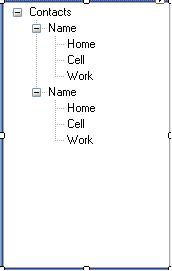
You want something looking like this?
| Description: |
|
| Filesize: |
5.89 KB |
| Viewed: |
4771 Time(s) |
|
|
|
| Back to top |
|
|
lurc
Grandmaster Cheater Supreme
Reputation: 2
Joined: 13 Nov 2006
Posts: 1900
|
| Posted: Sat Nov 10, 2007 8:27 pm Post subject: |
|
|
Kinda, I Want it to be like
Contacts
.....- Friends
...........Name
...........Name
...........Name
.....-Family
...........Name
...........Name
...........Name
And When You Click on the Name it Shows The Info On the Right
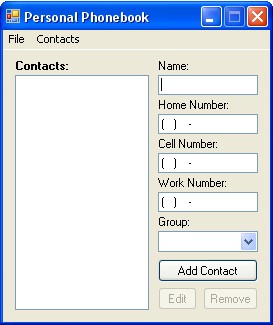
heres a pic of my form, treeviews empty atm:
And For the ComboBox, to add a group: (i added sGroup to my struct)
| Code: | private void cBox_SelectedIndexChanged(object sender, EventArgs e)
{
if (cBox.SelectedItem.ToString() == "Add Group...")
{
frmAdd addGroup = new frmAdd();
addGroup.ShowDialog();
if (Settings.Default.addOrNot == true)
{
Contacts c = new Contacts();
c.sGroup = Settings.Default.contactGroup;
lContacts.Add(c);
tv.Nodes.Add(lContacts[lContacts.Count - 1].sGroup);
cBox.Items.Add(lContacts[lContacts.Count - 1].sGroup);
cBox.SelectedItem = lContacts[lContacts.Count - 1].sGroup;
}
}
} |
frmAdd Code for Clicking "Add"
| Code: | private void button1_Click(object sender, EventArgs e)
{
if (textBox1.Text == "")
{
MessageBox.Show("Please Enter a Name for Your Group",
"Missing Information",
MessageBoxButtons.OK,
MessageBoxIcon.Information);
Settings.Default.addOrNot = false;
}
else
{
Settings.Default.contactGroup = textBox1.Text;
Settings.Default.addOrNot = true;
Close();
}
} |
It adds the new root to the left but then i cant get a way to choose that root as the root of the name's through the combobox
| Description: |
|
| Filesize: |
12.67 KB |
| Viewed: |
4761 Time(s) |
|
_________________
|
|
| Back to top |
|
|
killersamurai
Expert Cheater
![]() Reputation: 0 Reputation: 0
Joined: 10 Sep 2007
Posts: 197
Location: Colorado
|
| Posted: Sun Nov 11, 2007 1:17 am Post subject: |
|
|
I re-did my source to try and do what I think you are asking for. This one is really different. I've re-did some of the algorithm and made it so you can transfer data between forms. If you only want the name without the numbers (shown in the treeview), you would want to keep the structure and only show the name. But you would have to find a way to keep track of them.
|
|
| Back to top |
|
|
samuri25404
Grandmaster Cheater
Reputation: 7
Joined: 04 May 2007
Posts: 955
Location: Why do you care?
|
| Posted: Sun Nov 11, 2007 10:16 am Post subject: |
|
|
Ok, I'll go back to my original idea, create a class (or a struct if you want to), and make it Addressee. That addressee would have properties like the numbers, and the name.
That would make it incredibly easy to show the info on the right.
Give the TreeView an event handler for MouseClick, or OnClick, or whatever it is, and do something like this
| Code: |
{
string Name = MyTreeView.SelectedItem.Text; //Whatever the label thing is
int Spot = AddresseesN.FindIndex(Name); //AddresseesN and Addressees
Addressee temp = Addressees[Spot]; //are both lists, AddreseesN is of string, Addressees is of Addressee
FaxNumber.Text = temp.FaxNumber.ToString();
HomeNumber.Text = temp.HomeNumber.ToString();
CellNumber.Text = temp.CellNumber.ToString();
}
|
=)
Hope I helped,
~Samuri
|
|
| Back to top |
|
|
|
|
You cannot post new topics in this forum
You cannot reply to topics in this forum
You cannot edit your posts in this forum
You cannot delete your posts in this forum
You cannot vote in polls in this forum
You cannot attach files in this forum
You can download files in this forum
|
|
 FAQ
FAQ Search
 Memberlist
 Usergroups
 Register
 Profile
 Log in to check your private messages
 Log in



