| View previous topic :: View next topic |
| Author |
Message |
chimecko
Expert Cheater
![]() Reputation: 0 Reputation: 0
Joined: 28 Jul 2007
Posts: 116
|
 Posted: Thu Aug 09, 2007 8:27 am Post subject: Need help with Screen Resolution Posted: Thu Aug 09, 2007 8:27 am Post subject: Need help with Screen Resolution |
 |
|
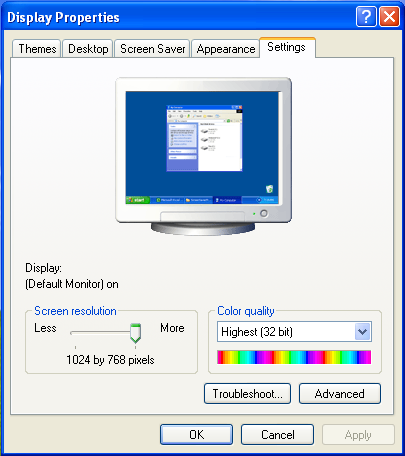
okay i know this isn't thr right place to post but i really need help.
i just recently switched to XP (Vista sucks) and i want to change my screen resolution even lower then it/ll let me, because for some reason
i can only switch between 800 by 600 pixels and 1024 by 768 pixels, but i want to make it even smaller like 1280 by 1000 or something.
how can i make it even smaller?
| Description: |
|
| Filesize: |
35.24 KB |
| Viewed: |
7266 Time(s) |
|
|
|
| Back to top |
|
 |
hcavolsdsadgadsg
I'm a spammer
![]() Reputation: 26 Reputation: 26
Joined: 11 Jun 2007
Posts: 5801
|
| Posted: Thu Aug 09, 2007 8:55 am Post subject: |
|
|
(Default Monitor)
Update video drivers, then if your monitor came with any, install those.
|
|
| Back to top |
|
|
chimecko
Expert Cheater
![]() Reputation: 0 Reputation: 0
Joined: 28 Jul 2007
Posts: 116
|
| Posted: Thu Aug 09, 2007 8:56 am Post subject: |
|
|
how do i update my video drivers?
your talking to a noob here so i'm kind of slow
|
|
| Back to top |
|
|
Kevin
Grandmaster Cheater Supreme
 Reputation: 0 Reputation: 0
Joined: 07 Mar 2007
Posts: 1139
Location: Spiderman-World
|
| Posted: Thu Aug 09, 2007 8:59 am Post subject: |
|
|
| you buy video drivers i think.
|
|
| Back to top |
|
|
hcavolsdsadgadsg
I'm a spammer
![]() Reputation: 26 Reputation: 26
Joined: 11 Jun 2007
Posts: 5801
|
| Posted: Thu Aug 09, 2007 9:03 am Post subject: |
|
|
No, you don't.
You go to the site of your manufacturer and get them. If you don't know, go to
Start -> Run -> type "dxdiag" with no quotes, go to the display tab, tell me what the name is.
|
|
| Back to top |
|
|
Kevin
Grandmaster Cheater Supreme
Reputation: 0
Joined: 07 Mar 2007
Posts: 1139
Location: Spiderman-World
|
| Posted: Thu Aug 09, 2007 9:08 am Post subject: |
|
|
| Oh yes. then you can just download the driver. I was thinking about the hardware thing inside your computer (i'm not good at that at all so i dont remember what its called, something like Video Card or Graphic Card)
|
|
| Back to top |
|
|
chimecko
Expert Cheater
![]() Reputation: 0 Reputation: 0
Joined: 28 Jul 2007
Posts: 116
|
| Posted: Thu Aug 09, 2007 9:09 am Post subject: |
|
|
| well for manufacturer it says TOSHIBA
|
|
| Back to top |
|
|
hcavolsdsadgadsg
I'm a spammer
![]() Reputation: 26 Reputation: 26
Joined: 11 Jun 2007
Posts: 5801
|
| Posted: Thu Aug 09, 2007 9:12 am Post subject: |
|
|
| Is it a laptop?
|
|
| Back to top |
|
|
chimecko
Expert Cheater
![]() Reputation: 0 Reputation: 0
Joined: 28 Jul 2007
Posts: 116
|
| Posted: Thu Aug 09, 2007 9:20 am Post subject: |
|
|
| yeah i'm using a laptop
|
|
| Back to top |
|
|
hcavolsdsadgadsg
I'm a spammer
![]() Reputation: 26 Reputation: 26
Joined: 11 Jun 2007
Posts: 5801
|
| Posted: Thu Aug 09, 2007 9:56 am Post subject: |
|
|
| Well, looking at their site for updates would be a good step. Otherwise, take a picture of your dxdiag display tab.
|
|
| Back to top |
|
|
Labyrnth
Moderator
![]() Reputation: 10 Reputation: 10
Joined: 28 Nov 2006
Posts: 6301
|
| Posted: Thu Aug 09, 2007 5:18 pm Post subject: |
|
|
Laptops mostly are non upgradeable on video cards unless you buy one that is made for this, Such as AlienWare laptops and other gaming laptops.
You can also right click "My Computer" and go to properties and the click the hardware tab and then click device manager and look at the display adapter and see what brand it is. But dxdiag is the best way to see the whole picture on what your card is and how much ram it has.
If it is Nvidia, you can get a driver that may let you change the resolution more smaller. But im thinking your stuck at 1024 x 768.
|
|
| Back to top |
|
|
|

 FAQ
FAQ Search
 Memberlist
 Usergroups
 Register
 Profile
 Log in to check your private messages
 Log in


